Genau Fresh Air 6L WiFi air humidifier
User Manual
Contents
User Manual
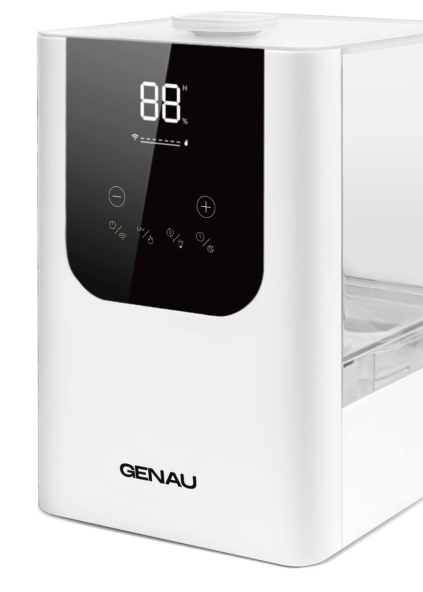
Genau Fresh Air 6L WiFi air humidifier.
Safety precautions
To extend the service life of the product and avoid malfunctions, follow the instructions during use and keep this user manual for future reference.
Precautions for use
- Check the power cord and accessories for signs of damage. If they are damaged, do not use the humidifier and contact customer support to resolve the issue.
- Please use a 220-240 V, 50/60 Hz power supply.
- To prevent damage to the product during transportation, the inner plate of the humidifier base is fixed and protected with foam. Please remove it before use to avoid overfilling, leaking, etc.
- Keep the humidifier out of reach of children and pets.
- During use, place the appliance on a dry and level table or floor.
- Keep the appliance away from walls, wooden furniture and other electrical appliances to avoid moisture getting on them.
- Do NOT place the appliance on carpets or towels to avoid blocking the air intake and damaging the humidifier.
- Keep the humidifier away from heat sources such as stoves, ovens or radiators.
- Do NOT pour water into the steam supply tube in the tank, to avoid damaging the main parts of the humidifier.
- The humidity error is ±15%, and the product's humidity sensor can only measure the humidity around it. The greater the distance, the greater the humidity error.
- It is recommended to keep the humidity at 40%-60%, which is the most comfortable humidity for the human body. You can also adjust the humidity according to your needs.
- Please add water to the tank. Do not exceed the "MAX" mark and do not add water directly into the base, otherwise it will cause a malfunction.
- Do NOT add water through the air outlet, to avoid a malfunction.
- Do NOT add essential oil or medicinal tablets to the water tank and the base. If necessary, please add the oil to the essential oil compartment.
- Do NOT touch the power cord or plug with wet hands, to avoid electric shock.
- Do NOT cover the nozzle, to avoid damaging it during use.
- Before cleaning the tank, switch off the appliance and unplug it from the socket to avoid danger.
- Do NOT move or tilt the appliance during use.
- When the appliance is not in use, switch it off and disconnect it from the mains, clean and dry it, and then store it in a cool and dry place.
- Do NOT disassemble or repair the product, otherwise it will lead to electric shock or a malfunction of the humidifier.
- Do NOT immerse the humidifier base, power cord or plug in water.
About your air humidifier
Structure
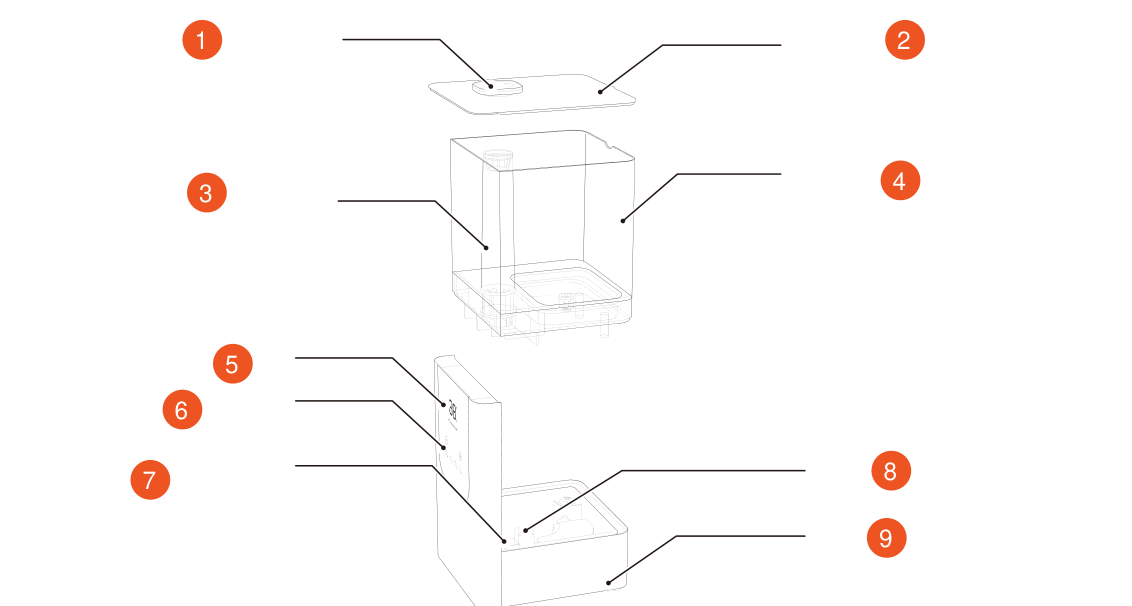
- Spray nozzle
- Water tank lid
- Spray tube
- Water tank
- Display
- Control Panel
- Essential oil compartment
- Air duct
- Base
Display screen
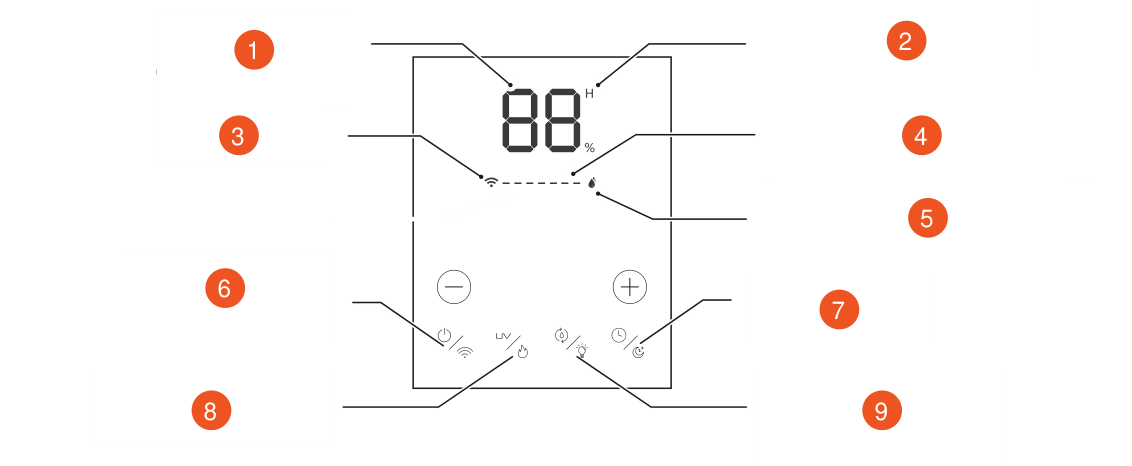
- Digital display (timer, humidity)
- Current air humidity
- Wi-Fi indicator
- Humidification level indication (7 levels in total)
- Constant humidity indicator
- Power on/off, Wi-Fi indicator
- Timer / sleep mode
- UV function / warm mist
- Humidity / LED indicator
How to use
Place the appliance on a level and dry table
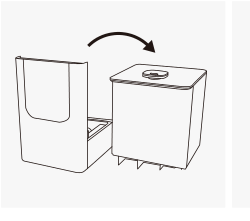
Remove the tank lid
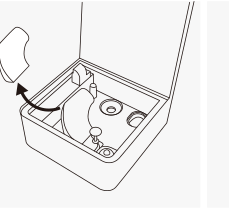
Remove the cotton material from the base
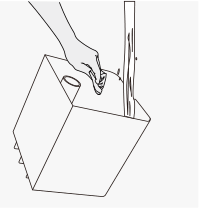
Clean the tank
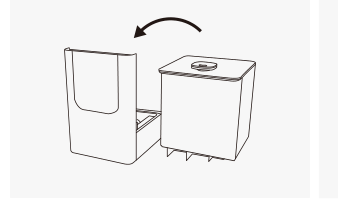
Install the water tank on the base
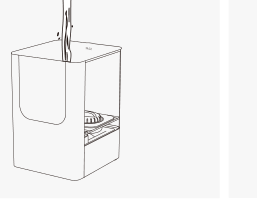
Pour water into the water tank (below the "MAX" mark).
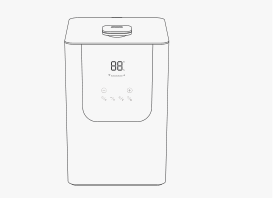
Put on the lid, plug in and switch on the appliance
Description of functions
Power
Press the power button to switch on the humidifier; the spray amount is set to the fourth level by default. Press the power button again to switch off the device.
Wi-Fi
Press and hold the power button for 3 seconds; the Wi-Fi icon on the LCD display will blink and the device will enter pairing mode. Follow the instructions in the app to pair the device.
Setting the humidification level (−) (+)
Press the (−) or (+) button to adjust the humidification power; the humidification level indicator on the LED display will light up accordingly.
UV
UV: short press to switch the ultraviolet sterilization light on and off.
Heating
A long press for 3 seconds switches the heating function on and off.
Setting constant humidity
- Press the constant humidity button to start setting constant humidity, press (−) or (+) to adjust the humidity: 45%-95%.
- After 5 blinks, the constant humidity indicator lights up, which means that the constant humidity setting was successful.
Setting the backlight
A long press of the backlight button switches the light on and off.
Setting the time
- Press the timer button to start the timer function; you can touch (−) or (+) to set the time: 1-12 hours. Select the time you need; when the digits are idle for 5 s they are confirmed automatically and then light up, which means that the time was set successfully.
- After running for the set time, the humidifier stops working and goes into standby mode.
- If you want to check the timer status, please press the timer button.
Sleep mode
Press and hold the sleep mode button to enter sleep mode. The LED display turns off after blinking three times. Pressing any button in sleep mode brings the device out of sleep mode. The display lights up again.
Low water protection, cleaning and maintenance
Low water protection
If the amount of water is too low, the device switches off automatically and the indicator blinks. Please disconnect it from the mains and add water.
Cleaning and maintenance
- Switch off the humidifier and unplug it from the socket.
- Remove the tank and pour the water out of the tank and the base.
- Clean the water tank: use a soft cloth and wipe the tank thoroughly.
- Clean the base: use a brush to clean small gaps and a soft towel to wipe other places.
Precautions for storage
If the humidifier is not used for a long time, please clean and dry the humidifier and its accessories, and then store them in a cool and dry place.
Questions and answers
| Problem | Cause | Solution |
|---|---|---|
| The display does not light up | The plug is not inserted / there is no power at the socket | Connect to / replace with another socket |
| No steam / little steam | Not enough water in the water tank | Add water to the water tank (below the "MAX" mark). |
| No steam / little steam | The air outlet is blocked | Check whether anything is blocking the socket and remove it. Please place the humidifier on a dry and level table. |
| No steam / little steam | The water tank is not installed correctly on the base. | Pour the water out of the base of the device and align the water tank and the base to ensure water flow, then start the humidifier. |
| The humidity of the product and the humidity measured by a hygrometer differ from each other | 1. The humidity error according to the industry standard is: ±15%. 2. The distance between the hygrometer and the humidifier affects the measurement results | It is recommended to place the hygrometer next to the humidifier for measurement; the error will be smaller |
| Can essential oil be added | 1. Do not add essential oil directly to the water tank or the base, otherwise it will cause a breakdown. 2. Add it only to the designated compartment. | Do not add essential oil directly to the water tank or the base. Add it only to the designated compartment. |
| Leaking | 1. Adding water directly to the base 2. Use on an uneven surface 3. Moving the humidifier during use 4. Pouring water into the outlet 5. Breakage/damage of the device | 1. Please add water to the tank, not directly to the base. 2. Always place the humidifier on a dry and level surface. 3. Do not move the humidifier during use. 4. Do not pour water into the outlet 5. Do not break or damage the device |
Cautions and attention
Cautions
- Do not disassemble, repair or modify this device without authorization.
- Keep this device out of reach of children and do not allow children to use or operate it, to avoid accidents.
- In the event of a malfunction, please disconnect the device from the mains immediately and contact the manufacturer or the after-sales customer service.
- Unplug the device from the socket when filling and cleaning.
- If the power cord is damaged, or the device has been dropped or crashed, please call a professional specialist for repair and inspection before use.
- When disposing of this device, cut off the power cord as well as all components that can be cut.
- Before use, make sure that the plug is not damaged, to avoid an accident.
- Make sure that the supply voltage matches the rated voltage of this device.
- Do not immerse the device in water and do not operate it in a wet condition.
- Keep away from any heat sources.
Attention
- The power source and voltage must match the rated voltage of the device. If the voltage does not match, contact your local dealer and do not use the product.
- Please use the device at normal room temperature (10-40 °C).
- Install it in a level and stable position to prevent the product from tilting.
- To avoid electric shock, do not use wet hands to connect and disconnect the power.
- If the device tilts, please switch off the power before handling it.
- Do not place the water tank while the device is running.
- Do not move, clean or add water while the device is running.
- The power must be switched off during cleaning.
- Do not allow water to get into the base during cleaning.
- Do not use wire or similar sharp objects to clean the water tank and the sink, so as not to damage the product.
- Do not disassemble the components of the device.
- Do not allow children to operate this device.
- Disconnect the appliance from the mains during filling and cleaning.
- This appliance is not intended for use by persons (including children) with reduced physical, sensory or mental capabilities, or lack of experience and knowledge, unless they have been given supervision or instruction concerning the use of the appliance by a person responsible for their safety.
- If the power cord is damaged, it must be replaced by the manufacturer, its service agent or similarly qualified persons in order to avoid a hazard.
Ultraviolet sterilization
Advantages of ultraviolet sterilization
- Does not produce toxic or harmful by-products and does not increase the AOC content of the water.
- Has high bactericidal efficiency, which ensures safe and reliable operation.
- The disinfection effect is influenced by the water temperature; the effect of the pH value is small.
- Can eliminate unpleasant odors and break down traces of organic compounds.
- Low energy consumption.
Precautions for use
- Opening the tank while UV irradiation is in use is prohibited, to avoid harming the eyes and skin of people and animals.
- Turbidity and particles in the water have a great influence on UV sterilization, affecting the passage of ultraviolet light and the sterilization effect. To prevent a decrease in the disinfection effect, please clean the sink regularly and replace the water with clean water.
- Children are prohibited from using it; please keep the device out of reach of children.
- Before using the appliance, make sure that the UV lamp cover is not damaged.
- If the UV lamp is damaged, stop using the device and contact the service department or a specialist for repair before further use.
- Be careful not to damage the UV lamp when cleaning or using the device.
Wi-Fi instructions
Download and register
- Download the app: Tuya Smart.
- Create an account.
Starting the Wi-Fi function
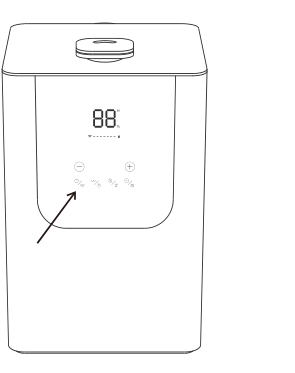
Press and hold the power button for 3 s; the Wi-Fi icon on the LCD display starts to blink.
Description of connecting the app to the network
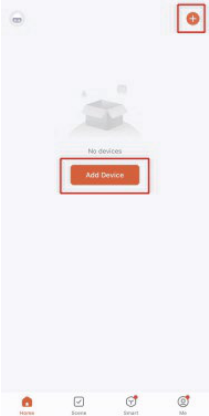
Add a device
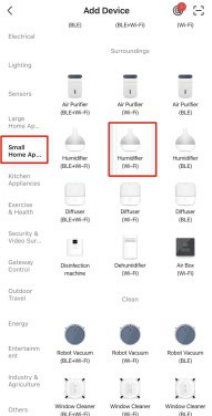
Select "Small Home Appliances" and tap Humidifier (Wi-Fi)
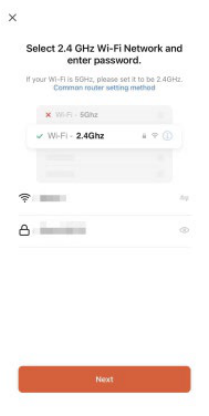
Select Wi-Fi and enter the password (only 2.4G Wi-Fi is supported)
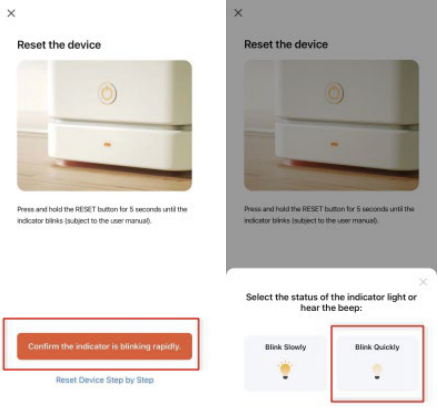
Make sure that the indicator starts to blink quickly
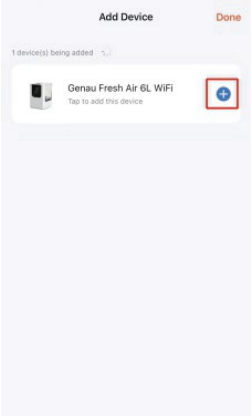
Tap "+" and wait for the connection
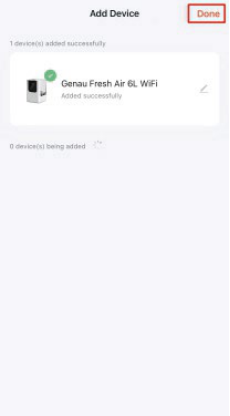
Connected successfully
Function display
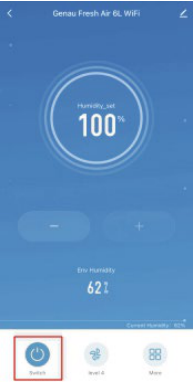
Switch (On/Off)
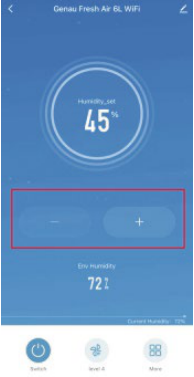
Setting the humidity (45%-95%)
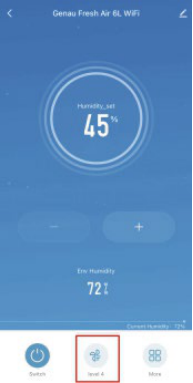
Setting the humidity level (levels 1-7)
Additional functions
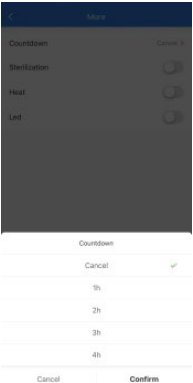
Setting the countdown/timer (1-12 hours)
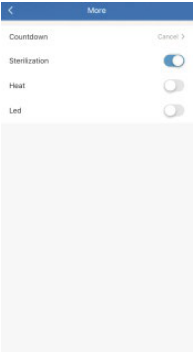
Sterilization/UV light
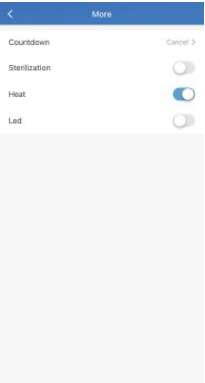
Warm mist
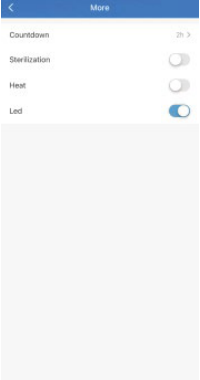
LED lamp
Instructions for using the device with multiple users
The first user can follow the steps below to share the device with a new user.
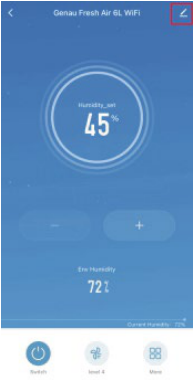
Tap the upper right corner
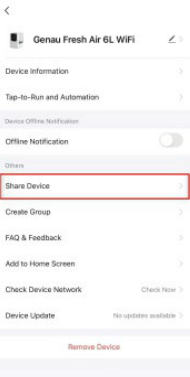
Share the device
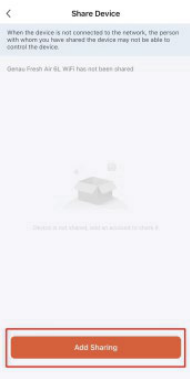
Add shared use
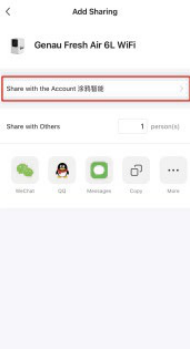
Share via account
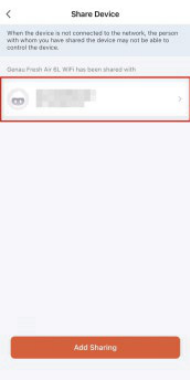
Added successfully
Instructions for removing the device from the app
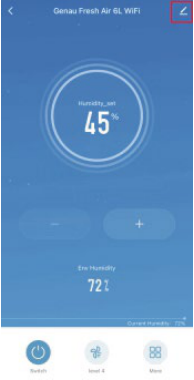
Tap the upper right corner
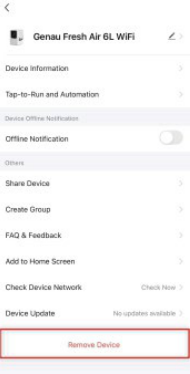
Remove the device
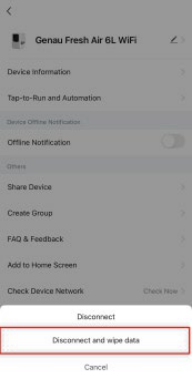
Disconnect and wipe data
Warranty
Genau guarantees the high quality and reliability of its products. We strive to offer only the best, which is why all of our equipment comes with a warranty.
Warranty Terms
- The warranty period starts from the date of sale.
- The warranty covers defects caused by manufacturing faults or defective materials.
- Warranty service is carried out at authorized service centers.
- If the product breaks down during the warranty period, the customer must bring this warranty card and the complete product to a service center for diagnostics and repair.
- If the warranty claim is confirmed, the product will be repaired or replaced free of charge.
- The warranty does not cover the following cases:
- mechanical damage caused by improper use or transportation;
- damage caused by liquids, fire, chemicals or other external factors;
- failures caused by not following the operating instructions;
- modifications to the design or repairs carried out by unauthorized persons without the approval of the Service;
- consumables and components with a limited service life (belts, batteries, etc.).
Warranty claims
To receive warranty service, the customer should contact the seller (the place where the equipment was purchased).
Specifications
| Parameter | Value |
|---|---|
| Model No. | Genau Fresh Air 6L WiFi |
| Device name | Ultrasonic + Hybrid humidifier |
| Water tank | 6 litres |
| Voltage | 100-240 V |
| Frequency | 50/60 Hz |
| Consumption | 25 W (cold mist) - 80 W (warm mist) |
| Output | 120-350 ml |
| Operating time | 20-50 h |
Service
For questions about assembly, operation of the humidifier and warranty, please contact Genau service in Kyrgyzstan.
Genau GmbH LLC (ОсОО «Генау ГМБХ»), Kyrgyzstan. Phone: +996 778 639 000