Genau Quadra Treadmill
User Manual
Contents
Thank you for your purchase!
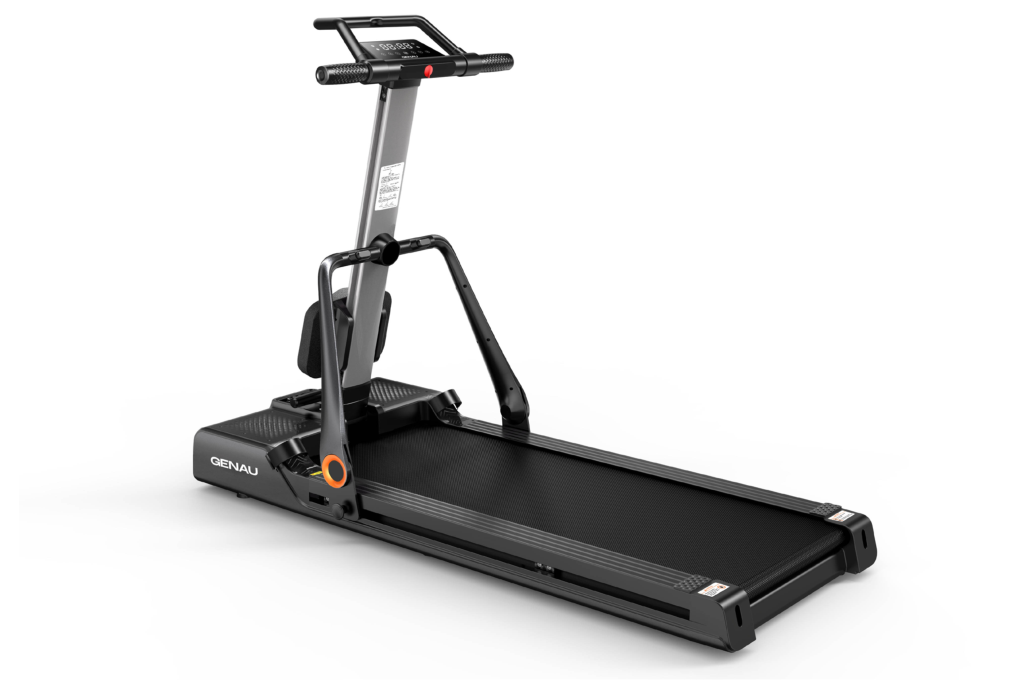
Thank you for purchasing the Genau Quadra treadmill. Please use the equipment correctly to ensure your safety and health. Read the information below carefully before use.
Please read this manual before assembling and using the treadmill.
As part of our commitment to continuous improvement, the product may be updated when necessary without prior notice. If this manual does not match the product, the actual product takes precedence.
Safety Instructions
- Install the treadmill only on a stable, level surface indoors. Do not let moisture get onto the belt or place foreign objects on it.
- Minimum safety clearances: 1 meter at the sides and in front, 2 meters behind.
- For an emergency dismount: hold the handrails firmly, shift your body weight forward, step onto the side strips with both feet and quickly step off the treadmill to the side.
- The power plug must be properly grounded and connected to a dedicated outlet.
- If the power cord is damaged, it must be replaced by qualified specialists.
- If the treadmill is not used for a long time, unplug it and keep the cord out of the reach of children.
- Store the lubricating oil out of the reach of children. If the oil is swallowed or gets into the eyes, rinse with water and seek medical attention.
- Children, persons with disabilities, and persons who feel physically unwell or have impaired cognitive functions must not use the treadmill without supervision.
- Do not use the equipment in dusty rooms. Maintain moderate humidity to avoid static electricity build-up. Use only original parts.
- Avoid contact with the moving parts of the treadmill. Do not put your hands or feet under the running belt. Do not use the treadmill outdoors, in high humidity or in direct sunlight.
- Before starting a workout, clip the safety cord to your clothing so that the treadmill stops automatically in an emergency.
- Make sure your clothing is fastened and does not restrict your movement. If you feel discomfort, stop exercising and see a doctor.
- Do not use the treadmill continuously for a long time — this may cause overheating and malfunction.
- The product is intended for home use only and is not suitable for professional training or medical purposes.
- Do not jump onto or off the treadmill while it is running — you may fall and get injured.
- Do not exercise immediately after eating, when tired or when feeling unwell.
- Do not let moisture, debris or metal objects get into the power plug. Never touch the plug with wet hands.
- Unplug the treadmill after use. Dust and moisture can damage the insulation.
- The treadmill must be properly grounded to reduce the risk of electric shock.
Product Components
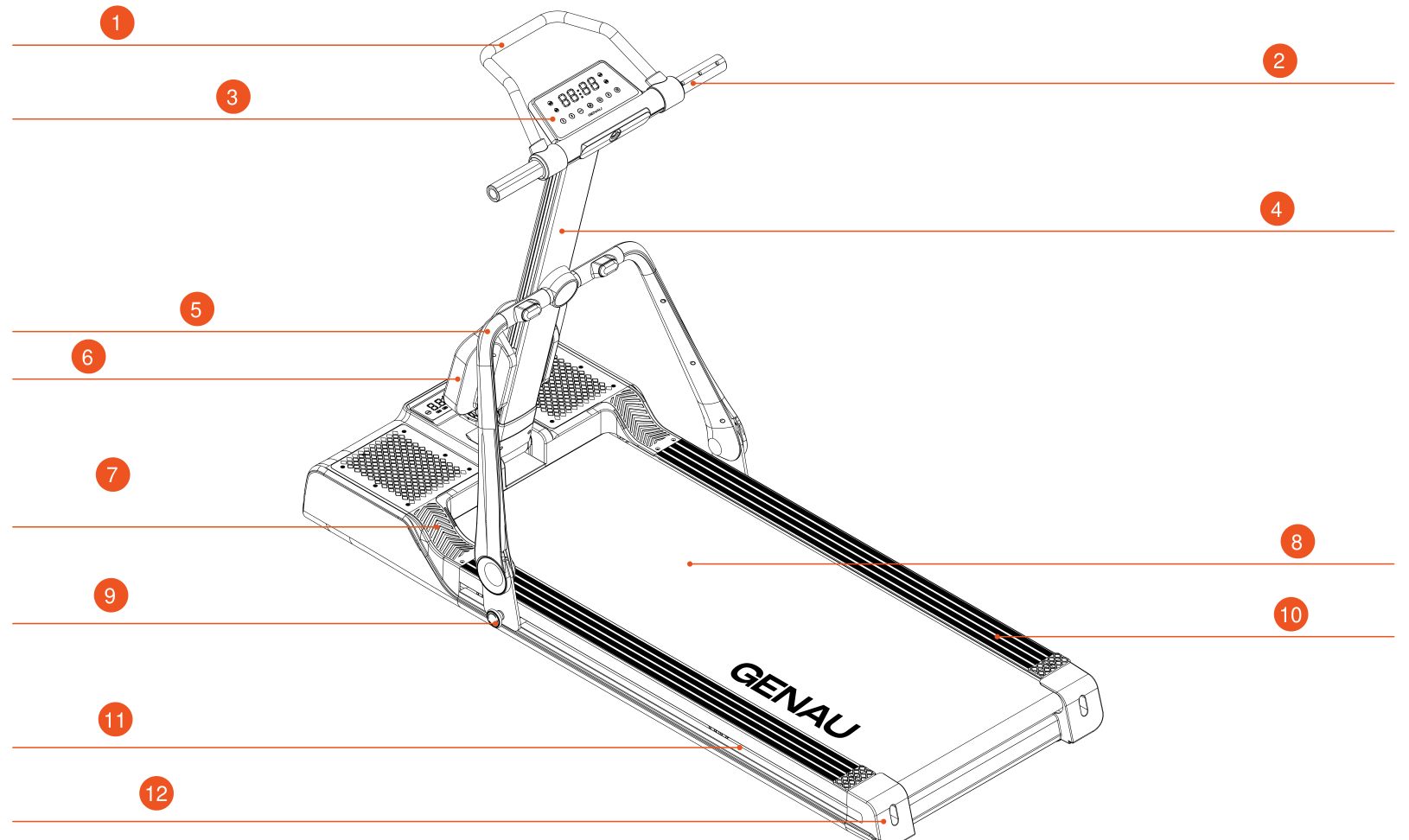
- Upper handrail
- Front handrail
- Treadmill electronic panel
- Center upright
- Center upright bracket
- Shock absorber
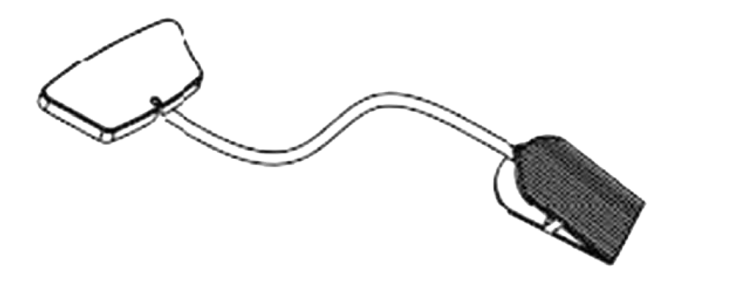
- Rowing machine pedal
- Running belt
- Knob (lock)
- Top cover
- Side cover
- Rear protective corner
Package Contents
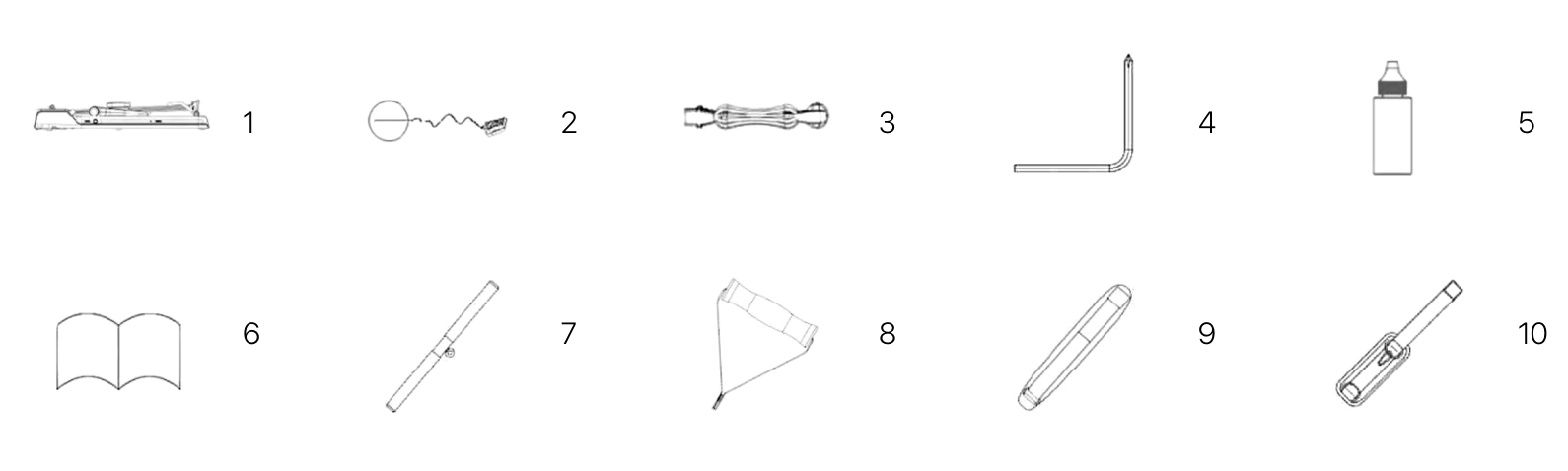
| No. | Item | Qty |
|---|---|---|
| 1 | Main unit | 1 pc |
| 2 | Safety key | 1 pc |
| 3 | Power cable | 1 pc |
| 4 | Hex key | 1 pc |
| 5 | Lubricating oil | 1 pc |
| 6 | User manual | 1 pc |
| 7 | Double rowing handle | 1 pc |
| 8 | Single pulling handle | 1 pc |
| 9 | Weight strap | 1 pc |
| 10 | Ankle strap | 1 pc |
Assembly
This product requires no assembly. Simply open the box, take out the treadmill and tighten the wing knobs (locks) on both sides. Then turn on the power and insert the safety key — the treadmill is ready to use.
Open the box and take out the treadmill.
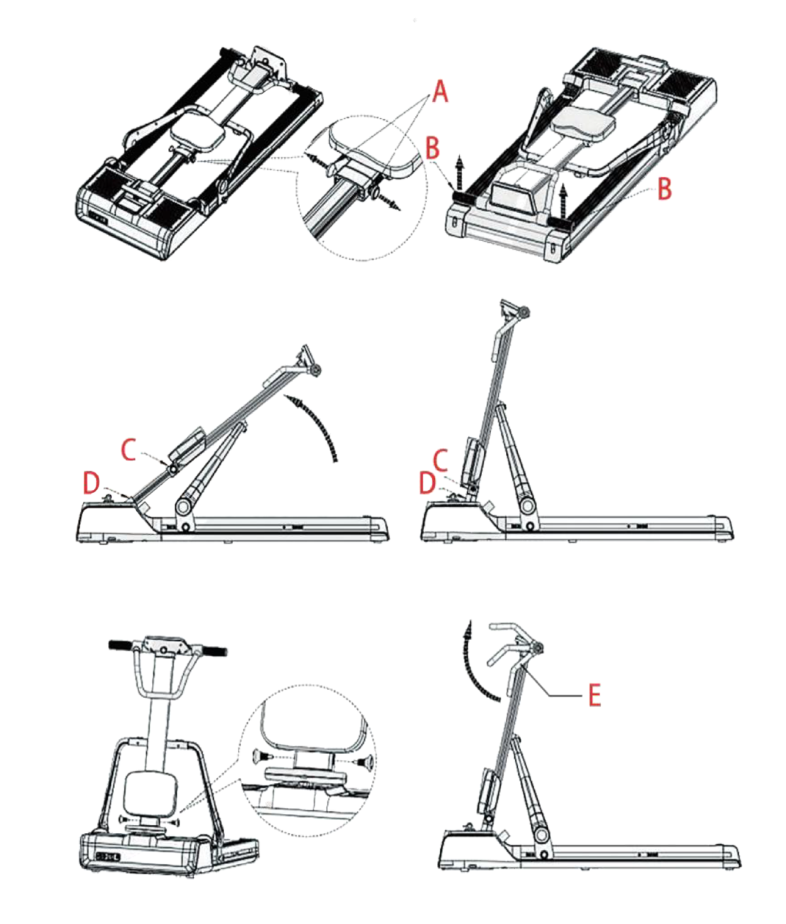
- Loosen the locking knobs (A) on both sides under the seat cushion.
- Hold the front handrail (B) with both hands and lift it up until the upright locks.
- Lower the decorative cover (C) until it touches the inner tube of the center upright (D).
- Tighten the locking knobs (A) on both sides and rotate the upper handrail (E) to the pin-locked position.
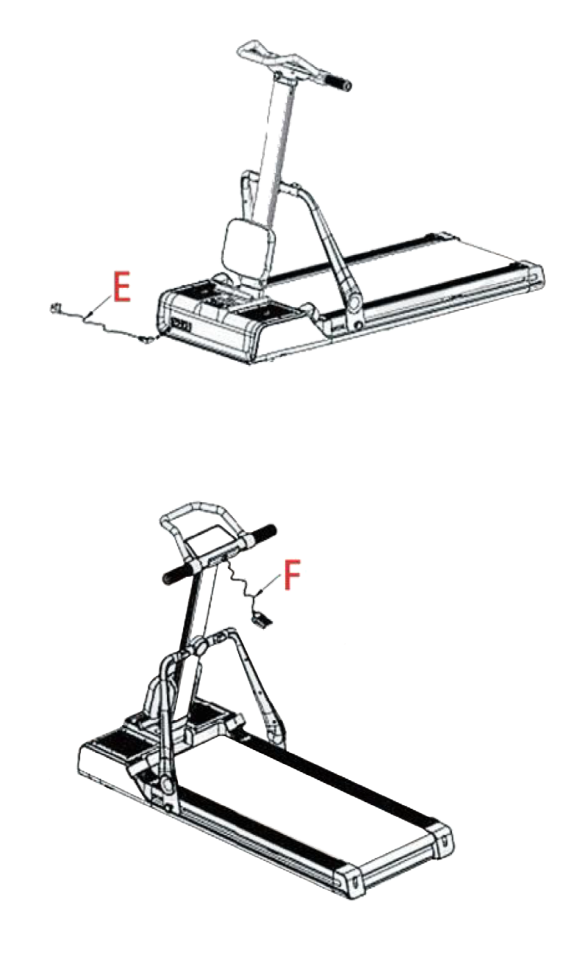
Plug in the power cord, turn on the power and insert the safety key (F) — the treadmill is ready to use.
This is a multifunctional treadmill with an adjustable structure and operating modes.
Setup and Operation
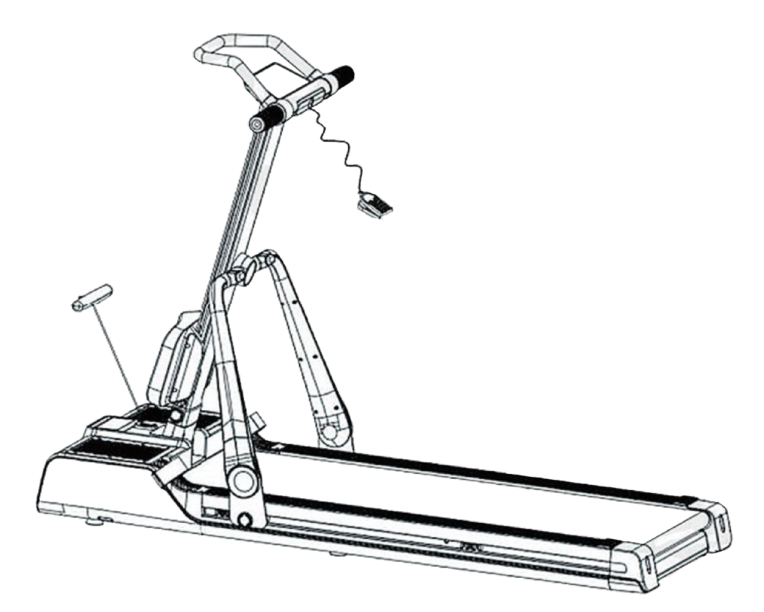
Configuration for running workouts.
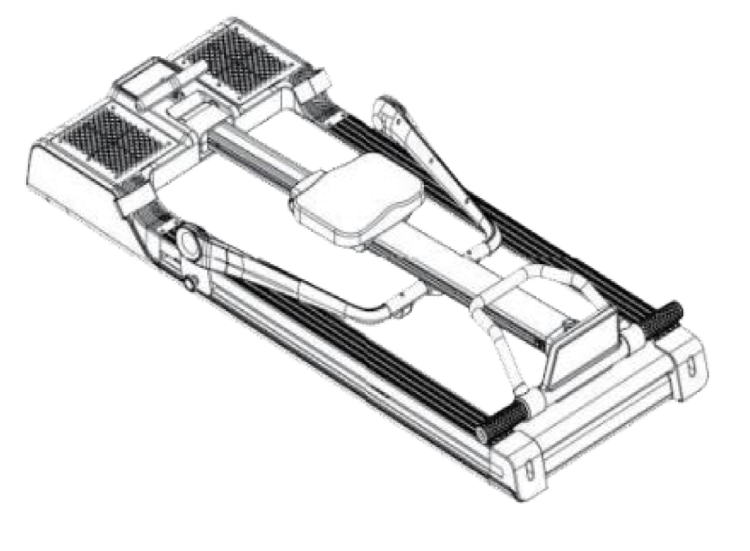
Converting the Treadmill to Rowing Mode
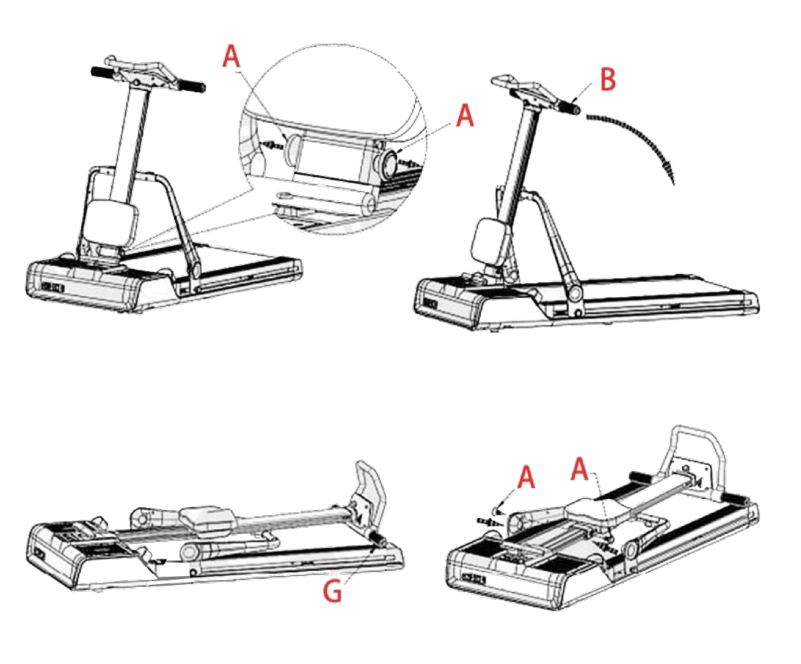
- Loosen the locking knobs (A) on both sides under the seat cushion.
- Hold the front handrail (B) with both hands.
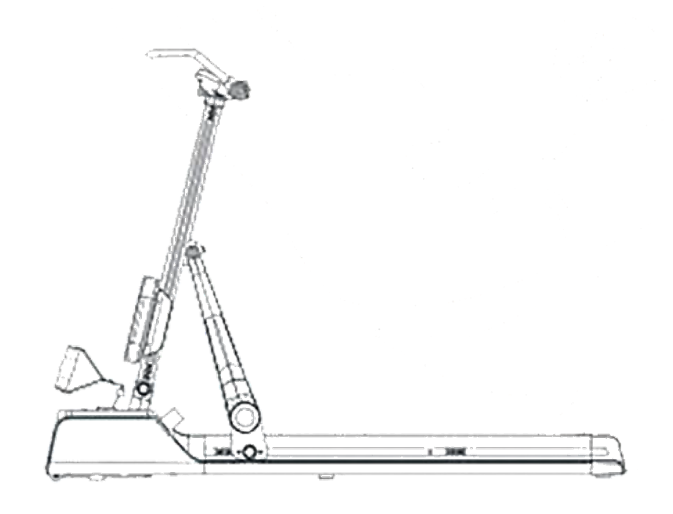
- Pull it in the direction of the arrow and rest the handrail on the rubber pad beyond the edge (G).
- Then tighten the previously loosened knobs (A).
Converting the Treadmill to Ab Trainer Mode
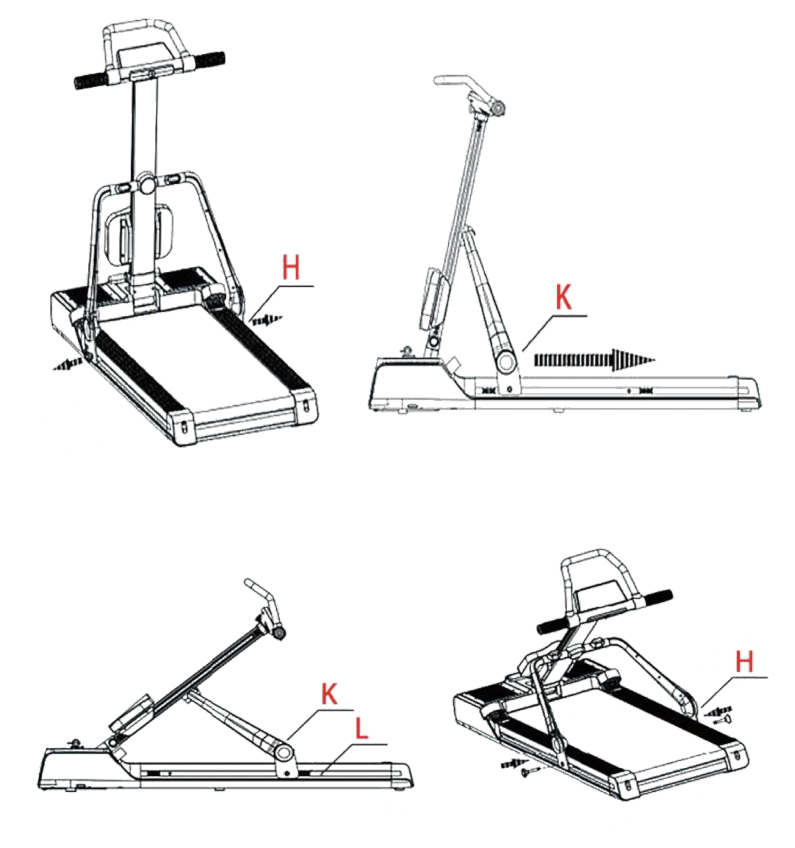
- Unscrew the lock (H) from its mount.
- Move the mounting bracket (K) in the direction of the arrow until it stops against the bracket stop (L).
- Tighten the previously loosened lock (H), securing the connecting brackets on both sides.
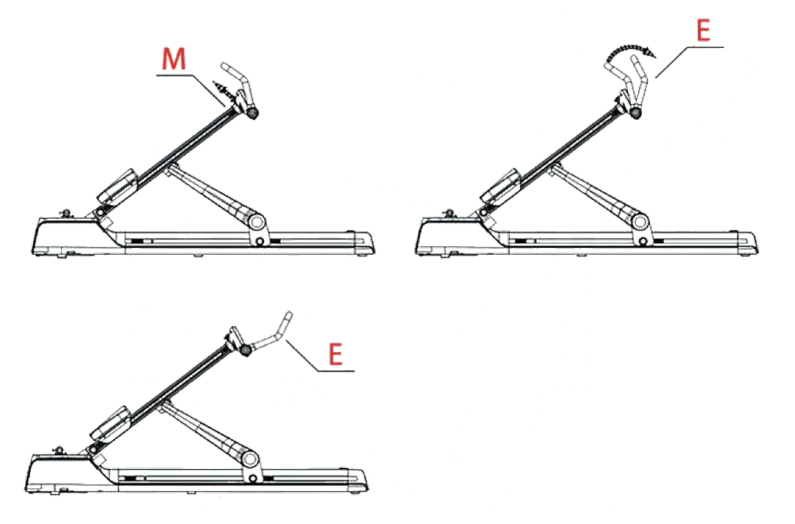
- Unlock the upper handrail by pulling the upper handrail lock (E) and the stop pin (M) outward, then rotate the handrail until the pin locks into the new position.
- In this position, the treadmill can be used as a single-arm pulling machine. The handle is attached to the strap with a climbing carabiner.
Using the Treadmill
- Plug in the power and turn on the switch (the red switch). The indicator lights up, a beep sounds and then the display turns on.
- When the treadmill is not in use, keep the safety key out of the reach of children. The lubricant bottle from the accessory kit should also be kept away from children. If it is accidentally swallowed or gets into the eyes, rinse immediately with water and see a doctor.
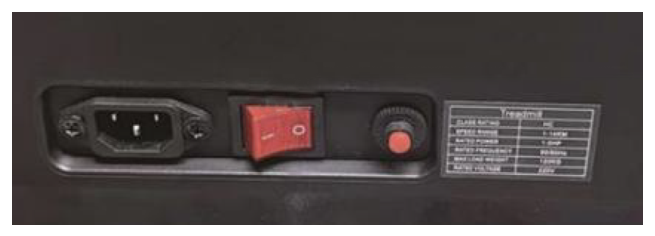
Using the Safety Key
- Fully insert the safety key onto the yellow mark on the control panel — only then can the treadmill operate.
- Attach the safety key clip to your clothing.
- In an emergency, pull out the safety key immediately — the motor will stop at once.
- To continue, insert the safety key back in place.
Treadmill Lubrication Recommendations
We recommend lubricating the motorized treadmill according to the following schedule:
- Once a month — for light users (less than 3 hours of use per week);
- Once every half month — for heavy users (more than 7 hours of use per week).
Control Panel
Rowing Mode
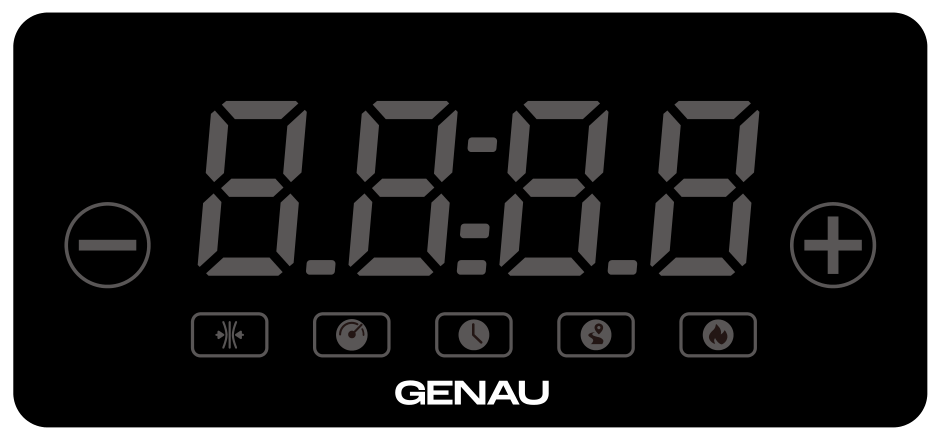
Data display
Single-window digital display showing 5 parameters:
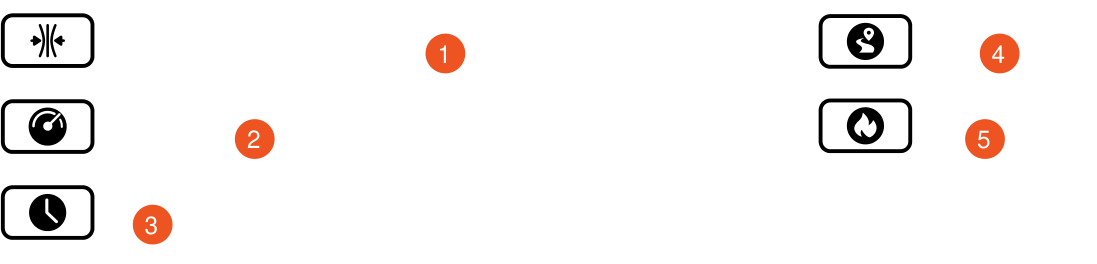
- Resistance (switches every 5 seconds)
- Stroke rate (strokes)
- Time
- Distance
- Calories
Display ranges
| Parameter | Initial value | Initial value setting | Setting range | Display range |
|---|---|---|---|---|
| Time (min:sec) | 0 | — | — | 0:00 — 99:59 |
| Resistance | 0.0 | — | — | 1 — 16 |
| Stroke count | 0 | — | — | 0 — 9999 |
| Distance (km) | 0 | — | — | 0.0 — 99.99 |
| Calories (kcal) | 0 | — | — | 0.0 — 99.99 |
Rowing mode buttons
Resistance down button (−)
- Each press decreases the rowing resistance by 1 level.
Resistance up button (+)
- Each press increases the rowing resistance by 1 level at a time.
Treadmill Mode
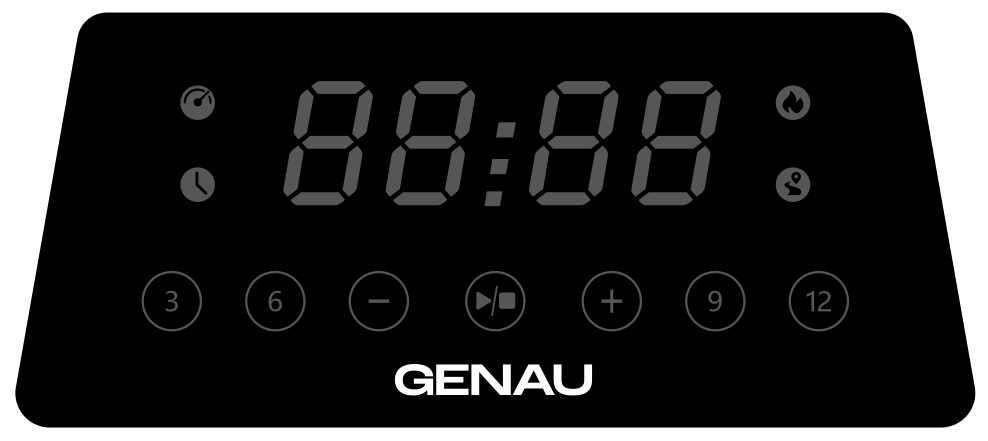
Control buttons
| Symbol | Function | Description |
|---|---|---|
| ▶/■ | Start/Stop | Press this button after turning on the power and inserting the safety key. The system starts a 3-second countdown and starts the treadmill at 1.0 km/h. This button also stops the treadmill while it is running. |
| + | Speed up | Each press increases the treadmill speed in 0.1 km/h steps. If you hold the button for more than 0.5 seconds, the speed increases automatically. |
| − | Speed down | Each press decreases the treadmill speed in 0.1 km/h steps. If you hold the button for more than 0.5 seconds, the speed decreases automatically. |
| 3 | Quick speed 3 km/h | Press this button to go to 3 km/h instantly. |
| 6 | Quick speed 6 km/h | Press to go to 6 km/h. |
| 9 | Quick speed 9 km/h | Press to go to 9 km/h. |
| 12 | Quick speed 12 km/h | Press to go to 12 km/h. |
Display ranges
| Parameter | Initial value | Initial value setting | Setting range | Display range |
|---|---|---|---|---|
| Time (min:sec) | 0 | — | — | 0:00 — 99:59 |
| Speed (km/h) | 1.0 | — | — | 1.0 — 14.0 |
| Distance (km) | 0 | — | — | 0.0 — 99.99 |
| Calories (kcal) | 0 | — | — | 0.0 — 99.99 |
Bluetooth function
Turn on Bluetooth in your device settings and select the Connect DP equipment. Once connected, open a music app on your phone to play music through the treadmill.
Energy-saving mode
The system supports an energy-saving function. If no commands are received for 5 minutes in standby mode, the display turns off automatically. Press any button to wake up the system.
Turning off the power
You can turn off the treadmill at any time with the power switch. This protects the equipment from damage.
Errors and Troubleshooting
Rowing Mode Error Codes
- ER 1 — Communication error
- ER 21 — Incorrect board connection
Treadmill Errors
- ER 1 — Communication error
- ER 3 — Overvoltage
- ER 4 — Overcurrent
- ER 5 — Overload
- ER 6 — Fault
- ER 7 — No signal from the controller
- ER 13 — IGBT transistor short circuit
Power Troubleshooting
(The electronic panel does not turn on after power is applied)
- Check whether the overload circuit breaker has tripped. If necessary, press it to reset.
- Check the power cable connections at the power switch, the circuit breaker and the control unit to make sure everything is connected correctly.
- Check the cable connection from the electronic panel to the control unit. If necessary, remove the upright and check each section of the connecting cable. Make sure every wire is firmly plugged in. If the cable is damaged (broken or snapped), it must be reconnected or replaced.
Maintenance and Care
Remove dust from the exposed areas of the running belt to prevent dirt from building up under the belt. Make sure your shoes are clean and do not let foreign objects get onto the running belt and platform.
Clean the surface of the running belt with a damp cloth and soap, avoiding water on the electrical components.
Special Lubricant for the Running Belt and Deck
The treadmill has been pre-lubricated at the factory. Friction between the belt and the deck significantly affects the service life and performance of the treadmill, so regular lubrication is required.
Maintenance Recommendations
- Once a month — for light users (< 3 hours of use per week). Twice a month — for heavy users (> 7 hours of use per week).
- To extend the service life of the device, we recommend turning off the treadmill after 1 hour of continuous operation and letting it rest for 10 minutes before the next use.
- The running belt tension should be optimal:
- If the belt is too loose, it will slip.
- If the belt is too tight, it can impair motor performance and increase wear of the rollers and the belt.
Running Belt Centering and Tension Adjustment
For the best treadmill performance, the running belt must be properly centered and tensioned.
Belt alignment:
- Place the treadmill on a level surface.
- Run it at about 6–8 km/h.
- If the belt drifts to the left: turn the left adjustment screw 1/2 turn clockwise and the right screw 1/2 turn counterclockwise.
- If the belt drifts to the right: turn the right adjustment screw 1/2 turn clockwise and the left screw 1/2 turn counterclockwise.
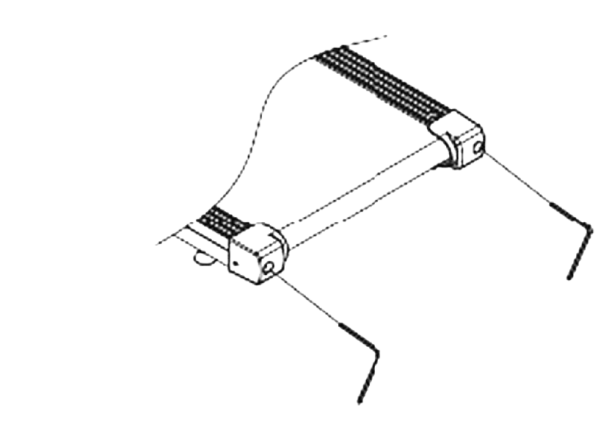
A treadmill is sports equipment that requires proper care and maintenance.
Care and Maintenance Recommendations:
- The treadmill must be checked regularly for wear and damage.
- Worn or damaged components (e.g. motors, electronic controllers, power cables, running belts) must be restored or professionally repaired to a condition that meets the factory safety standards.
- Faulty parts must be replaced immediately, or the equipment must be taken out of service until it is repaired (e.g. if the power cable is damaged).
- Pay special attention to the parts most subject to wear (e.g. the running belt).
Warm-up and Cool-down Exercises
A successful workout program consists of three parts: warm-up, aerobic exercise and cool-down.
The warm-up is the most important part of a workout and should be done before every session. It helps warm up the body, stretch the muscles and prepare the body for more intense exercise. Repeating the warm-up exercises after your workout helps relieve muscle tension and soreness.
We recommend doing suitable warm-up and cool-down exercises as shown below:
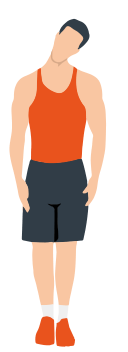
Head rolls
First tilt your head toward your right shoulder, stretch your neck and rotate your head once clockwise and once counterclockwise; then tilt your head toward your left shoulder and make one counterclockwise rotation. Repeat.
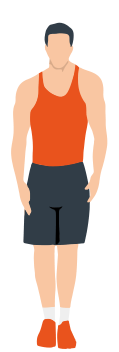
Shoulder lifts
Raise your left shoulder and make 5 backward rotations; then raise your right shoulder and make 5 backward rotations, alternating sides.
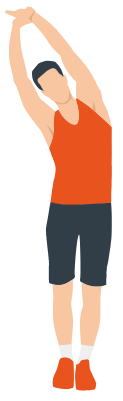
Side stretch
Raise your arms above your head, then grasp your right wrist with your left hand and reach upward until you feel your right arm fully stretched. Hold for 5 seconds before switching to the other arm.
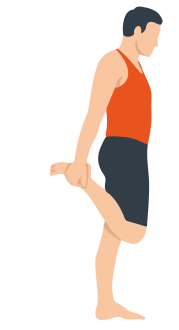
Quadriceps stretch
Holding onto a wall with your right hand for balance, pull your left foot back with your left hand, bringing the heel as close to your buttock as possible. Hold for 15 seconds, then repeat with the other leg.
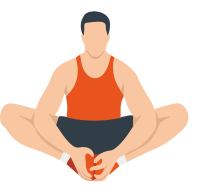
Inner thigh stretch
Sit on the floor, bring the soles of your feet together, hold them with both hands and pull them as close to your body as possible. Slowly press down on your heels and hold this position for 15 seconds.
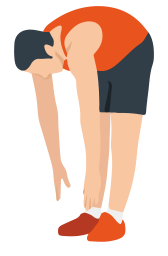
Toe touch
Slowly bend forward, relax your back and shoulders and reach for your toes. Bend as low as you can and hold the position for up to 15 seconds.
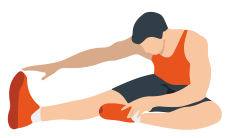
Hamstring stretch
Sit down, straighten your right leg and bend your left leg. Hold your left ankle with your left hand and pull it inward so that your left foot is as close to your body as possible, with the sole against the inner side of your right thigh. Then lean your body forward and reach both hands toward your toes — the deeper the stretch, the better. Hold this position for 15 seconds, then switch legs.
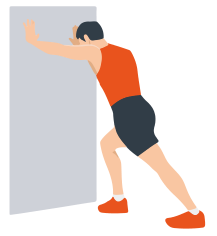
Calf stretch
Lean against a wall with both hands, tilt your body at a 45-degree angle to the floor and alternately move your left and right legs back, as if walking.
Warranty
Genau guarantees the high quality and reliability of its products. We strive to offer only the best, which is why all of our equipment comes with a warranty.
Warranty Terms
- The warranty period starts from the date of sale.
- The warranty covers defects caused by manufacturing faults or defective materials.
- Warranty service is carried out at authorized service centers.
- If the product breaks down during the warranty period, the customer must bring this warranty card and the complete product to a service center for diagnostics and repair.
- If the warranty claim is confirmed, the product will be repaired or replaced free of charge.
- The warranty does not cover the following cases:
- mechanical damage caused by improper use or transportation;
- damage caused by liquids, fire, chemicals or other external factors;
- failures caused by not following the operating instructions;
- modifications to the design or repairs carried out by unauthorized persons without the approval of the Service;
- consumables and components with a limited service life (belts, batteries, etc.).
Warranty claims
To receive warranty service, the customer should contact the seller (the place where the equipment was purchased).
Specifications
| Parameter | Value |
|---|---|
| Rated voltage | 220–240 V~ |
| Rated frequency | 50–60 Hz |
| Motor power | 3.0 hp |
| Speed | 1.0–14 km/h |
| Running belt size | 1250 × 460 mm |
| Maximum user weight | 140 kg |
| Unfolded dimensions | 1620 × 690 × 1170 mm |
Service
For questions about assembly, operation and warranty, please contact Genau service in Kyrgyzstan.
Genau GmbH LLC (ОсОО «Генау ГМБХ»), Kyrgyzstan. Phone: +996 778 639 000