Genau VibroFit V3 Vibration Platform
User Manual
Contents
Thank you for your purchase!
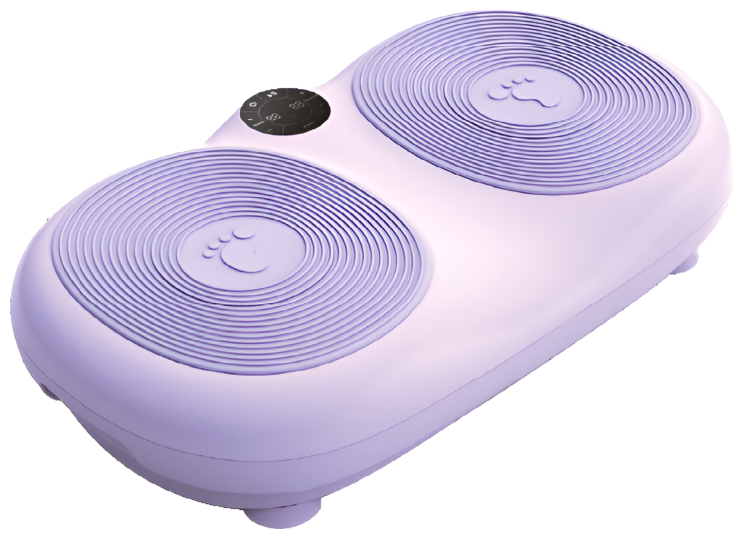
You have just purchased a product designed with quality, safety and functionality in mind. This equipment lets you exercise safely and comfortably without leaving home. Regular exercise is one of the best ways to stay healthy. For your safety and health, please read this manual before use.
Please read all instructions before using this product and keep them for future reference.
Safety Instructions
Operating conditions
- Do not use the unit in a damp or dusty environment, to avoid a short circuit or motor failure.
- Do not use the device if the room temperature exceeds 40 °C.
- Do not place the product outdoors or in direct sunlight.
- Place the unit only on a flat, stable surface.
- Attention: when moving the device from a cold room to a warm one, wait at least 1 hour before switching it on to avoid condensation and damage to the unit.
Who should not use this product?
Consult a doctor before use if you:
- You are under medical supervision or feel unwell;
- You have cancer;
- You are pregnant or menstruating;
- You have heart disease or osteoporosis;
- You have a pacemaker or other implants;
- You are younger than 10 or older than 60;
- You have a prosthesis or difficulty walking;
- Have poor tolerance of vibration or intense physical exertion.
- You have diabetes or circulatory disorders.
Operating rules
- Remove metal and sharp objects such as jewelry, mobile phones, keys, knives, etc.
- Do not smoke while using the unit.
- Do not use together with other medical devices.
- Do not use the device for medical purposes.
- Do not use immediately after eating or drinking.
- Keep away from children and pets. Do not insert fingers or objects into gaps in the structure.
- Maximum permitted user weight is 150 kg. Do not use the unit if you exceed this limit.
- Do not use at the same time as another person.
- Do not disassemble or modify the unit. This may cause a short circuit or other damage.
Stop using immediately in the following cases
- Water or other liquids get on the housing or the remote control;
- The housing is damaged or an unusual noise appears;
- Painful sensations during a session;
- Power supply failures;
- Lightning.
Power supply and cable
- Make sure that the voltage meets the requirements of the unit.
- Do not pull on the cord — disconnect by holding the plug.
- Switch the device off and unplug it from the socket during long periods of non-use.
- If the cable is damaged or the device breaks down, stop using it, disconnect the power and contact a service center.
VibroFit V3 Vibration Platform
- The mini vibration platform not only effectively reduces body fat but also helps improve your overall physical shape. The device works on the principle of smooth lateral oscillations and amplitude superposition, acting on the muscles of the whole body. As a result, calorie burning is activated and excess fat deposits are eliminated.
- With just 5–10 minutes a day on the platform, you can burn as many calories as in 1 hour of running. This increases the effectiveness of your workouts and lets you achieve visible results without a significant time investment. The user can adjust the vibration speed independently, from 1 to 30/60 levels, choosing the optimal mode.
- The device has a convenient and intuitive design. Ease of use is combined with high effectiveness. Thanks to high-frequency, low-amplitude vibrations, the platform helps reduce stiffness in the legs caused, for example, by rheumatism or, in older people, by insufficient physical activity.
- The effectiveness of the device is confirmed by positive reviews from users of various ages and professions. According to ATV, there are reports confirming the beneficial effect of the platform on health. It is a universal tool for exercising at home, suitable for all family members.
- Exercising on the platform helps you lose weight by increasing the body's energy expenditure, without the need to follow strict diets or resort to aggressive weight-loss methods that may harm the body, that is, without the risk of regaining lost kilograms.
- In addition, with just 5 minutes a day, men can improve their physical shape and women can maintain a slim figure. The vibration platform also helps speed up metabolism and slow down the aging process. Use the device with comfort and confidence: it is designed to support your health, appearance and overall well-being.
Product Description
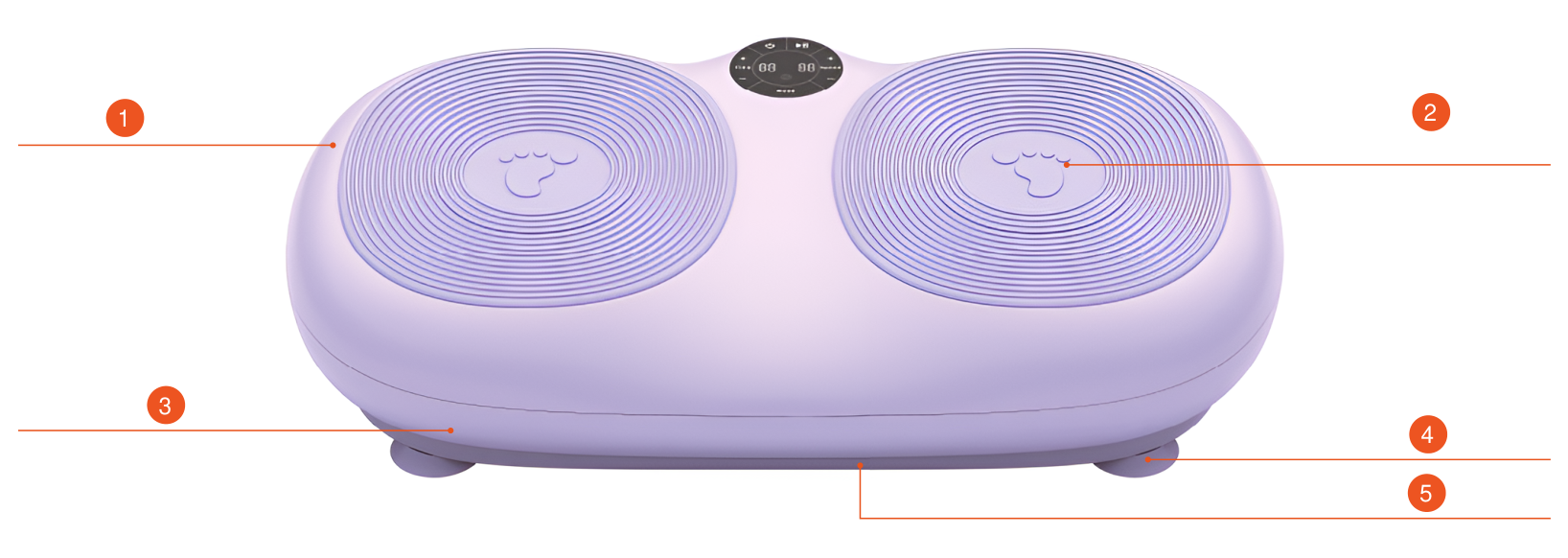
- Top cover
- Rubber foot mat
- Middle section cover
- Support foot
- Lower platform
Control panel and remote control
Control Panel
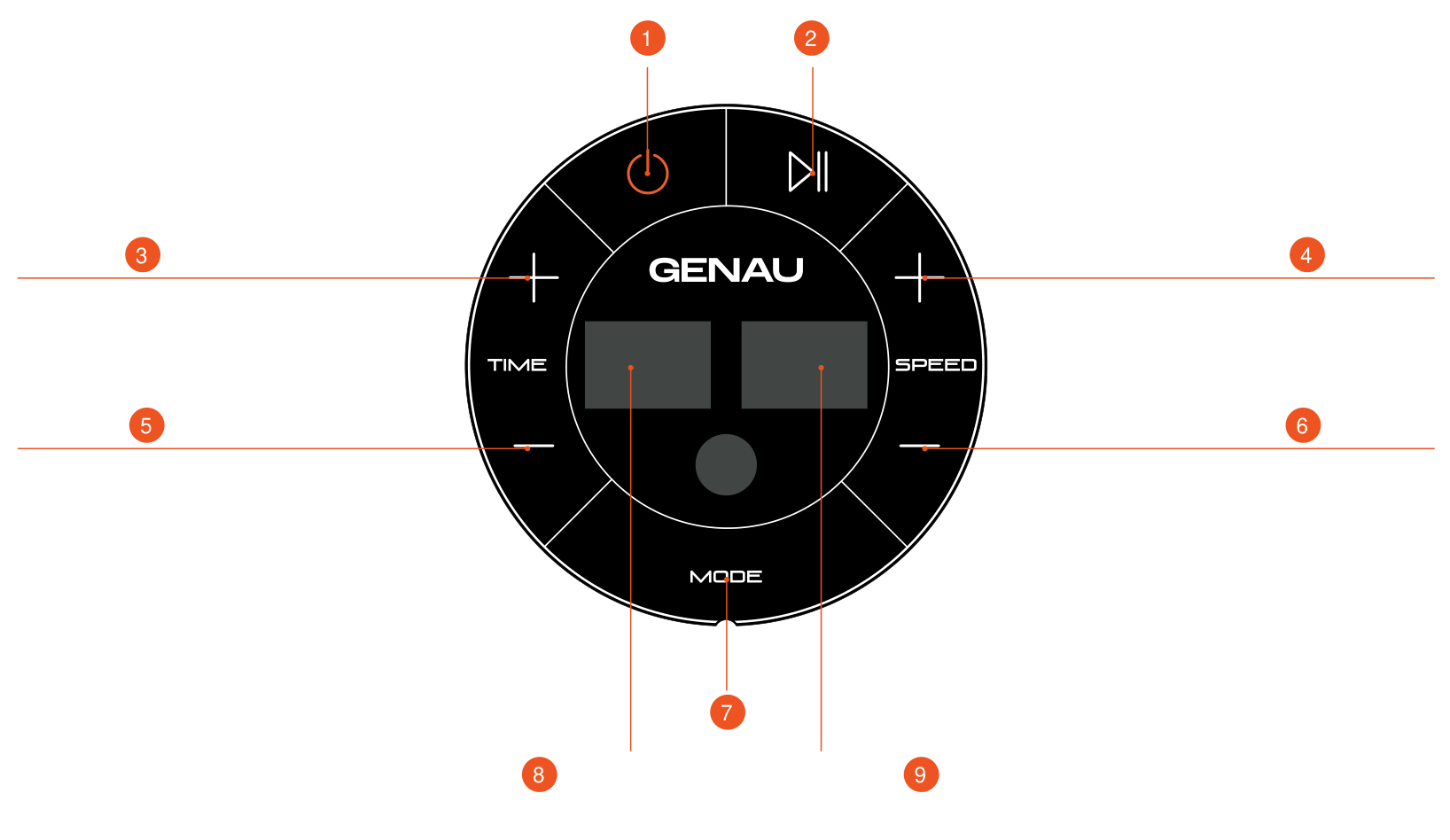
- Power
- On / Off
- Increase time
- Speed up
- Decrease time
- Speed down
- Mode selection
- Time / auto function / mode display window
- Speed display window
Remote control
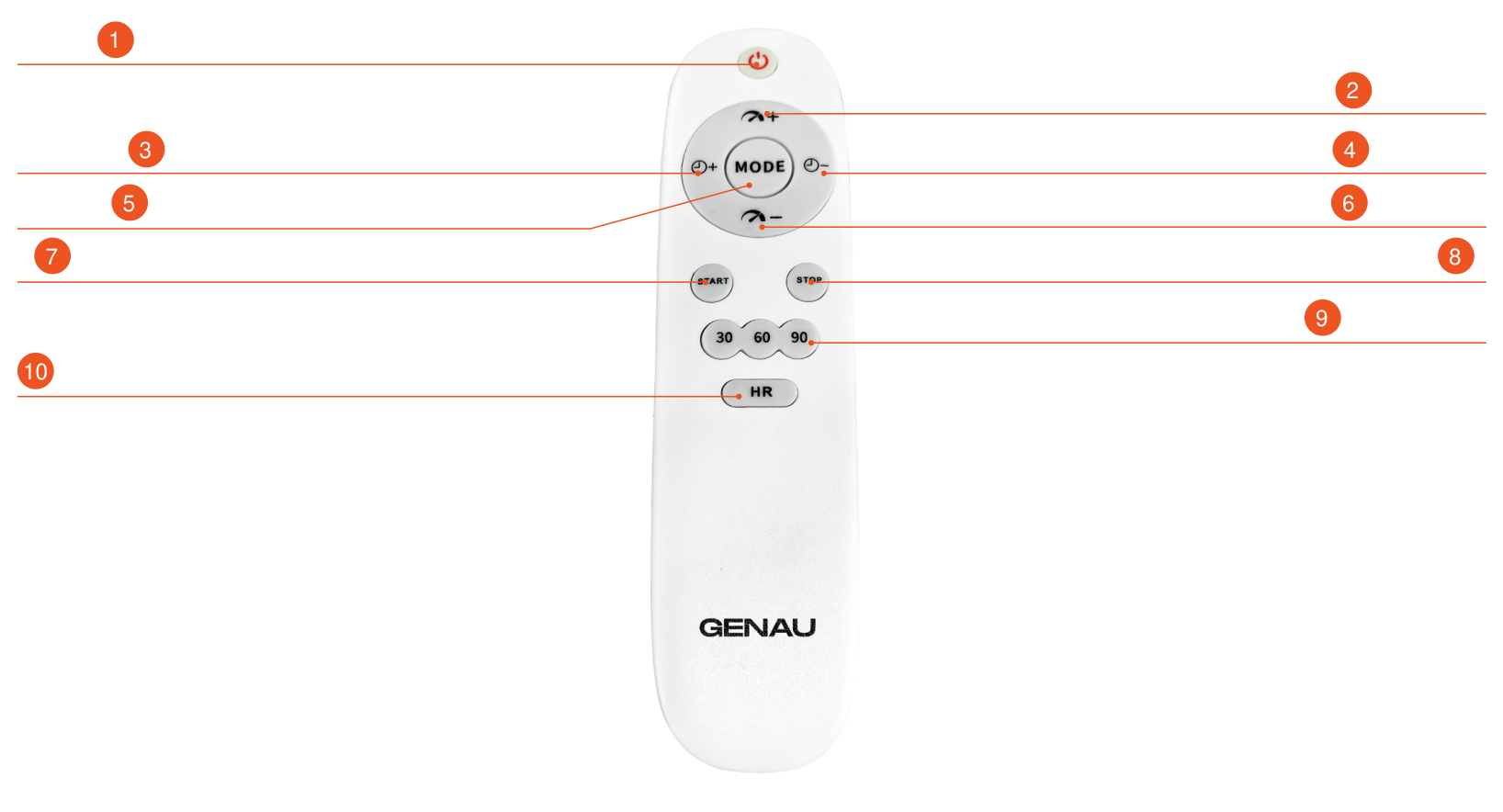
- Power button
- Speed up
- Increase time
- Decrease time
- Program selection
- Speed down
- Start
- Stop
- Speed selector
- HR
Button Functions
| Function | Description |
|---|---|
| Speed+ | In manual mode, press this button during operation to increase the speed, from 1 to 99. |
| Speed- | In manual mode, press this button during operation to decrease the speed, from 1 to 99. |
| Start | Connect the power, turn on the main switch and press to start the device. |
| Time+ | Increase the time (maximum value is 30 minutes). |
| Time- | Decrease the time (20 minutes by default, minimum value is 5 minutes). |
| Pause | Press this button to pause operation. |
| Power button | Press this button to switch off the power during operation. |
| Mode switch | Manual mode is set by default. Automatic modes: “P1”, “P2”, “P9”. “HR” is the manual mode. In automatic mode, the vibration frequency is adjusted automatically, and the speed and time cannot be adjusted. In manual mode, you can adjust the time and speed (but not in standby mode). |
Common problems and solutions
| No. | Problem | Solution |
|---|---|---|
| 1 | The device does not turn on | Make sure the power plug is firmly inserted into the socket. Check that the main power switch is on. There may be an overcurrent: replace the fuse with an identical one if it has blown. |
| 2 | Unusual sounds during operation | Slight noise during operation is normal and does not indicate a malfunction. No further action is required. |
| 3 | The remote control does not work | Check the battery in the remote control and replace it if necessary. Make sure the distance to the device does not exceed 2.5 meters, which is the maximum range of the infrared signal. |
| 4 | The device stops during use | The set workout time has ended. Wait 10 minutes, then restart the device. |
| 5 | The device works incorrectly | There may be a command overload. Switch off the power, wait a few seconds and switch the vibration platform on again. |
If the suggested actions do not solve the problem, contact the manufacturer or an authorized service center.
Exercise guide
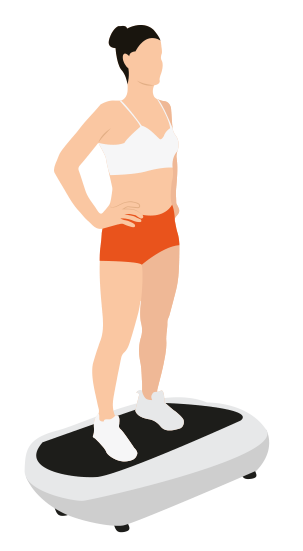
Whole-body workout position
Stand on the platform with your feet shoulder-width apart. This helps improve general circulation and increase muscle tone.
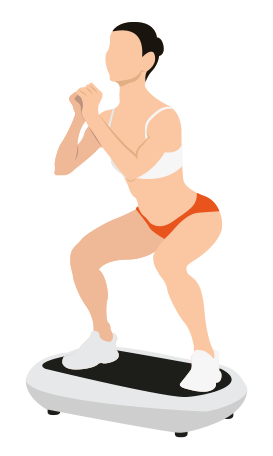
Bent-knee pose
When squatting, place your feet as wide apart as your shoulders and bend your knees to 90 degrees if you can, and hold this position. This is an excellent exercise for training the thighs.
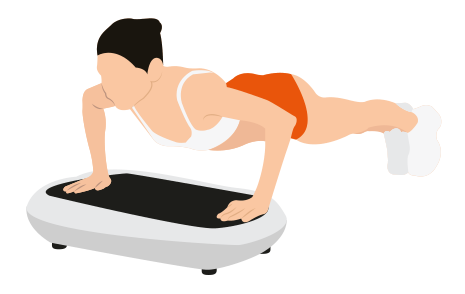
Push-up pose
Place your hands shoulder-width apart. If you want to train the muscles more, bend your elbows to a 90-degree angle and hold this position.
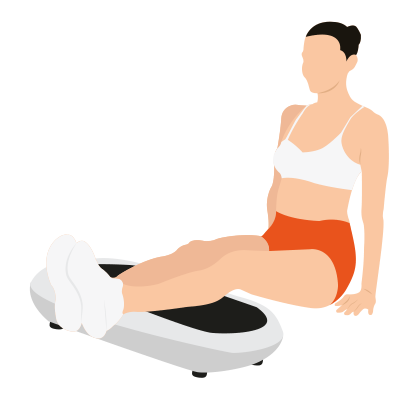
Calf pose
Place your shins on the platform as shown in the picture, resting your hands on the floor behind you. To make the exercise deeper, lift your buttocks off the floor and press down on your calves.
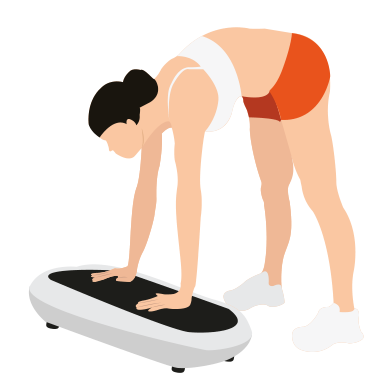
“Waist bend” pose
Straighten your legs, bend at the waist and place your hands on the platform. To perform the exercise more deeply, bend your arms at the elbows.
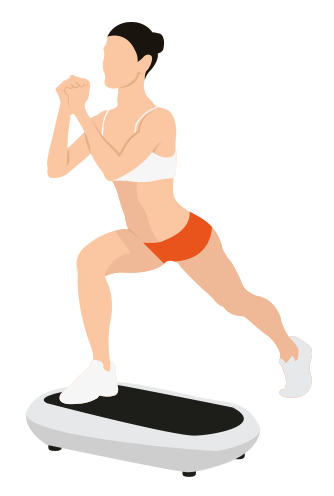
One-leg pose
Place one foot on the pedal and relax. For a deeper exercise, lunge forward, loading the platform with more of your body weight.
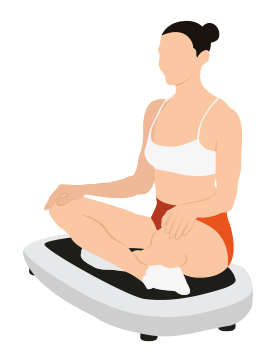
Seated pose 1
Sit so that your buttocks rest on the vibrating platform. Sit comfortably, keeping your back straight.
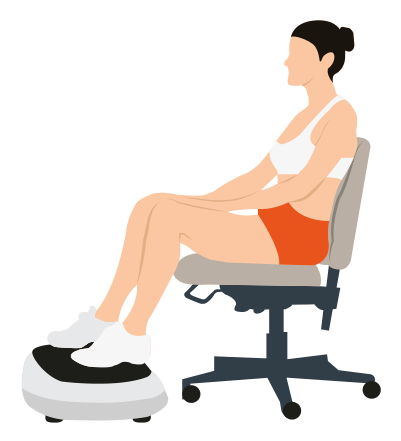
Seated pose 2
Sitting on a chair, place your feet on the platform. This is an excellent way to relieve tension and improve circulation in the legs.
Benefits of use
Body shaping
Thanks to balanced high-frequency vibration, the Vibrofit V3 platform lets you use various body positions to act deeply on muscle tissue, increase its elasticity and reduce local fat deposits. Regular use helps shape the body, restore muscle tone and boost self-confidence.
Fitness and well-being
Using positions inspired by Eastern practices (meditation, static stances, etc.) helps relax the body and mind, relieve muscle tension and pain, and improve circulation and overall well-being.
Cleaning and maintenance
Cleaning the housing surface
Before cleaning, make sure the main switch of the device is off and the power cord is unplugged from the socket.
The rubber mat and the platform housing can be wiped with a damp cloth with a mild detergent, then carefully dried with a clean dry cloth.
Care of the remote control
Wipe the remote control only with a soft dry cloth. Do not use wet wipes or a wet cloth, to avoid damaging the electronics.
Maintenance
- Make sure the power is off and the plug is removed from the socket.
- Regularly remove dust and dirt from the housing. Store the device in a dry, ventilated place, away from sources of moisture.
- If you do not plan to use the vibration platform for a long time, it is recommended to cover it with a protective cover (sold separately) to prevent dust from getting inside.
Warranty
Genau guarantees the high quality and reliability of its products. We strive to offer only the best, which is why all of our equipment comes with a warranty.
Warranty Terms
- The warranty period starts from the date of sale.
- The warranty covers defects caused by manufacturing faults or defective materials.
- Warranty service is carried out at authorized service centers.
- If the product breaks down during the warranty period, the customer must bring this warranty card and the complete product to a service center for diagnostics and repair.
- If the warranty claim is confirmed, the product will be repaired or replaced free of charge.
- The warranty does not cover the following cases:
- mechanical damage caused by improper use or transportation;
- damage caused by liquids, fire, chemicals or other external factors;
- failures caused by not following the operating instructions;
- modifications to the design or repairs carried out by unauthorized persons without the approval of the Service;
- consumables and components with a limited service life (belts, batteries, etc.).
Warranty claims
To receive warranty service, the customer should contact the seller (the place where the equipment was purchased).
Technical data
| Parameter | Value |
|---|---|
| Product name | Vibrofit V3 vibration platform |
| Rated voltage | 220–240 V~ |
| Rated power | 200 W |
| Rated frequency | 50/60 Hz |
| Max. user weight | 150 kg |
Manufacturer: KIMS Industry and Trade Co., Ltd. No 776 Xiangzhang west road, Daxu industrail zone, Yongkang city (321300), Zhejiang province, China.
Service
For questions about assembly, operation and warranty, please contact Genau service in Kyrgyzstan.
Genau GmbH LLC (ОсОО «Генау ГМБХ»), Kyrgyzstan. Phone: +996 778 639 000