Foldable elliptical trainer Genau Axima Fold
User Manual
Contents
Thank you for your purchase!
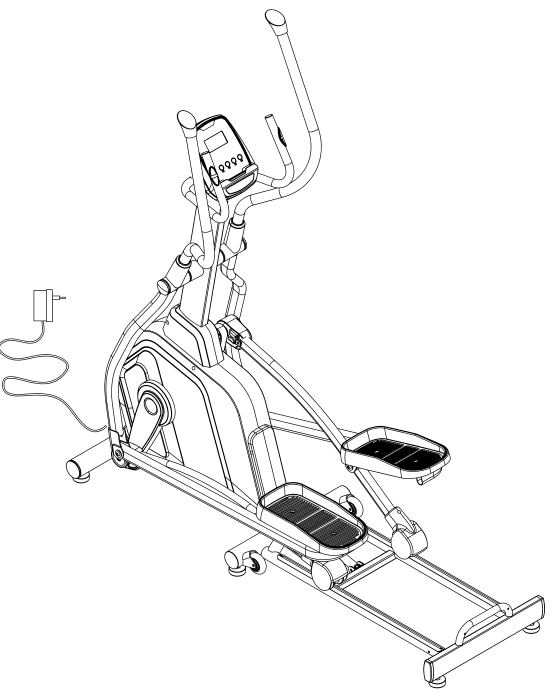
Thank you for purchasing the Genau Axima Fold elliptical trainer. Please use the equipment correctly to ensure your safety and health. Before use, read the information below carefully.
Please read this manual before assembling and using the treadmill.
As part of our commitment to continuous improvement, the product may be updated when necessary without prior notice. If this manual does not match the product, the actual product takes precedence.
Safety Instructions
- It is important to read this manual completely before assembling and using the equipment. Safe and effective operation is possible only with correct assembly, maintenance and use.
- Consult a doctor before starting any exercise, especially if you have medical conditions or physical limitations that may pose a risk, or if you take medication that affects heart function, blood pressure or cholesterol level.
- Listen to your body. Incorrect or excessive exercise can harm your health. Stop exercising if you feel pain, shortness of breath, dizziness, rapid heartbeat or other alarming symptoms.
- Keep children and pets away from the equipment. For adult use only.
- Use on a flat, hard surface, with a protective mat if necessary. Free space around the equipment: at least 0.6 m.
- Before use, make sure all screws and nuts are tightened. Do not use the equipment if you notice defects or unusual noises until the faults are fixed.
- When using the equipment's computer, the heart rate readings are for reference only and are not a medical indicator.
- Wear suitable clothing and avoid loose items that may catch on the equipment.
- Intended for home use. Maximum user weight: 120 kg.
- Move the equipment carefully to avoid injuring your back.
- Do not use for therapeutic purposes.
- Keep the manual and the assembly tools.
Exploded diagram
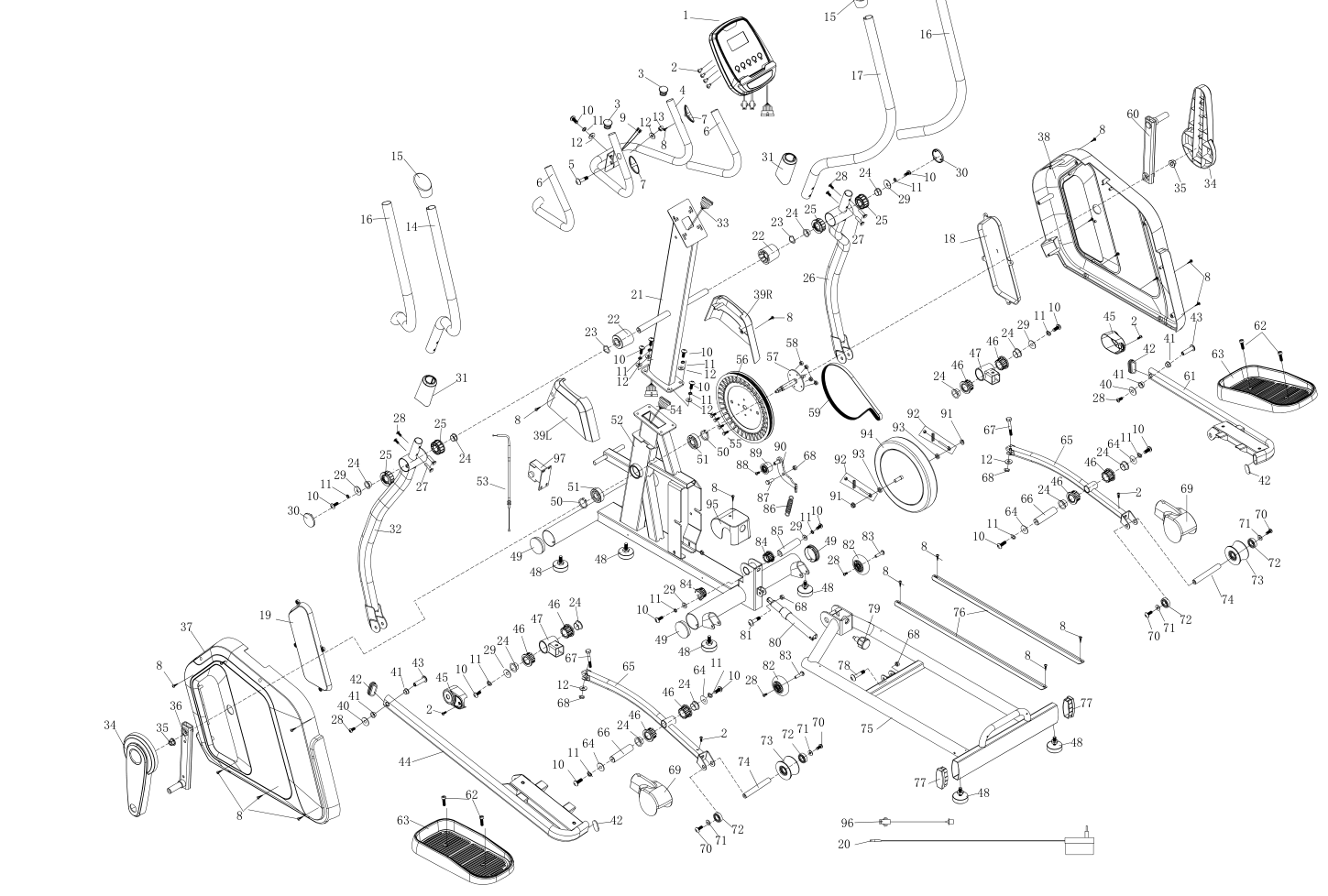
Parts list
| No. | Item | Qty |
|---|---|---|
| 1 | Computer | 1 |
| 2 | Screws M5×10 | 4 |
| 3 | End cap 25 | 2 |
| 4 | Center handle | 1 |
| 5 | Hex bolt M6×55 | 1 |
| 6 | Foam grips | 2 |
| 7 | Pulse sensor 22 | 2 |
| 8 | Screws ST4.2×19 | 20 |
| 9 | Pulse sensor cable | 2 |
| 10 | Hex bolt M8×16 | 13 |
| 11 | Spring washer d8 | 13 |
| 12 | Washer d8×Φ20×1.5 | 7 |
| 13 | Nut M8 | 1 |
| 14 | Handlebar post (left) | 1 |
| 15 | End cap | 2 |
| 16 | Foam grips | 2 |
| 17 | Handlebar post (right) | 1 |
| 18 | Left protective cover | 1 |
| 19 | Right protective cover | 1 |
| 20 | Power adapter | 1 |
| 21 | Handlebar post | 1 |
| 22 | Pendulum spacer bushing | 2 |
| 23 | Arc-shaped washer d19×Φ25×0.3 | 2 |
| 24 | Bushing with liner Φ26.9×11 | 12 |
| 25 | Spacer bushing Φ50×Φ21×20 | 4 |
| 26 | Right swing arm | 1 |
| 27 | Bolt Φ8×27.5 | 4 |
| 28 | Hex screws M6×15 | 4 |
| 29 | Washer d8×Φ32×2 | 6 |
| 30 | End cap Φ50×15 | 2 |
| 31 | Gloves | 2 |
| 32 | Left swing arm | 1 |
| 33 | Central line | 1 |
| 34 | Crank cover | 2 |
| 35 | Hex nut M10×1.25 | 2 |
| 36 | Left crank | 1 |
| 37 | Left crank cover | 1 |
| 38 | Left chain cover | 1 |
| 39L/R | Right chain cover | 1 set |
| 40 | Washer d6×Φ16×1.50 | 2 |
| 41 | Bushing Φ28×10×Φ10.1 | 4 |
| 42 | End cap PT50×25 | 4 |
| 43 | Bolt Φ10×38–M6×18 | 2 |
| 44 | Left connecting rod | 1 |
| 45 | Connecting cover | 2 |
| 46 | Protective spacer bushing Φ38×Φ21×20 | 8 |
| 47 | U-shaped connecting plate | 2 |
| 48 | Support M8×30 | 6 |
| 49 | End cap Φ60 | 4 |
| 50 | Retaining ring d20 | 2 |
| 51 | Bearing 6004 | 2 |
| 52 | Main frame | 1 |
| 53 | Tension cable | 1 |
| 54 | Sensor cable | 1 |
| 55 | Hex bolt M6×15 | 4 |
| 56 | Plastic wheel | 1 |
| 57 | Axle | 1 |
| 58 | Nylon bolt M6 | 4 |
| 59 | Belt | 1 |
| 60 | Right crank | 1 |
| 61 | Right connecting rod | 1 |
| 62 | Hex bolt M8×16×Φ13 | 4 |
| 63 | Pedal | 2 |
| 64 | Washer d8×Φ25×1.5 | 4 |
| 65 | Connecting rod set | 2 |
| 66 | Axle Φ19×79 | 2 |
| 67 | Bolt M8×50 | 2 |
| 68 | Nylon bolt M6 | 5 |
| 69 | Roller cover | 2 |
| 70 | Hex bolt M10×16 | 4 |
| 71 | Washer d10×Φ22×1.5 | 4 |
| 72 | Bearing 6003 | 4 |
| 73 | Roller | 2 |
| 74 | Axle | 2 |
| 75 | Rear main frame | 1 |
| 76 | Aluminum strip | 2 |
| 77 | End cap YG75×25 | 2 |
| 78 | Hex bolt M8×50 | 1 |
| 79 | Spring lock M16×30 | 1 |
| 80 | Cylinder | 1 |
| 81 | Hex bolt M8×30 | 1 |
| 82 | Polyurethane roller | 2 |
| 83 | Bolt Φ8×30.5 | 2 |
| 84 | Spacer 16 | 2 |
| 85 | Axle Φ16×59 | 1 |
| 86 | Tension spring | 1 |
| 87 | Hex bolt M8×15 | 1 |
| 88 | Bolt M6×10 | 1 |
| 89 | Idler roller | 1 |
| 90 | Idler roller connecting rod | 1 |
| 91 | Hex bolt M10×1 | 2 |
| 92 | Adjustment bolt | 2 |
| 93 | Hex bolt M10×1 | 2 |
| 94 | Flywheel | 1 |
| 95 | Small cover | 1 |
| 96 | Power cable | 1 |
| 97 | Motor | 1 |
| 98 | Bolt M8*10 | 2 |
| 99 | Washer d10Φ282 | 1 |
| 100 | Bolt M10*20 | 1 |
Assembly
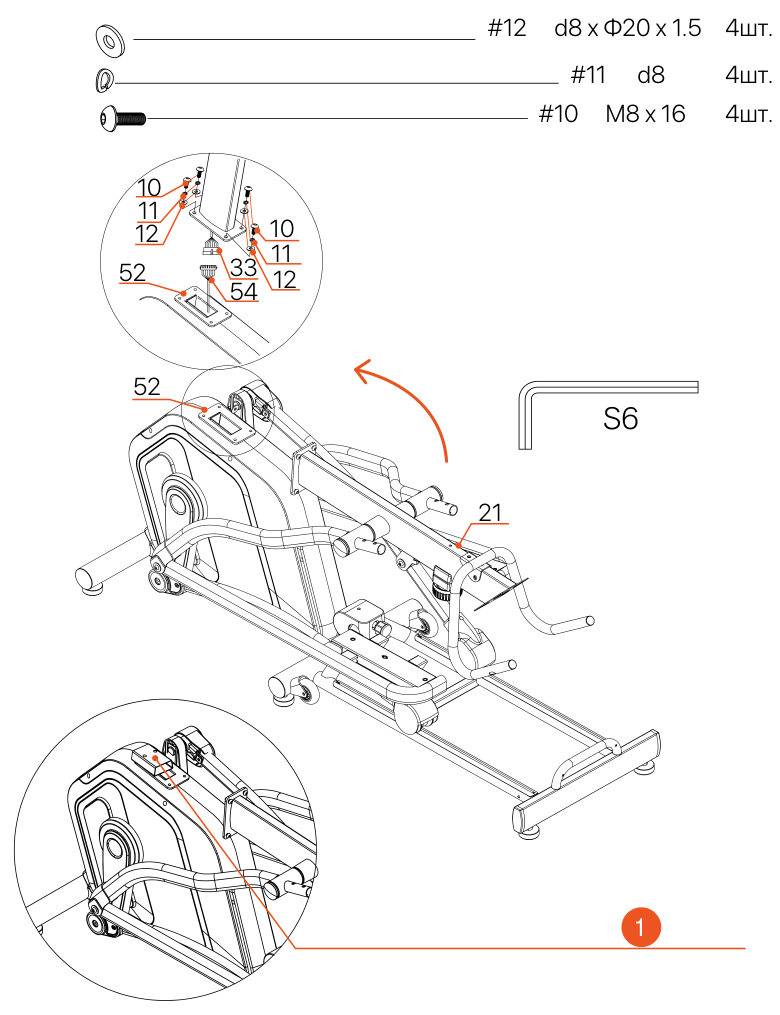
- Packaging
- Remove the packaging installed on the main frame (52) and set the screws aside.
- With the help of several people, carefully place the handlebar post (21) next to the main frame (52). Connect the middle cable (33) to the sensor wire (54).
- Carefully align the handlebar post (21) with the connecting plate on the main frame (52). Secure it with the hex bolt (10), spring washer (11) and washer (12).
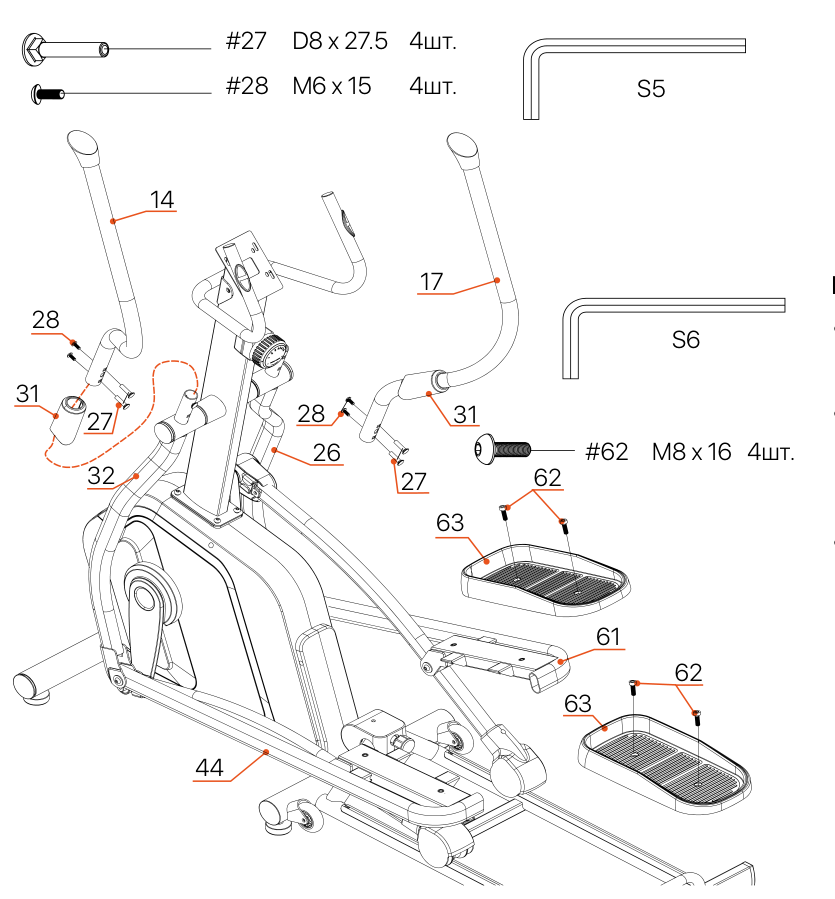
- Put the handle grips (31) on the left handle (14) and the right handle (17) respectively.
- Secure the handles (14/17) to the swing arm (32/26) using the bolt (27) and the hex screw (28) respectively.
- Secure the pedals (63) to the connecting rod (44/61) using the hex bolt (62).
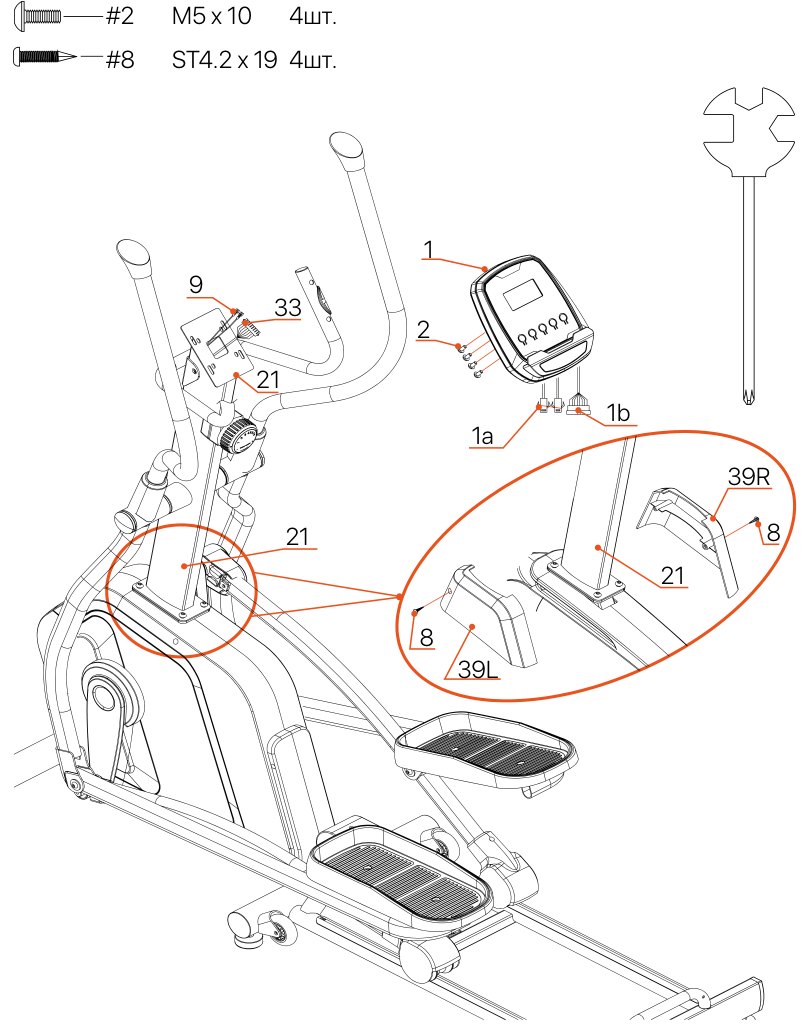
- Install the small cover (39L/R) on the handlebar post (21). Secure it with the screws (8).
- Connect the handlebar wires (1a/1b) from the computer (1) to the middle cable (33) and the pulse cable on the handles (9).
- Secure the computer (1) to the console panel of the handlebar post (21) with the screws (2).
- Assembly is complete. Make sure all bolts and nuts are securely tightened.
Rail adjustment instructions
Rail position 1: horizontal (operating)
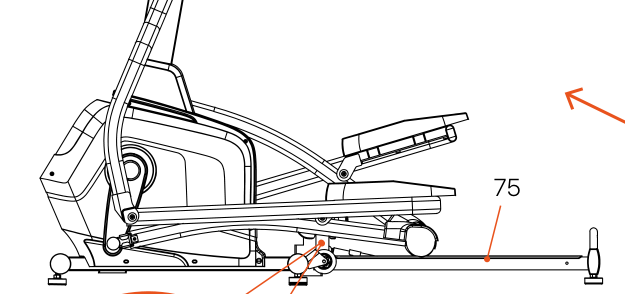
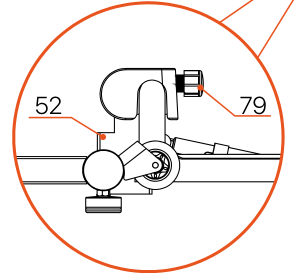
Make sure the spring-loaded knob (79) is fully inserted into the main frame (52). (Supplied in this position).
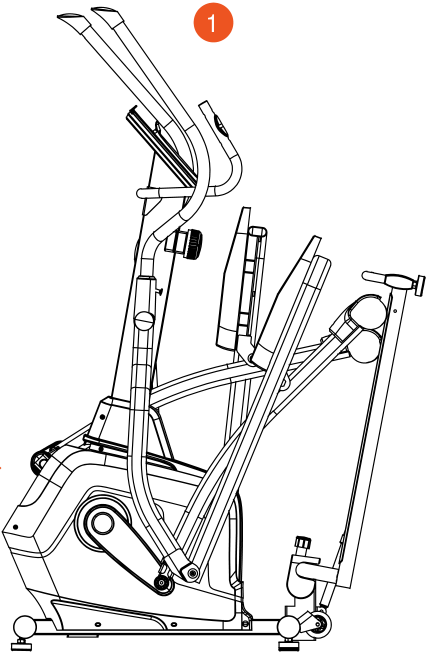
- Rail position 2: raised (storage)
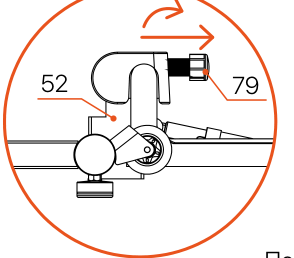
Move both rollers toward the center of the rail as far as possible. Pull the spring-loaded knob (79) outward and turn it 90 degrees. This disconnects the pin from the main frame (52) and locks it in the disengaged position. Raise the rear main frame (75) until the cylinder (80) locks in place.
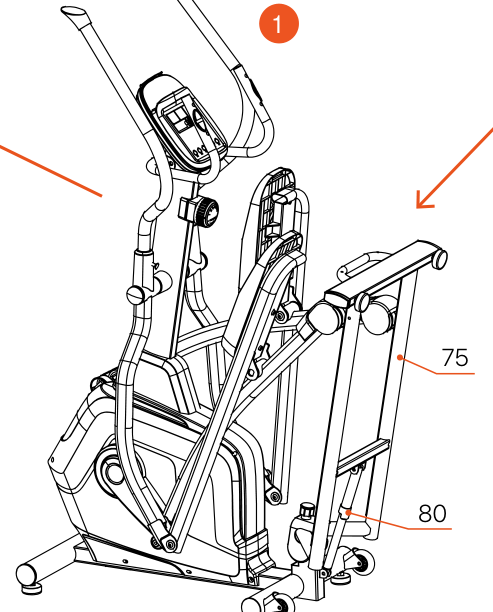
- Rail position 3: raised (alternative)
Carefully push the rear main frame (75) forward to unlock the cylinder (80). Use your foot to gently press up on the cylinder (80) until the locking mechanism is fully released. Release the rear main frame (75) and let it slowly lower in a controlled manner to ground level.
Main functions
| Function | Description |
|---|---|
| START/STOP | 1. Start and pause the workout. 2. Start body fat measurement. |
| DOWN | Decrease the value of the selected workout parameter: Time, Distance, etc. During a workout, decreases the resistance load. |
| UP | Increase the value of the selected workout parameter. During a workout, increases the resistance load. |
| ENTER | Enter the desired value or workout mode. |
| RECOVERY | When the computer has detected the heart rate value, press to enter the recovery function. |
| MODE | 1. During a workout, press to switch the display: RPM → Speed, ODO → Distance, WATT → Calories. 2. Holding the button for 3 seconds resets all function values to zero. |
Selecting a workout program
After power-on, use the UP or DOWN keys to select, then press ENTER to enter the desired mode. There are 7 main workout modes in total: Manual, Preset programs, Watt program, Body fat measurement program, Target heart rate program, Heart rate control program and User program.
Functions
| Function | Description |
|---|---|
| SPEED | Displays the current workout speed. Maximum speed: 99.9 km/h or mph. |
| RPM | Displays the current revolutions per minute. |
| TIME | Accumulates workout time from 00:00 to 99:59. The user can set a target time. |
| DIST | Accumulates distance from 0.00 to 999.9 km or miles. The user can set a target distance. |
| ODO | Total accumulated distance from 0 to 9999 km or miles. |
| CAL | Accumulates the number of calories burned from 0.00 to 9999. The user can set a target number of calories. |
| WATT | Displays the current power in watts. |
| HEART RATE | Displays the current heart rate in beats per minute. |
| TARGET H.R. | The user can set a target heart rate. |
| PROGRAM | 24 different programs are available for workouts. |
| LEVEL | The program contains 32 resistance levels, with 8 bars in each column. Each column corresponds to 1 minute of workout (without changing the time value), and each bar corresponds to 4 resistance levels. |
| RPM indicator | Shows the current revolutions: 20--99, yellow: 100--250. |
Workout parameters
TIME / DISTANCE / CALORIES / AGE / POWER (W) / TARGET HEART RATE
Setting workout parameters
- After selecting a workout mode: Manual, Preset programs, Watt program, Fat burning, Target heart rate, Heart rate control and User program. You can preset several workout parameters in advance for the desired result.
- After selecting a program, pressing ENTER will make the «Time» parameter flash.
- Use the UP or DOWN keys to select the desired time value. Press ENTER to confirm the value.
- The flashing cursor moves to the next parameter. Continue using the UP or DOWN keys. Press START/STOP to start the workout.
More about workout parameters
| Parameter | Setting range | Default value | Increase / decrease step | Description |
|---|---|---|---|---|
| Time | 0:00~99:00 | 00:00 | ± 1:00 | Time — 0:00 ~ 99:00 — 00:00 — ± 1:00 — 1. At 0:00 the time counts up. 2. At 1:00~99:00 it counts down to 0. |
| Distance | 0.00~999.0 | 0.00 | ±1.0 | Distance — 0.00 ~ 999.0 — 0.00 — ± 1.0 — 1. At 0.0 the distance counts up. 2. At 1.0~999.0 it counts down to 0. |
| Calories | 0~9995 | 0.00 | ±5 | Calories — 0 ~ 9995 — 0.00 — ± 5 — 1. At 0 the calories count up. 2. At 5~9995 they count down to 0. |
| Watts | 50~250 | 100 | ±5 | Watts — 50 ~ 250 — 100 — ± 5 — Can be set only in the watt control program. |
| Age | 10~99 | 30 | ±1 | Age — 10 ~ 99 — 30 — ± 1 — The target heart rate is calculated from age. If exceeded, the heart rate flashes. |
| Pulse | 60~220 | 60 | ±1 | Heart rate — 60 ~ 220 — 60 — ± 1 — Setting the target heart rate. |
Program operation
Manual mode (P1)
Program profile
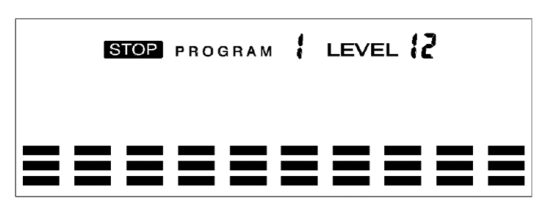
Setting parameters for manual mode
Select «Manual» with the UP or DOWN buttons, then press the ENTER button. The first parameter, «Time», will start flashing so that it can be changed. Change the value with the UP or DOWN buttons. Press ENTER to save the value and move to the next parameter. Continue setting all the required parameters, then press START/STOP to start the workout.
Preset programs (P2~P13)
Program profile
12 program profiles are available in total. All profiles have 32 resistance levels.
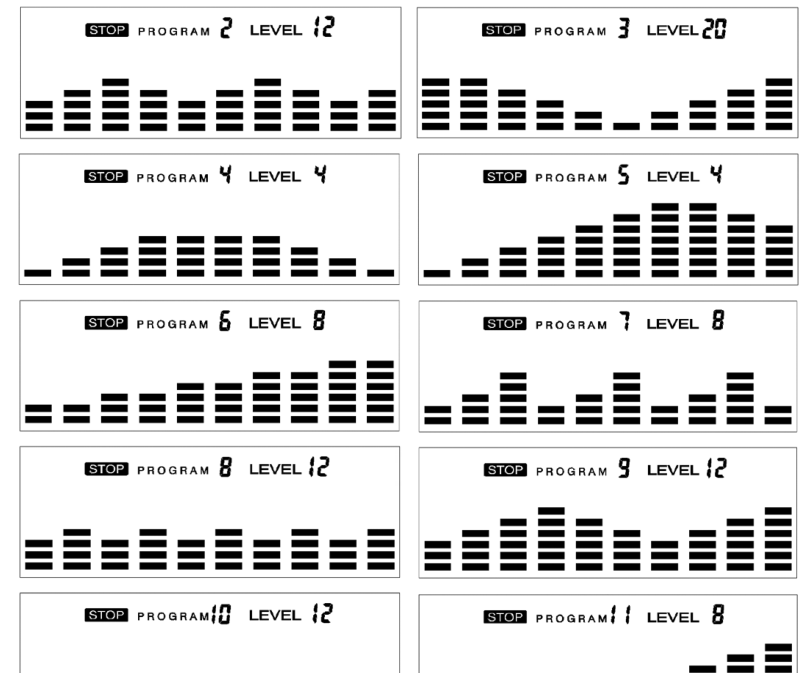
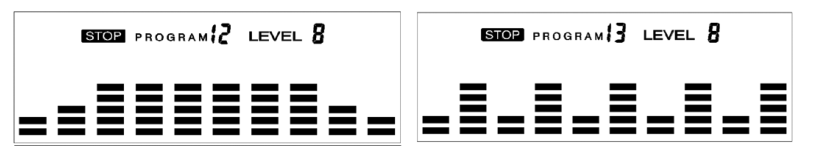
Setting parameters for preset programs
Select one of the preset programs with the UP or DOWN keys, then press the ENTER key. The first parameter, «Time», will start flashing so that the value can be changed with the UP or DOWN keys. Press ENTER to save the value and move to the next parameter. Repeat for all the required parameters, then press START/STOP to start the workout.
Training in any preset program
While the profile is flashing, users can train at different resistance levels in different time intervals. The resistance level can be changed during the workout with the UP/DOWN keys.
Watt control program (P14)
Program profile
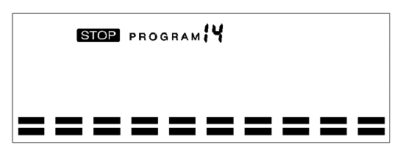
Select the «Watt control program» with the UP or DOWN keys, then press the ENTER key. The first parameter, «Time», will start flashing and can be changed with the UP or DOWN keys. Press ENTER to save the value and move to the next parameter. After setting all the parameters, press START/STOP to start the workout.
The computer will automatically adjust the resistance depending on speed to maintain a constant watt value. The user can change the watt value during the workout with the UP/DOWN keys.
Body fat measurement program (P15)
Program profile
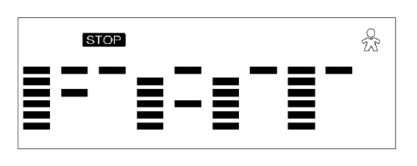
Entering data for fat measurement
- Select «Body fat measurement program» with the UP or DOWN keys, then press ENTER.
- «Male» will start flashing: select gender with the UP or DOWN keys, press ENTER to save and move to the next parameter.
- «175» in the Height field will start flashing: adjust the height…
- «70» in the Weight field will start flashing: adjust the weight…
- «30» in the Age field will start flashing: adjust the age…
- Press START/STOP to start the measurement…
- After 15 seconds the display shows the fat %, BMR, BMI and body type.
- BMR: Basal metabolic rate
- BMI: Body mass index
- Press START/STOP to return to the main screen.
«Target heart rate» program (P16)
Program profile
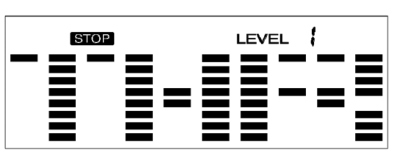
Setting parameters for target heart rate
- Select «Target heart rate» with the UP or DOWN keys, then press the ENTER key. The first parameter, «Time», will start flashing and its value can be adjusted with the UP or DOWN keys. Press ENTER to save the value and move to the next parameter.
- Continue setting all the required parameters, then press START/STOP to start the workout.
Heart rate control program (P17-P20)
Program profile


4 target heart rate options are available:
- HRC - 55% Target heart rate = 55% of (220 - age)
- HRC - 65% Target heart rate = 65% of (220 - age)
- HRC - 75% Target heart rate = 75% of (220 - age)
- HRC - 85% Target heart rate = 85% of (220 - age)
Setting parameters for heart rate control
Select «One of the heart rate control programs» with the UP or DOWN buttons, then press ENTER. The first parameter, «Time», will start flashing and its value can be changed with the UP or DOWN buttons. Press ENTER to save the value and move to the next parameter.
If one of the workout parameters reaches zero, a beep sounds and the workout stops automatically. Press the START/STOP button to continue with the unfinished parameter.
User program (P21-P24)
Program profile
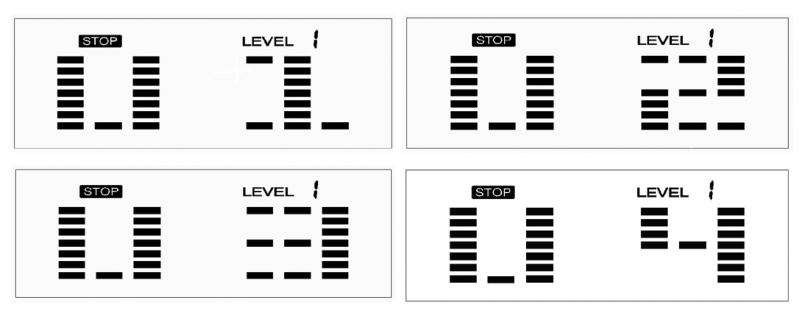
4 user programs allow the user to set up their own program, which can be used immediately.
Setting parameters of the user program
Select «user» with the UP or DOWN buttons, then press ENTER. The first parameter, «Time», will start flashing and can be adjusted with the UP or DOWN buttons. Press ENTER to save the value and move to the next parameter.
After setting the required parameters, level 1 will start flashing; use the UP or DOWN buttons to adjust it, then press ENTER until finished. (10 columns in total.) Press START/STOP to start the workout.
Care, Storage and Maintenance
Cleaning
Regularly removing dust and cleaning the trainer will extend its service life. It is also important to keep your shoes clean so that foreign objects do not get inside the trainer.
Maintenance
Replacing worn parts
Defective parts must be replaced immediately. Pay special attention to components subject to rapid wear and replace them when necessary.
Adjustment and leveling
For stability, adjust the floor levelers on the rear and front supports so that the trainer stands level.
Unusual noises during operation
If you hear noise, squeaking or grinding, stop exercising and contact the service center.
Storing the Treadmill
Recommended conditions
Temperature +10~+35°C, Humidity: 50–75%
Acclimatization
If the trainer has been stored at low temperature or high humidity, leave it in normal conditions for 2–4 hours before use.
Special rules and warnings
Electrical safety and grounding
Proper grounding is required when operating from the mains. If in doubt, contact an electrician.
No commercial use
For home use only; not suitable for gyms or medical facilities.
Workout Tips and Recommendations
Warm-up and Cool-down
A successful exercise program consists of three parts: warm-up, cardio workout and cool-down.
Warm-up is a very important part of a workout. It must be done before every workout. Warm-up helps to warm up the body, stretch the muscles and allow the body to adapt to more intense exercise.
Repeating the warm-up at the end of the exercise can help relieve muscle soreness.
We suggest doing the appropriate warm-up and cool-down exercises according to the following scheme:
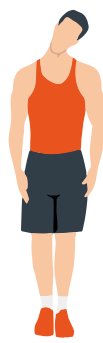
Head rolls
First tilt your head toward your right shoulder, stretch your neck and rotate your head once clockwise and once counterclockwise; then tilt your head toward your left shoulder and make one counterclockwise rotation. Repeat.

Shoulder lifts
Raise your left shoulder and make 5 backward rotations; then raise your right shoulder and make 5 backward rotations, alternating sides.
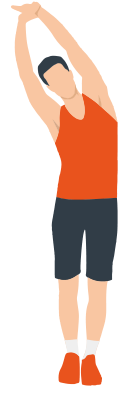
Side stretch
Raise your arms above your head, then grasp your right wrist with your left hand and reach upward until you feel your right arm fully stretched. Hold for 5 seconds before switching to the other arm.
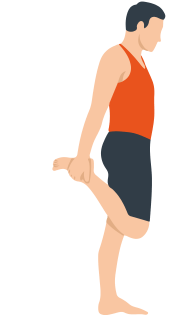
Quadriceps stretch
Holding onto a wall with your right hand for balance, pull your left foot back with your left hand, bringing the heel as close to your buttock as possible. Hold for 15 seconds, then repeat with the other leg.
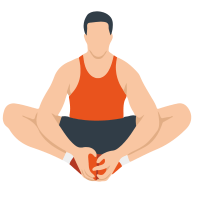
Inner thigh stretch
Sitting on the floor, put the soles of your feet together, clasp them with both hands and pull them in as close to your body as possible. Slowly press down on both heels and hold this position for 15 seconds.
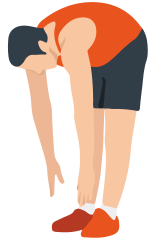
Toe touch
Slowly bend forward, relax your back and shoulders, and reach for your toes. Bend as low as possible and hold the position for up to 15 seconds.
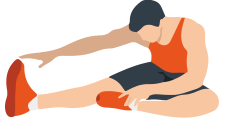
Hamstring stretch
Sit down, straighten your right leg, bend your left, take your left ankle with your left hand and push it inward so that your left foot is as close to your torso as possible and the sole of the foot is against the inner side of your right thigh. Then press down on the body, stretch your left and right arms forward to touch your toe; the stronger the pressure, the better. Hold this position for 15 seconds and switch to the left leg.
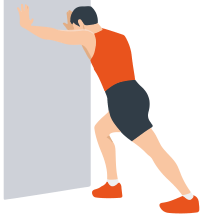
Calf stretch
Leaning on the wall with both hands, tilt your torso at an angle of 45 degrees to the floor and take your left and right legs back in turn, performing walking movements.
Warranty
Genau guarantees the high quality and reliability of its products. We strive to offer only the best, which is why all of our equipment comes with a warranty.
Warranty Terms
- The warranty period starts from the date of sale.
- The warranty covers defects caused by manufacturing faults or defective materials.
- Warranty service is carried out at authorized service centers.
- If the product breaks down during the warranty period, the customer must bring this warranty card and the complete product to a service center for diagnostics and repair.
- If the warranty claim is confirmed, the product will be repaired or replaced free of charge.
- The warranty does not cover the following cases:
- mechanical damage caused by improper use or transportation;
- damage caused by liquids, fire, chemicals or other external factors;
- failures caused by not following the operating instructions;
- modifications to the design or repairs carried out by unauthorized persons without the approval of the Service;
- consumables and components with a limited service life (belts, batteries, etc.).
Warranty claims
To receive warranty service, the customer should contact the seller (the place where the equipment was purchased).
Specifications
| Parameter | Value |
|---|---|
| Maximum user weight | 120 kg |
| Manufacturer | Evertopxiamen Evertop Fitness Products Co., Ltd, Building no.44 Fengshanyilane, Tongan District, Xiamen, Fujian, China |
Service
For questions about assembly, operation and warranty, please contact Genau service in Kyrgyzstan.
Genau GmbH LLC (ОсОО «Генау ГМБХ»), Kyrgyzstan. Phone: +996 778 639 000