Genau Ergo XT 850 Exercise Bike
User Manual
Contents
Thank you for your purchase!
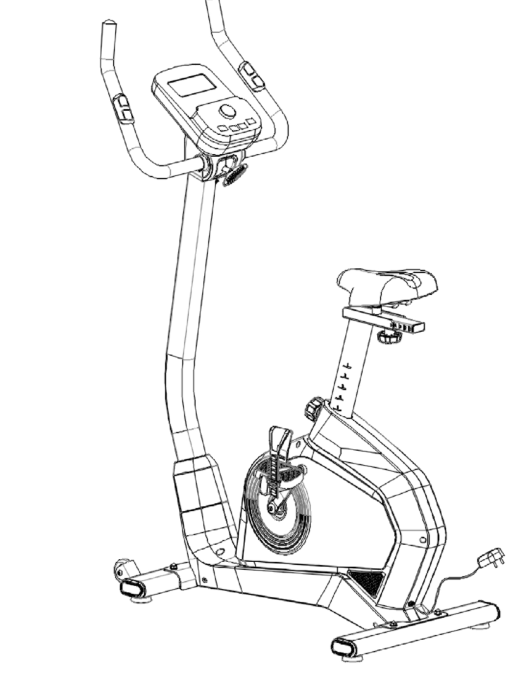
Thank you for purchasing the Genau Ergo XT 850 exercise bike. Please use the equipment correctly to ensure your safety and health. Before use, read the information below carefully.
Please read this manual before assembling and using the treadmill.
In line with the principle of continuous development, the product may be updated when necessary without prior notice.
If the manual does not match the product, the actual product takes priority.
Safety Instructions
- This bike is intended for indoor use only. Install and use it on a flat, hard surface. Do not place foreign objects on the bike.
- If the power cord is damaged, it must be replaced by the manufacturer's specialists, a service center or a similar qualified department. Disconnect the power cord when the bike is not used for a long time.
- The product is not suitable for children or people with disabilities. Do not use it if you feel unwell.
- Do not use the bike in a dusty room. Maintain normal humidity. Avoid static electricity so that it does not affect the operation of the console. Use only original parts.
- Do not use the bike near heat sources or moving objects.
- Disconnect the power before moving the bike. Do not disassemble the bike without the manufacturer's permission. Wear fitted clothing and avoid loose items that may get caught.
- If you feel unwell, stop using the bike and see a doctor.
- Use grounded sockets. If the plug does not fit the socket, do not touch it; contact an electrician.
- The product is intended for home use. Do not use it for professional training or medical purposes.
- Do not use the bike if the housing is damaged or the welded parts are cracked.
- Do not use the bike after eating, when tired or when unwell.
- Do not let needles, debris or water get into the socket. Do not touch the plug with wet hands.
- Disconnect the bike from the power supply when not in use.
- If you are unsure about the grounding, contact an electrician.
Scale
When assembling the exercise bike, you can use the supplied scale to measure the length of the screws for easier installation.
Product Components
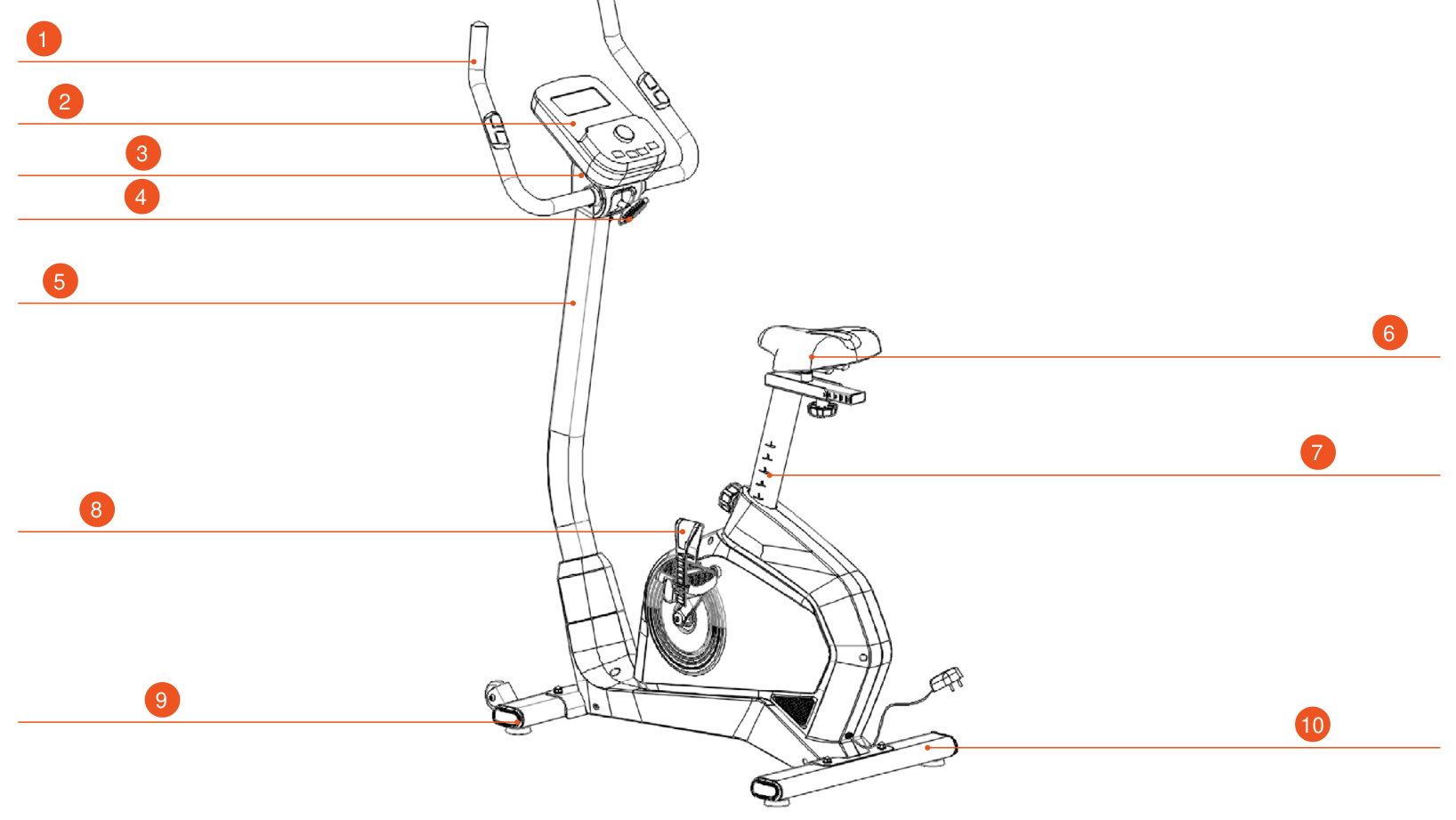
- Handlebar
- Console
- Upper handlebar cover
- Lower handlebar cover
- Upright
- Seat
- Seat post
- Left pedal
- Front stabilizer
- Rear stabilizer
Package Contents
| No. | Item | Unit | Qty |
|---|---|---|---|
| 1 | Bike frame | pcs | 1 |
| 2 | Console | pcs | 1 |
| 3 | Tool kit | set | 1 |
| 4 | Front stabilizer | pcs | 1 |
| 5 | Rear stabilizer | pcs | 1 |
| 6 | Pedals | pair | 1 |
| 7 | Seat post | pcs | 1 |
| 8 | Seat | pcs | 1 |
| 9 | Upright | pcs | 1 |
| 10 | Upper / lower handlebar cover | set | 1 |
| 11 | Post cover | pcs | 1 |
| 12 | Rectifier | pcs | 1 |
Tool kit
| No. | Item | Unit | Qty |
|---|---|---|---|
| 1 | Hex key (5 mm) | pcs | 1 |
| 2 | Wrench | pcs | 1 |
| 3 | Handlebar bushing | pcs | 1 |
| 4 | T-handle | pcs | 1 |
| 5 | M8×55 square-head bolt | pcs | 2 |
| 6 | ST4×16 pan-head screw | pcs | 2 |
| 7 | Washer (φ8.5×φ16×1.5T) | pcs | 4 |
| 8 | Washer (φ8×φ13×1.5T) | pcs | 1 |
| 9 | Spring washer (M8) | pcs | 1 |
| 10 | Cap nut (M8) | pcs | 4 |
| 11 | User Manual | pcs | 1 |
Assembly
Stabilizers
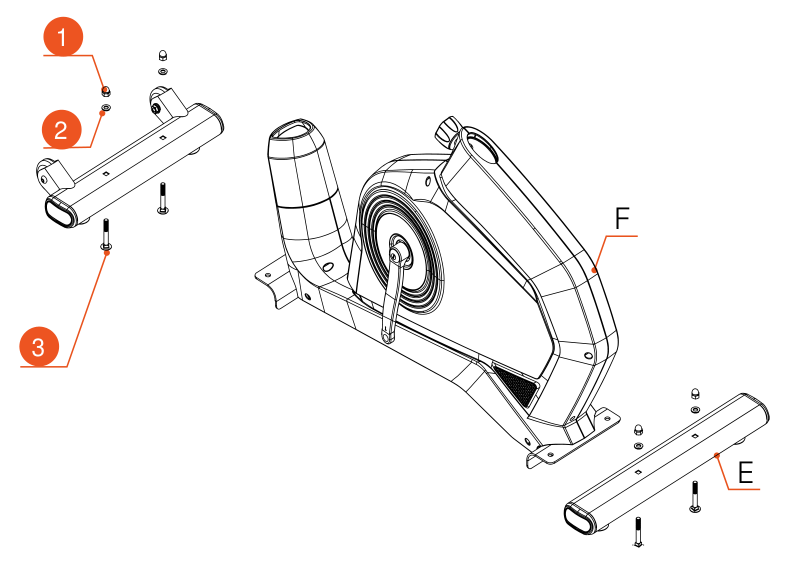
- L-3 — nut
- L-2 — flat washer
- L-1 — square-head screw
- Take the front stabilizer I and the rear stabilizer E out of the packaging, and take the square-head screw L-1, flat washer L-2, nut L-3 and wrench L-10 from the tool kit.
- Install the front stabilizer I and the rear stabilizer E, using wrench L-10 to tighten nut L-3, as shown in the figure.
Pedals
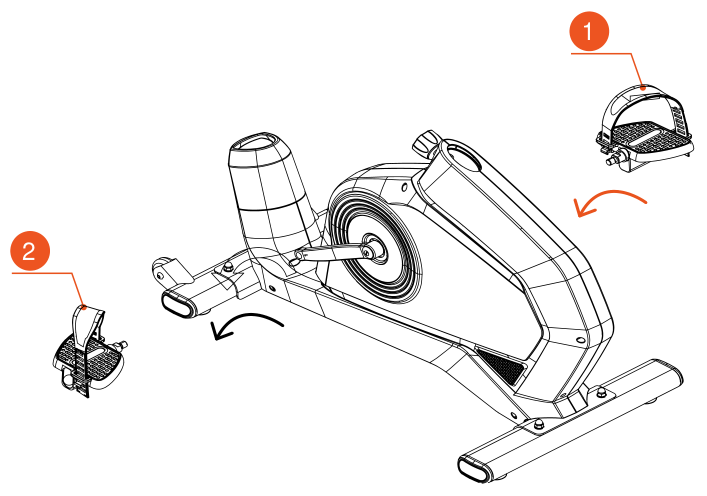
- F-13 — right pedal
- F-21 — left pedal
- Take out the left pedal F-21 and the right pedal F-13.
- Use the universal wrench L-10 to turn and fix them in the direction indicated by the arrow, as shown in the figure.
Seat and post
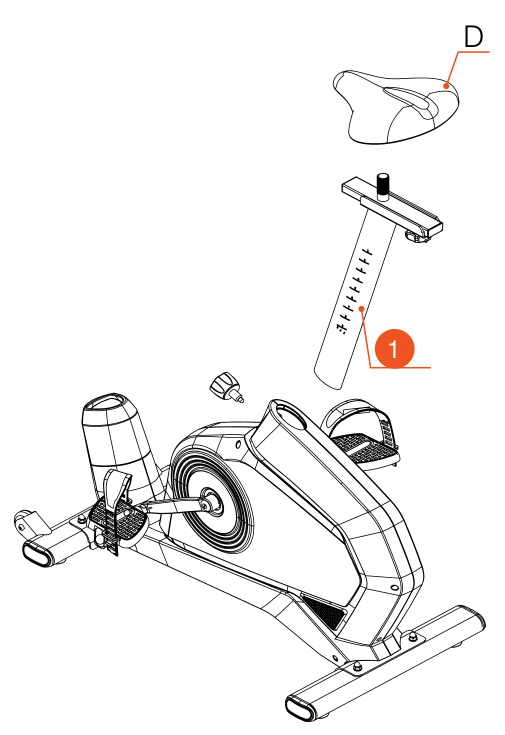
- D-6 — seat tube
- Take the seat tube D-6 out of the packaging (as shown).
- To install: unscrew and remove the locking knob F-23 pre-installed on the frame. Insert the seat tube D-6 into the hole in the frame and adjust its height so that the lock F-23 lines up with the corresponding hole and the marks on tube D-6. Tighten the lock F-23.
- Take the seat cushion D out of the packaging, adjust its angle and position, then secure it with the universal wrench L-10.
Post and cables
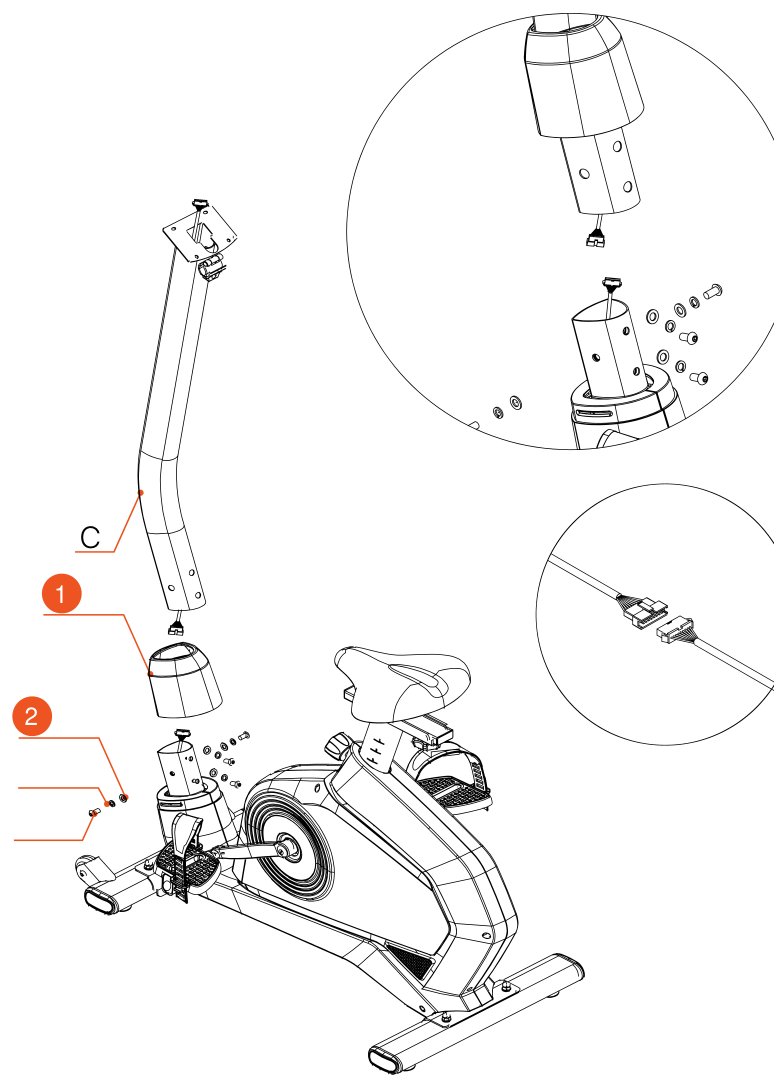
- F-29 — handlebar cover
- F-28, F-27, F-26 — screws
- Take the handlebar post C out of the packaging. Take the hex key L-9 from the tool kit and remove the handlebar cover F-29.
- Using hex key L-9, unscrew the pre-installed screws F-26, F-27, F-28 from the frame.
- Put the handlebar cover F-29 back in its original place on the frame. Connect the post cable K-6 to the handlebar post cable K-5, as shown in the diagram.
- Insert the handlebar post into the corresponding mounting place on the frame and tighten the previously removed screws F-26, F-27, F-28 with hex key L-9.
Handlebar
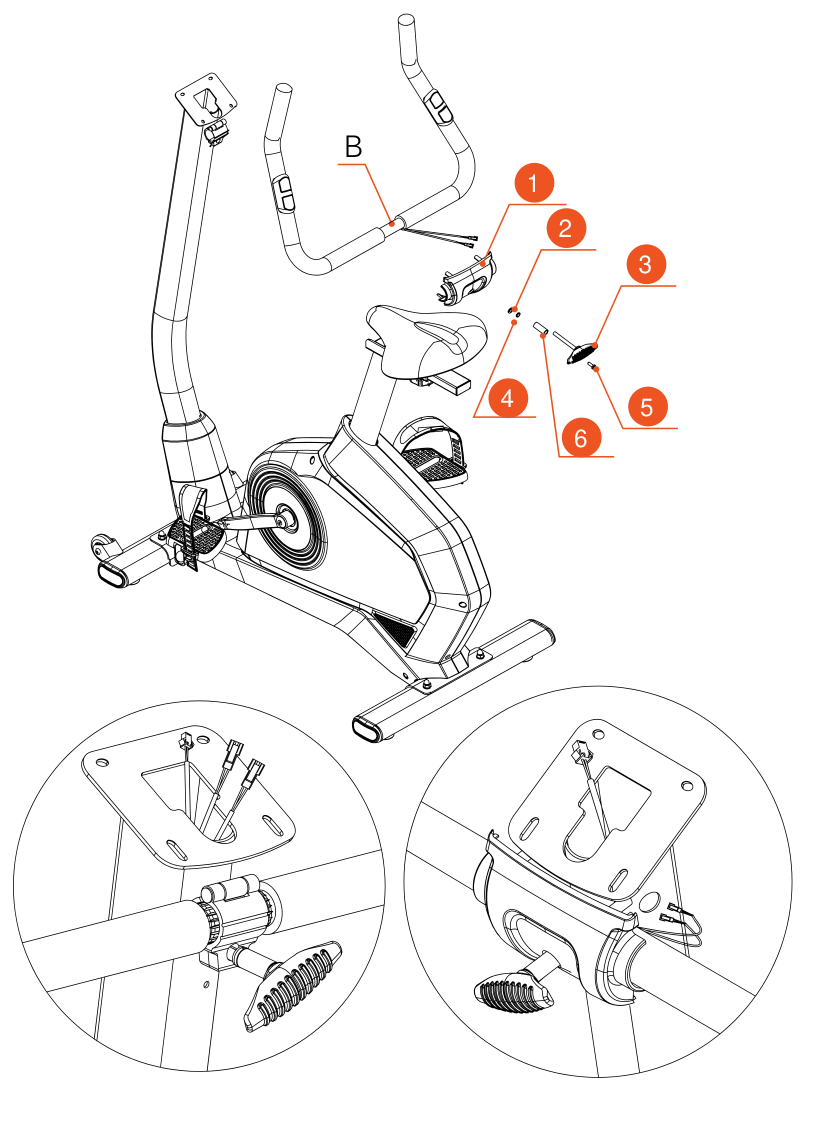
- C-3 — rear cover
- L-4 — flat washer
- L-7 — T-handle screw
- L-5 — spring washer
- C-1
- L-6 — bushing
- Take the handlebar B, spring washer L-5, flat washer L-4, bushing L-6, T-handle screw L-7 and rear cover C-3 out of the box.
- Use the T-handle screw L-7 to secure the hole of the handlebar post C. Insert the pulse sensor K-4 into the threaded hole of the handlebar post C. The lower handlebar cover is pre-assembled and does not need to be assembled.
Console
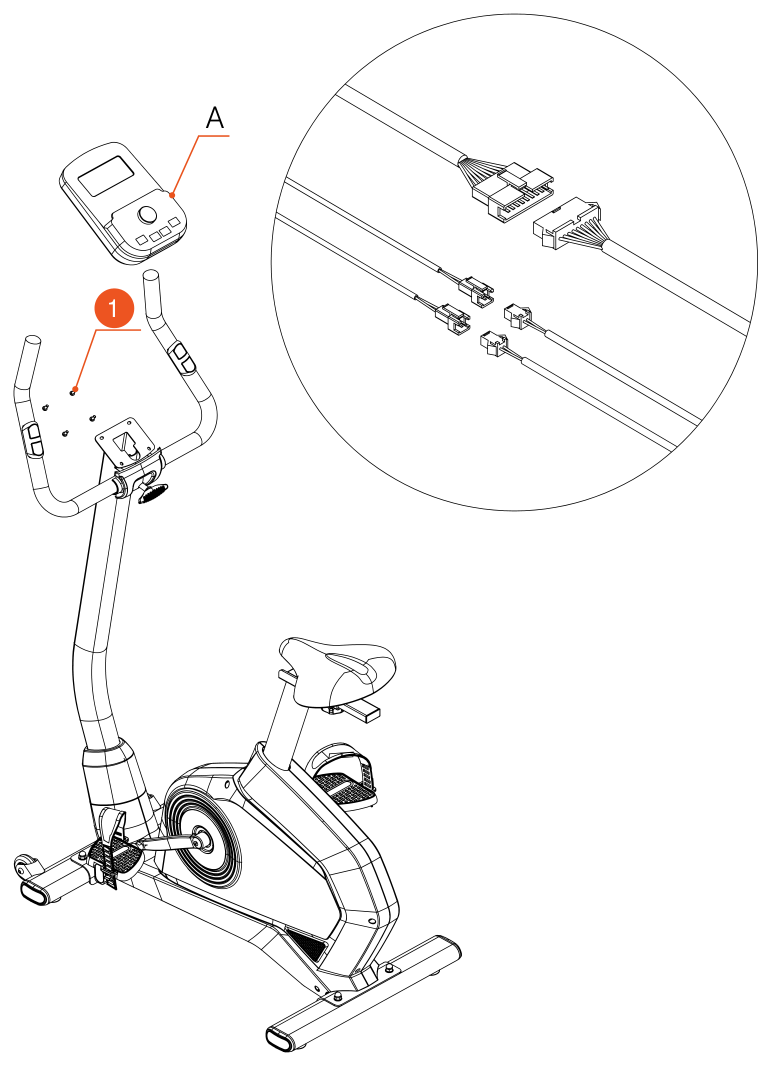
- A-1
- Take the console A out of the packaging.
- Use wrench L-10 and a Phillips screwdriver to remove the four M512 screws pre-installed on the console A.
- Connect the open connector on the back of the console A to the connector in the handlebar post C in order, as shown in the figure.
- Connect the wire to the connector of the handlebar post C.
- Align the electronic unit with the hole of the handlebar post C.
- Secure the console by tightening the pre-installed M512 screws (4 pcs.).
Handlebar cover
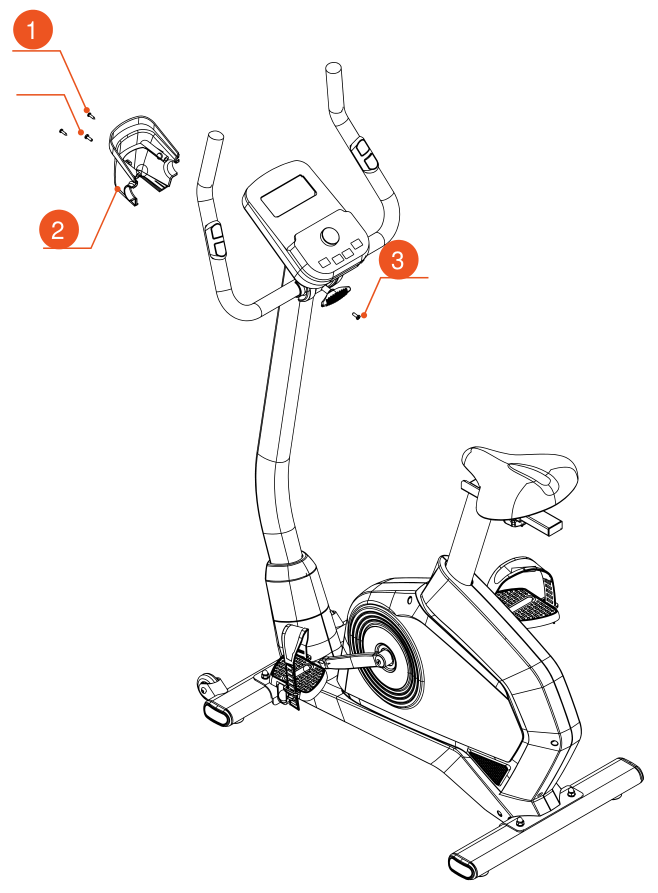
- L-8, C-1
- C-2 — cover
- C-1
- Take the armrest cover out of the packaging and install the cover C-2.
- Using M5×16L ×2 screws and wrench L-10 together with a Phillips screwdriver (as in step 5), secure the upper and lower covers of the simple armrest, using Phillips-head self-tapping screws L-8 and the screwdriver on the side of wrench L-10# to hold them in place.
Adapter
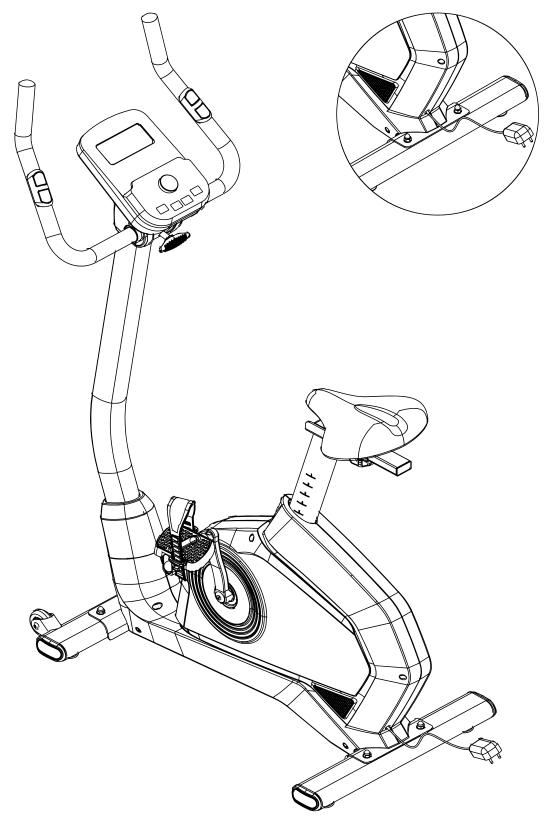
- Take the adapter K-1 out of the packaging, connect one end of the adapter to the DC connector on the frame and plug the other end into a 100–240V socket. Once the console A lights up, the bike assembly is complete.
Adjustment
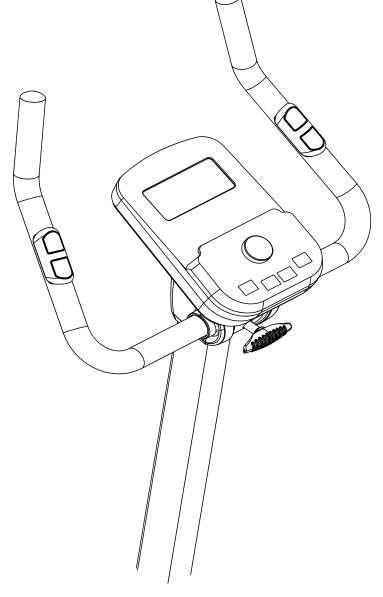
Adjusting the handlebar / seat height
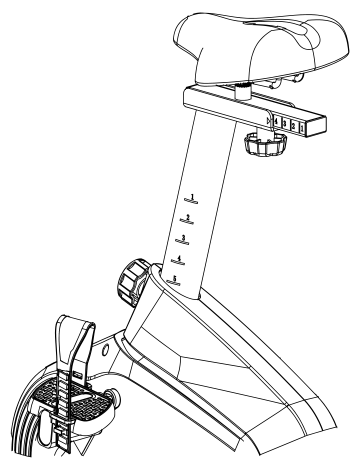
You can adjust the handlebar angle and the seat height with the adjusting screw to suit your riding position and feel comfortable.
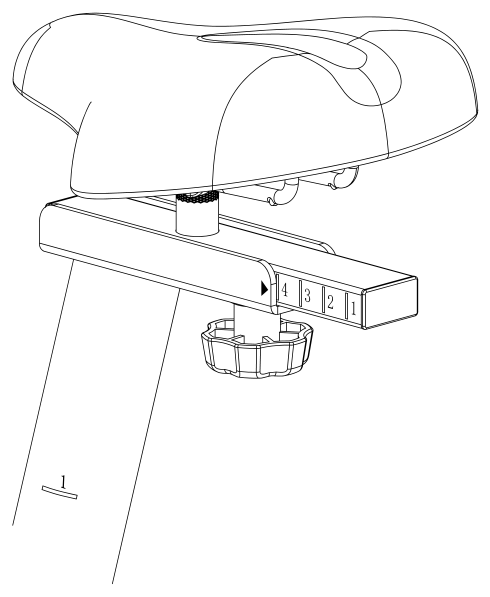
Adjusting the seat
You can adjust the distance of the seat from the handlebar, forward and back, with the screw under the seat.
Operation
Functions of the rotary knob
| Function | Description |
|---|---|
| Start/Stop | Starts or stops the workout. |
| Reset | In stop mode, returns to the menu; when held for 6 seconds, the console restarts. |
| Up (+) | 1. Selects the workout program; 2. Increases the value. |
| Mode | In stop mode, press to select and enter a mode. In workout mode the button is inactive. |
| Down (–) | 1. Selects the workout program; 2. Decreases the value. |
| Recovery | Heart rate recovery check. |
| Body Fat | Body fat percentage measurement. |
Display Functions
| Function | Description |
|---|---|
| Time | Display range: 0:00 ~ 99:99; Setting range: 0:00 ~ 99:00 minutes. |
| Distance | Display range: 0 ~ 99.99; Setting range: 0 ~ 99.90 km. |
| Calories | Display range: 0 ~ 9999; Setting range: 0 ~ 9990 calories. |
| Pulse | Display range: 30 ~ 230; Setting range: 30 ~ 230. |
| Watt | Display range: 0 ~ 999 W; Setting range: 10 ~ 350 W. |
| Speed | 0.0 ~ 99.9 km/h. |
| RPM | 0 ~ 999. |
- Connect the power (or hold the RESET key for 2 seconds). A beep will sound and the LCD display will light up for 2 seconds. The console then enters standby mode. At this moment the motor is set to load 1.
- In standby mode you can press "START/STOP" to start a workout immediately ("Quick start"). Or select a program with the UP/DOWN buttons: MANUAL → BEGINNER → ADVANCE → SPORTY → CARDIO → WATT.
- In "MANUAL" mode, use the MODE button and the UP/DOWN buttons to set the time, distance or calories. After confirming, press "START/STOP" and the workout begins. During the workout you can change the load level with the UP/DOWN buttons.
Workout programs
BEGINNER mode (P01–P04)
- Press "START/STOP", then use UP/DOWN to select a level from Beginner 1 to 4. Confirm with the MODE button. Set the time with UP/DOWN and press START to begin the workout.
- During the workout the system adjusts the load level by itself. You can stop the workout with the "START/STOP" button. When the time reaches 0:00, the workout ends automatically. The RESET button clears all data. Holding RESET for 3 seconds restarts the console.
ADVANCE mode (P05–P08)
- Press "START/STOP", then use UP/DOWN to select a level from Advance 1 to 4 and confirm with MODE. Set the time with the UP/DOWN buttons and press START to begin the workout.
- During the workout the system adjusts the load automatically. You can stop the workout with the "START/STOP" button. When the time reaches 0:00, the workout ends automatically. The RESET button clears all data. Holding RESET for 3 seconds restarts the console.
SPORTY mode (P09–P12)
- Press "START/STOP", then select a level from Sporty 1 to 4 with UP/DOWN and confirm with MODE. Set the time with the UP/DOWN buttons and press START to begin the workout.
- During the workout the system adjusts the load automatically. To stop, press "START/STOP". When the time reaches 0:00, the workout ends automatically.
CARDIO mode (P13–P16)
- In the menu, select CARDIO with the UP/DOWN buttons and confirm with MODE. Then select the target load level (55%–TAG) and confirm with MODE again. After that, set the time and start the workout.
- During the workout the system automatically adjusts the load to reach the set value. You can stop the workout with the "START/STOP" button.
- The RESET button clears all data. Holding RESET for 3 seconds restarts the console.
WATT mode (P17)
- In the menu, select WATT with UP/DOWN and confirm with MODE. Then set the time and the target WATT value. Press "START/STOP" to begin the workout.
RECOVERY function
- This function works only while the pulse is being measured. Only "TIME" and "PULSE" are displayed.
- The timer shows "0:60" and starts counting down. During this time the screen displays your actual pulse. When the countdown ends, the "FX" result (a score from 1 to 6) appears and a signal sounds.
- Press RECOVERY again to return to the menu or stop the measurement.
Bluetooth APP function
- The product is compatible with the Fitshow, Zwift and Kinomap apps. Download them from the App Store or Google Play Store to use them.
Error Codes and Troubleshooting
| Error code | Problem description | Possible cause | Solution |
|---|---|---|---|
| E01 | Error E01, the buzzer sounds 9 beeps | The console does not detect the gearbox potential | 1. Check whether there is a gearbox potential signal (replace the gearbox if necessary). 2. Check the wiring harness for integrity (replace the harness if necessary). |
| E02 | Error E02, the buzzer sounds 9 beeps | The console detects that the gearbox potential value exceeds the set range | Check the gearbox potential signal (replace the gearbox if necessary). |
| E03 | Error E03, the buzzer sounds 9 beeps | Within the set time (30 seconds) the console does not detect the set gearbox potential value | 1. Check the gearbox potential signal (replace the gearbox if necessary). 2. Turn the device off and on again, then check whether the gearbox works normally (no mechanical obstruction or jamming); replace the gearbox if necessary. |
Care, Storage and Maintenance
Cleaning
Regular and thorough cleaning will extend the service life of the upright exercise bike.
Remove dust regularly to keep the exercise bike clean. Make sure your athletic shoes are clean and prevent foreign objects from getting inside the exercise bike.
Workout Tips and Recommendations
Warm-up and Cool-down
A successful exercise program consists of three parts: warm-up, cardio training and cool-down.
Warm-up is a very important part of a workout. A warm-up must be done before every workout. It helps warm up the body, stretch the muscles and allows the body to adapt to more intense exercise.
Repeating the warm-up at the end of the exercise can help relieve muscle soreness.
We suggest doing the appropriate warm-up and cool-down exercises according to the following scheme:
Exercises
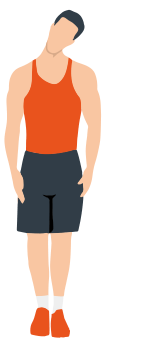
Head rolls
First pull your head toward your right shoulder, stretch your neck and turn your head once clockwise and once counterclockwise; pull your head toward your left shoulder and make one turn counterclockwise. Repeat.
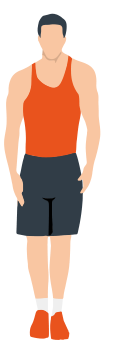
Shoulder lifts
Raise your left shoulder and make 5 backward rotations; then raise your right shoulder and make 5 backward rotations, alternating sides.
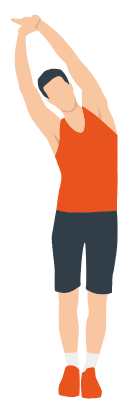
Side stretch
Raise your arms above your head, then grasp your right wrist with your left hand and reach upward until you feel your right arm fully stretched. Hold for 5 seconds before switching to the other arm.
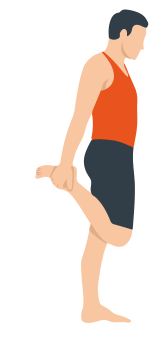
Quadriceps stretch
Holding onto a wall with your right hand for balance, pull your left foot back with your left hand, bringing the heel as close to your buttock as possible. Hold for 15 seconds, then repeat with the other leg.
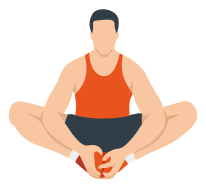
Inner thigh stretch
Sitting on the floor, put the soles of your feet together, clasp them with both hands and pull them in as close to your body as possible. Slowly press down on both heels and hold this position for 15 seconds.
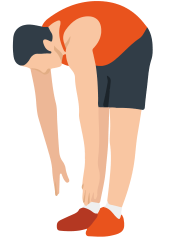
Toe touch
Slowly bend forward, relax your back and shoulders and reach for your toes. Bend as low as you can and hold the position for up to 15 seconds.
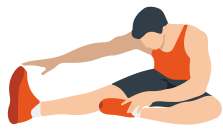
Hamstring stretch
Sit down, straighten your right leg, bend your left leg, grab your left ankle with your left hand and push it inward so that your left foot is as close to your torso as possible and the sole of the foot is against the inside of your right thigh. Then press forward with your body and reach both arms forward to touch your toes; the more pressure, the better. Hold this position for 15 seconds and switch to the left leg.
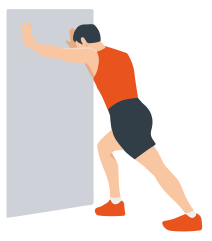
Calf stretch
Lean against a wall with both hands, tilt your body at a 45-degree angle to the floor and alternately move your left and right legs back, as if walking.
Warranty
Genau guarantees the high quality and reliability of its products. We strive to offer only the best, which is why all of our equipment comes with a warranty.
Warranty Terms
- The warranty period starts from the date of sale.
- The warranty covers defects caused by manufacturing faults or defective materials.
- Warranty service is carried out at authorized service centers.
- If the product breaks down during the warranty period, the customer must bring this warranty card and the complete product to a service center for diagnostics and repair.
- If the warranty claim is confirmed, the product will be repaired or replaced free of charge.
- The warranty does not cover the following cases:
- mechanical damage caused by improper use or transportation;
- damage caused by liquids, fire, chemicals or other external factors;
- failures caused by not following the operating instructions;
- modifications to the design or repairs carried out by unauthorized persons without the approval of the Service;
- consumables and components with a limited service life (belts, batteries, etc.).
Warranty claims
To receive warranty service, the customer should contact the seller (the place where the equipment was purchased).
Service
For questions about assembly, operation and warranty, please contact Genau service in Kyrgyzstan.
Genau GmbH LLC (ОсОО «Генау ГМБХ»), Kyrgyzstan. Phone: +996 778 639 000