Genau Neogen N6000 Electric Treadmill
User Manual
Contents
Thank you for your purchase!
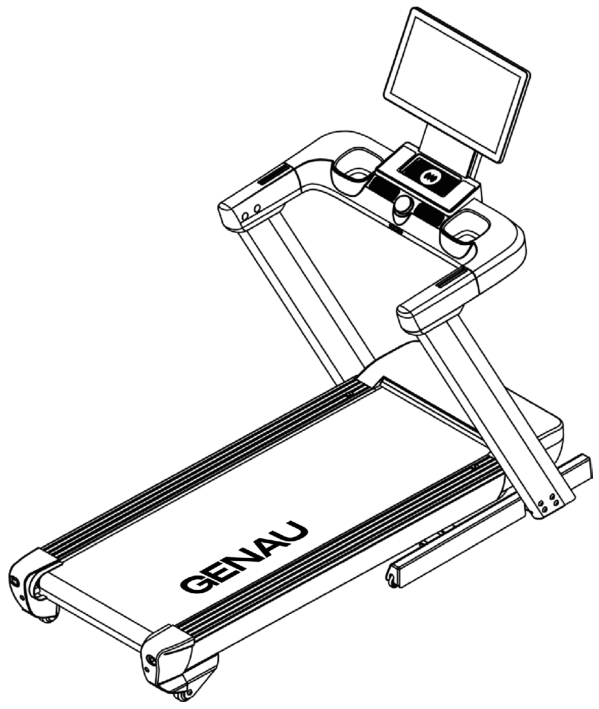
Thank you for purchasing the Genau Neogen N6000 treadmill. Please use the equipment correctly to ensure your safety and health. Read the information below carefully before use.
Please read this manual before assembling and using the treadmill.
As part of our commitment to continuous improvement, the product may be updated when necessary without prior notice. If this manual does not match the product, the actual product takes precedence.
Safety Instructions
- When using electrical appliances, basic precautions should always be followed, including: read all instructions carefully before using this treadmill.
Warning!
To reduce the risk of burns, fire, electric shock or injury:
- Do not leave the treadmill unattended while it is plugged in. Unplug the appliance from the outlet when it is not in use and before putting on or taking off parts.
- Use this treadmill only for its intended purpose as described in the manual. Do not use accessories not recommended by the manufacturer.
- Do not use the treadmill if the cord or plug is damaged, if it is not working properly, has been damaged or has been dropped into water. Replace the damaged cord/plug or contact a service center for inspection and repair.
- Keep the cord away from hot surfaces.
- Do not block the ventilation openings. Keep them free of dust, hair and similar items. Do not insert or drop any objects into the openings.
- Do not use the treadmill outdoors.
- Do not use where aerosol products are being sprayed or where oxygen is being administered.
- To disconnect, first switch off the treadmill, then pull the plug out of the outlet.
- Connect the treadmill only to a properly grounded outlet. See the grounding instructions.
- This appliance is not intended for use by persons with reduced physical, sensory or mental capabilities or lack of experience/knowledge, unless they are supervised by a person responsible for their safety. Keep children under 13 away from the treadmill.
- Do not carry the treadmill by the cord or use the cord as a handle.
- For household use only.
- Remove the remote (or the key, or the safety pin, if applicable) after use and keep it away from children.
Important Precautions
- Use the equipment correctly to ensure your safety and health. It is important to read this entire manual before assembling and using the treadmill. Safe and effective use is only possible if the equipment is correctly assembled, maintained and operated. You are responsible for ensuring that all users are informed of the warnings and precautions.
- Consult a doctor before starting training, especially if you have chronic conditions or are taking medication that affects blood pressure, heart rate or cholesterol levels.
- Listen to your body. Pain, chest tightness, rapid heartbeat, shortness of breath, dizziness or nausea are reasons to stop exercising immediately and see a doctor.
- Keep children and pets away from the treadmill. The equipment is intended for adults only.
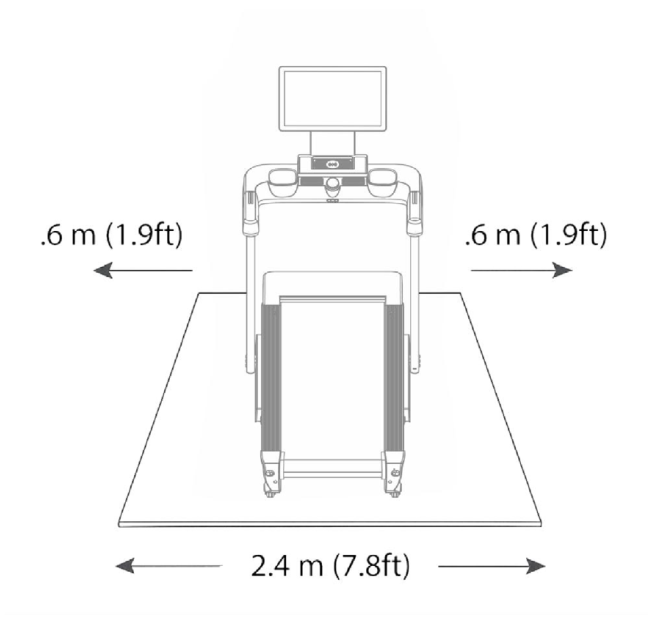
- Place the treadmill on a firm, level surface. Leave at least 240 cm of free space behind it and 60 cm on each side. Do not place the treadmill on carpets without an underlay.
- Make sure all nuts and bolts are securely tightened.
- Use only for the intended purpose. If you find a fault, stop using the treadmill and have the fault repaired.
- Wear suitable sportswear. Do not wear loose clothing that could get caught.
- Do not touch moving parts with your hands.
- Do not use the treadmill for medical purposes.
- Lift and move the equipment carefully so as not to damage it or injure yourself.
- Use only in dry, cool rooms. Do not store in damp or very hot places.
- For home use only, not intended for commercial use.
- If you feel unwell or in an emergency, hold the handrails with both hands and jump onto the side rails.
Important Operating Instructions
- Plug the power plug directly into the outlet.
- Read the manual before using the equipment.
- Speed changes do not happen instantly.
- Be careful while on the treadmill: distraction can cause you to lose balance and drift off the center of the belt, which may result in serious injury.
- The machine starts at low speed. To start a workout, stand on the side rails, wait for the belt to start, then carefully step onto the moving belt.
- The safety key is provided for emergencies. The treadmill works only with the key inserted. In an emergency, pull out the key to stop the treadmill immediately. After the key is reinserted, the display resets.
- The equipment is intended for adults only. Children must not play near it or use it. Adult supervision is mandatory.
- Pregnant and breastfeeding women must consult a doctor before starting training.
- Be sure to drink water during and after your workout.
- Do not lift the treadmill.
- The belt must be lubricated before first use.
Important Electrical Safety Information
Grounding methods
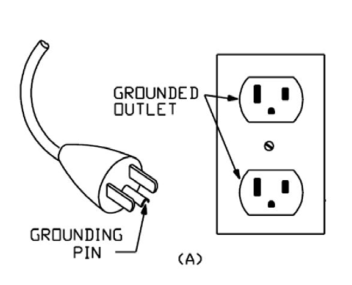
This appliance must be grounded. Grounding reduces the resistance to electric current and lowers the risk of electric shock. The plug must be connected to a suitable outlet that is installed and grounded in accordance with local regulations. Make sure the outlet matches the shape of the plug. Do not use adapters.
This product is designed for a standard mains supply and is equipped with a grounding plug (see figure A). Make sure the outlet fits the plug. Do not use adapters.
Warning!
- NEVER use an outlet with a residual current device (GFCI) with this treadmill. Route the cable away from moving parts, including the lift mechanism and transport wheels.
- NEVER connect to generators or uninterruptible power supplies (UPS).
- NEVER remove the cover without disconnecting the power.
- NEVER expose to rain or moisture. The treadmill is not intended for use outdoors, near swimming pools or in high-humidity conditions.
Product Components
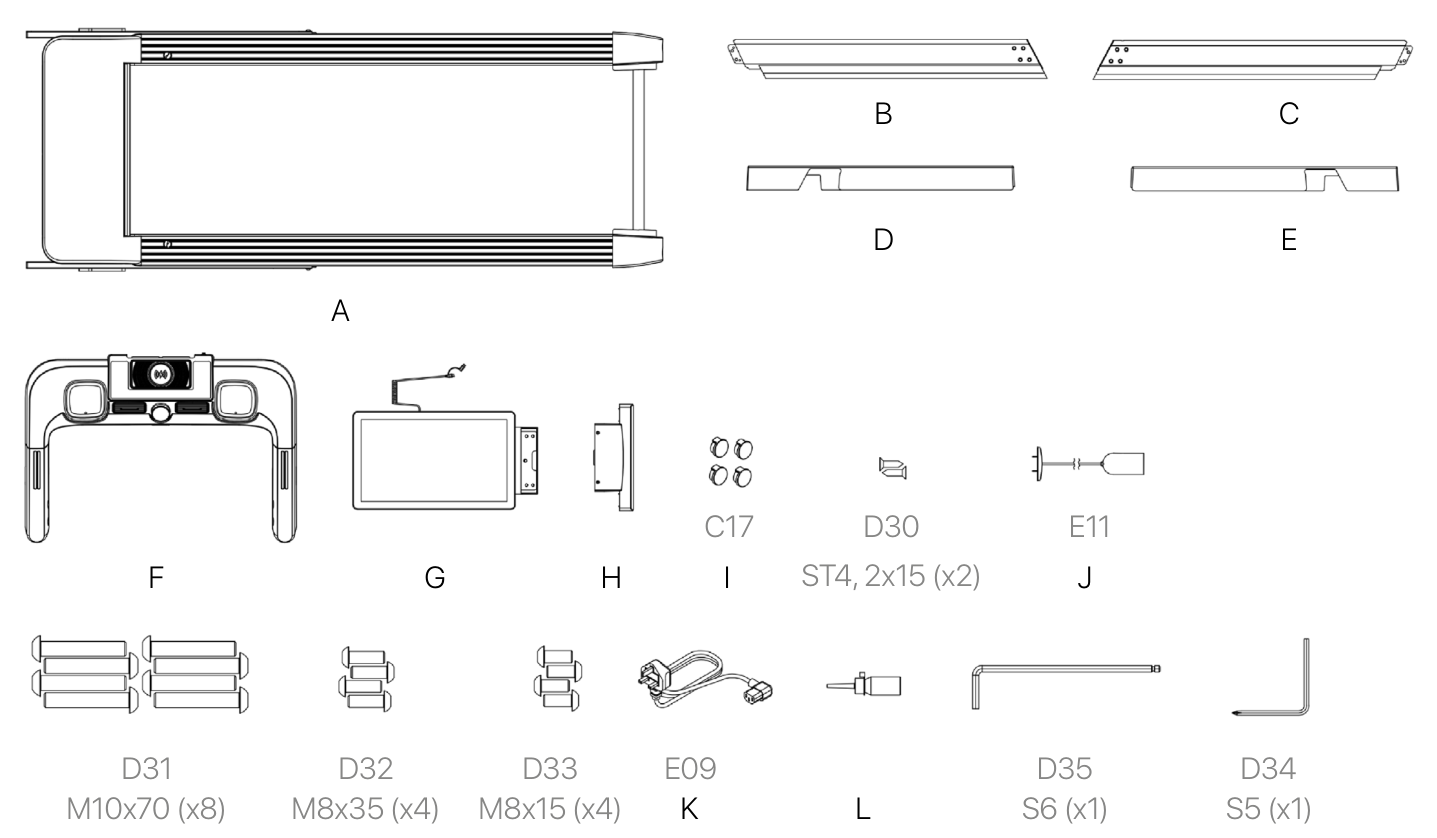
Please check carefully that all items inside the package are complete and in good condition. If anything is missing or damaged, please contact customer support!
Assembly
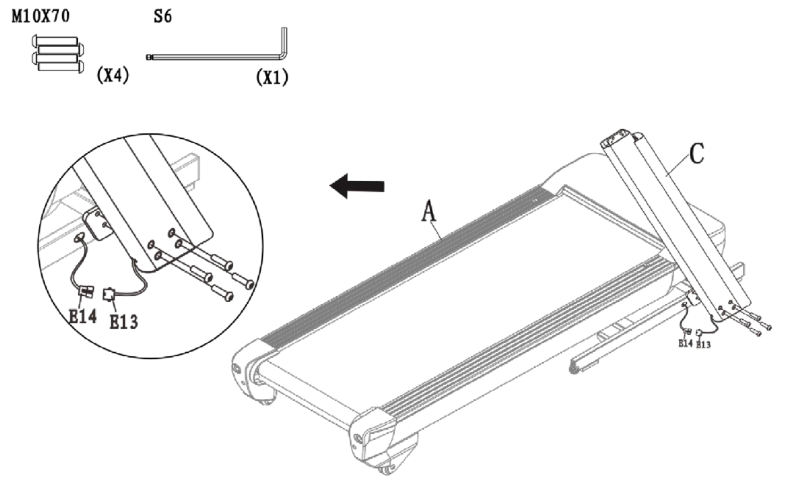
- Attach the right upright (C) to the lower frame and secure it with the bolts shown below using the hex key.
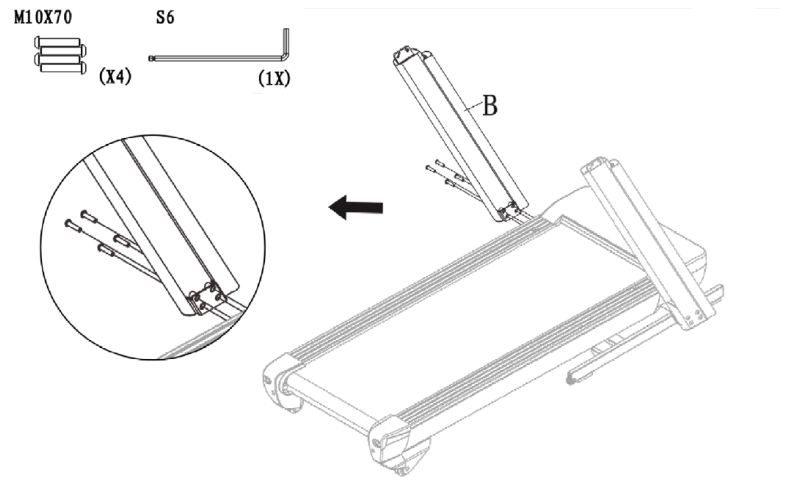
Attach the left upright (B) to the lower frame and secure it with the bolts using the hex key.
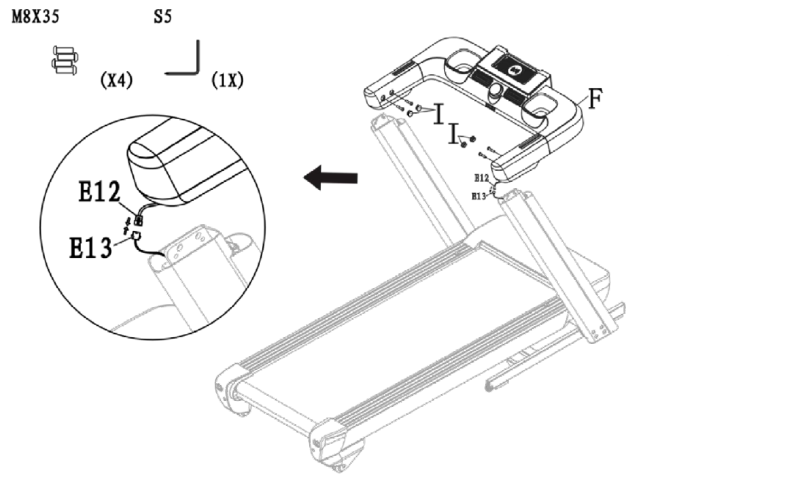
- Connect signal wires E12 and E13-upper.
- Attach the handlebar (F) to both uprights (left and right), secure it with the bolts using the hex key and tighten all bolts firmly.
- Insert 4 caps (I) into the holes on the left and right handlebars.
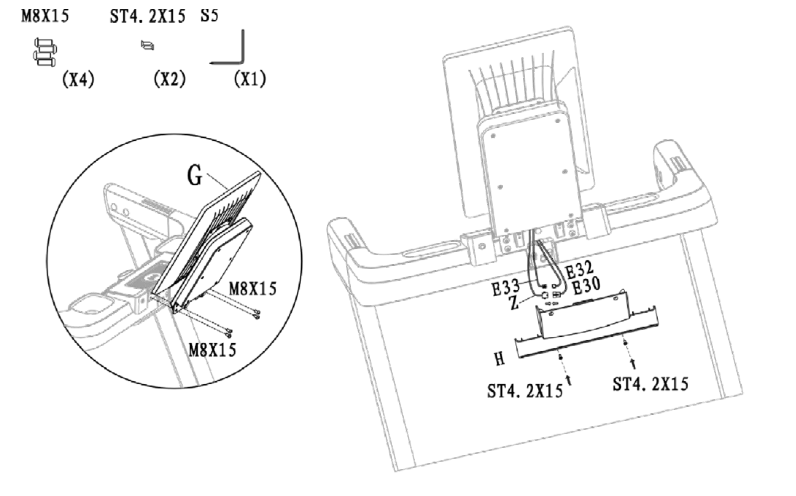
- Attach the screen (G) to the handlebar with 4 M8×15 bolts and tighten all bolts firmly.
- Connect wires E32 and E33, then wires Z and E30.
- Install the lower rear console cover (H) and secure it with 2 ST4.2×15 screws. Tighten all screws.
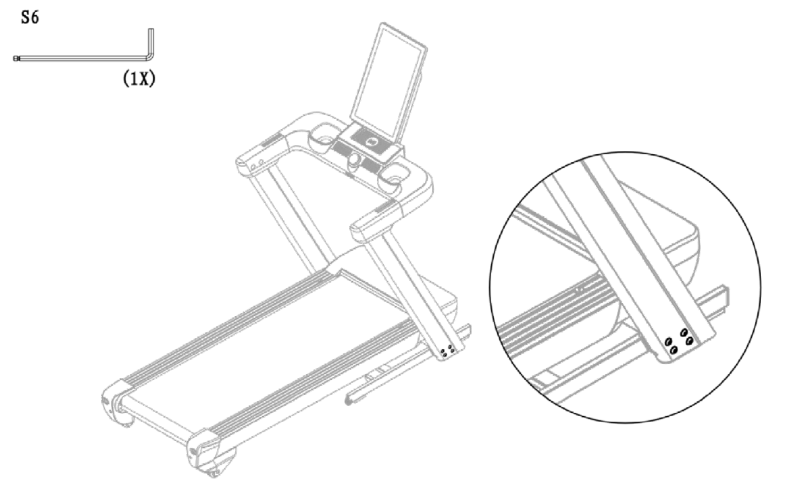
Fully tighten all the bolts that were pre-tightened in steps 1 and 2.
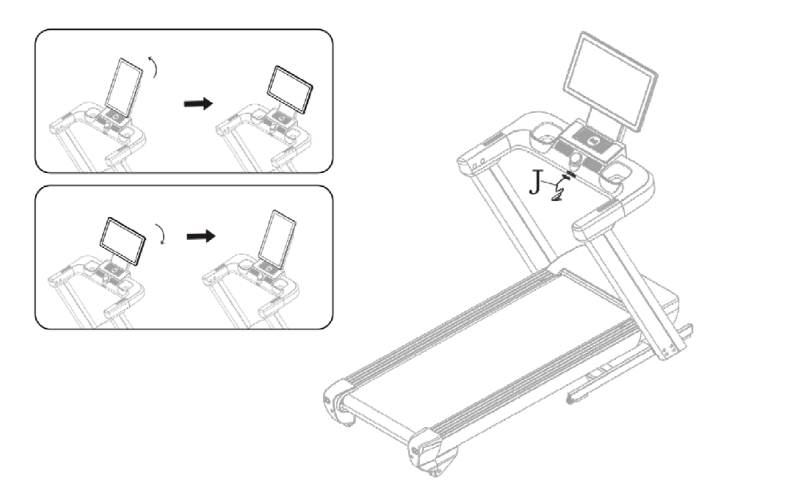
Insert the safety key (J). The console screen can be rotated.
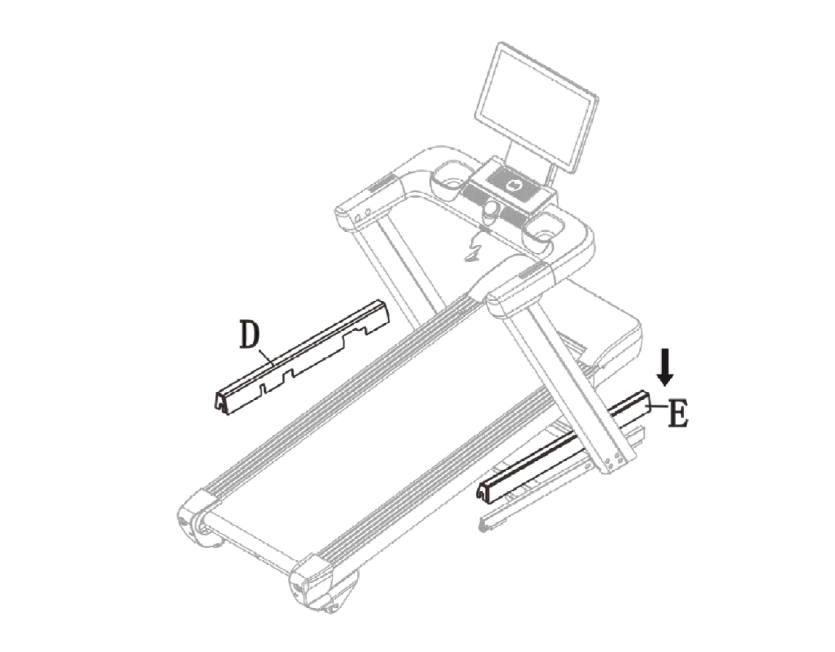
- Plug in the treadmill, switch on the power and set the incline to the maximum level.
- Then install the side covers on the uprights (D and E) on the frame.
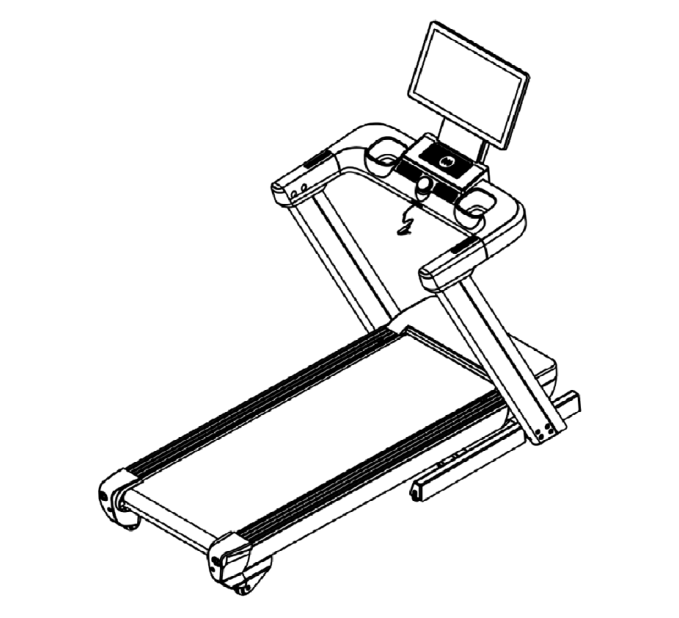
Assembly is complete! Before starting, you can adjust the incline as you like. Make sure all bolts and screws are securely tightened before use.
Folding and Unfolding the Treadmill
- Do not fold or unfold the treadmill by hand.
- The treadmill is equipped with the PowerTouch automatic system. Manual operation may damage internal components and void the warranty.
- Press the «FOLD/UNFOLD» button on the control panel to raise or lower the treadmill.
- The treadmill will move automatically.
This is an electric folding treadmill. Folding and unfolding are controlled by a button on the right side of the console (FOLD/UNFOLD button No. 1).
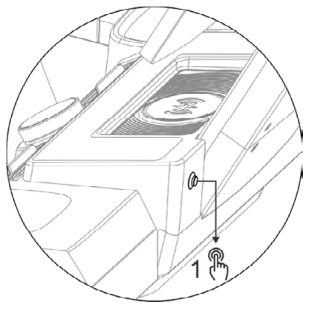
Unfolding the treadmill
When the treadmill is folded and the display shows FOLD, press the FOLD/UNFOLD button once to start unfolding.
During unfolding, UNFOLDING appears on the display. When finished, the treadmill switches to standby mode.
If you press the button again during unfolding, unfolding pauses and the FOLDPAUSE message appears. Press the button again to continue.
The treadmill is equipped with an infrared sensor. If the sensor detects a person or animal too close, a warning signal sounds and unfolding pauses.
Once the object is removed, unfolding resumes after 2–4 seconds.
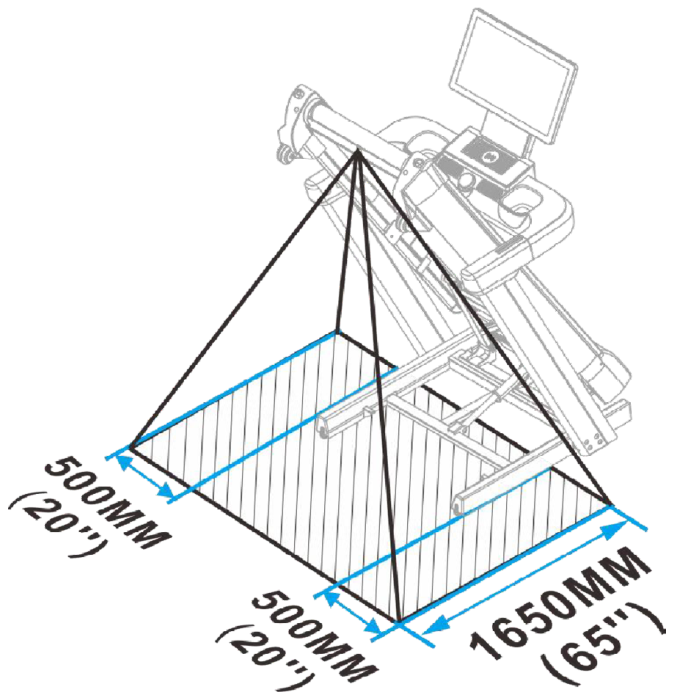
Folding the treadmill
When the treadmill is unfolded and you want to fold it, press FOLD/UNFOLD button No. 1.
During folding, «FOLDING» is shown on the screen. If you press the button again during the process, folding pauses and «FOLDPAUSE» appears on the display.
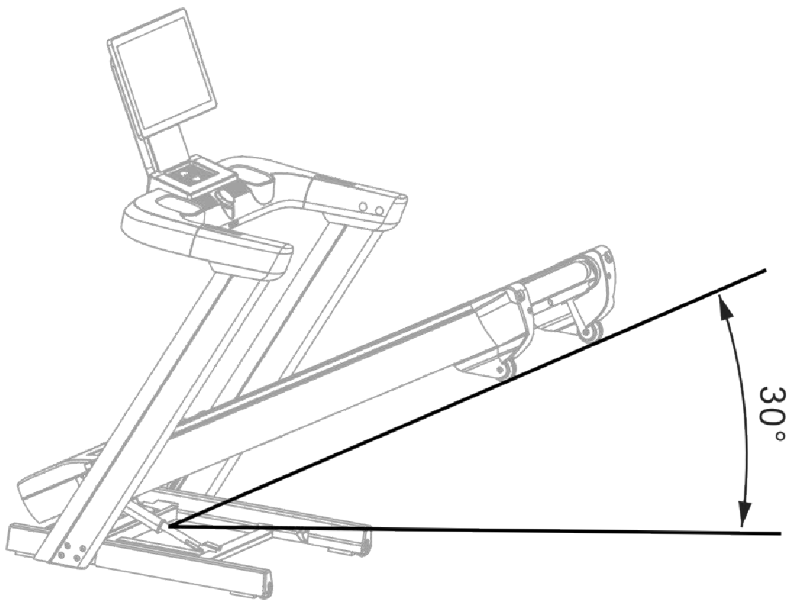
In FOLDPAUSE mode, if the incline angle is less than 30°, press the button once more to continue folding. If the angle is more than 30°, pressing the button again displays «FOLD», but the process does not continue. One more press switches the unit to UNFOLDING mode, and once unfolding is complete the treadmill switches to standby mode.
Forced unfolding
If the treadmill is folding but you want to unfold it, press and hold the FOLD/UNFOLD button for 2 seconds. The treadmill will be unfolded forcibly.
Additional warnings
- If a person is standing on the belt during folding and the angle is less than 30°, the system detects the obstacle and automatically switches to unfolding mode.
- If the angle is more than 30° and the system detects an obstacle, folding stops, «FOLD» is displayed, and pressing the button switches the process to UNFOLDING mode.
Moving and Positioning the Treadmill
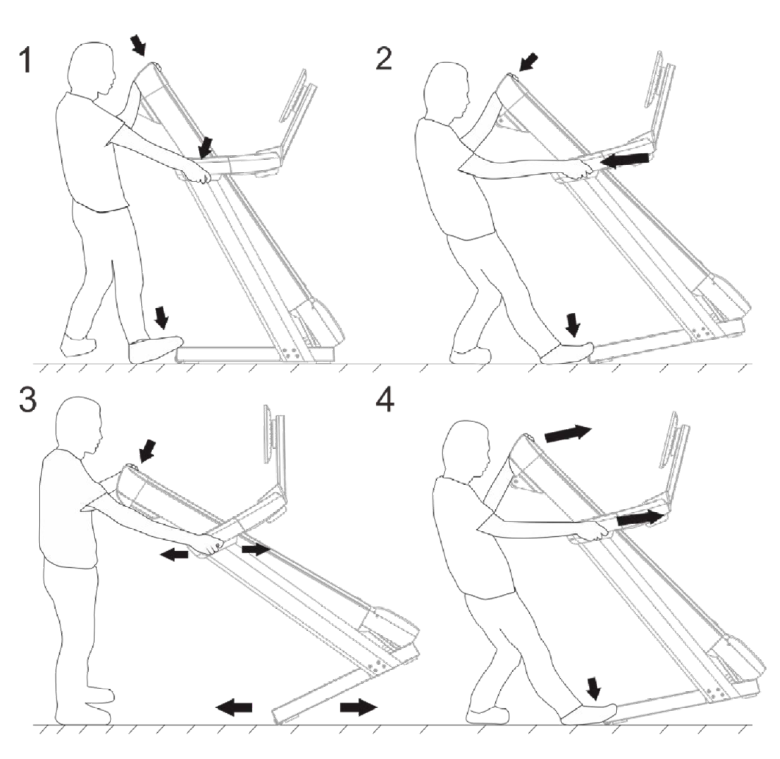
Operation
Console
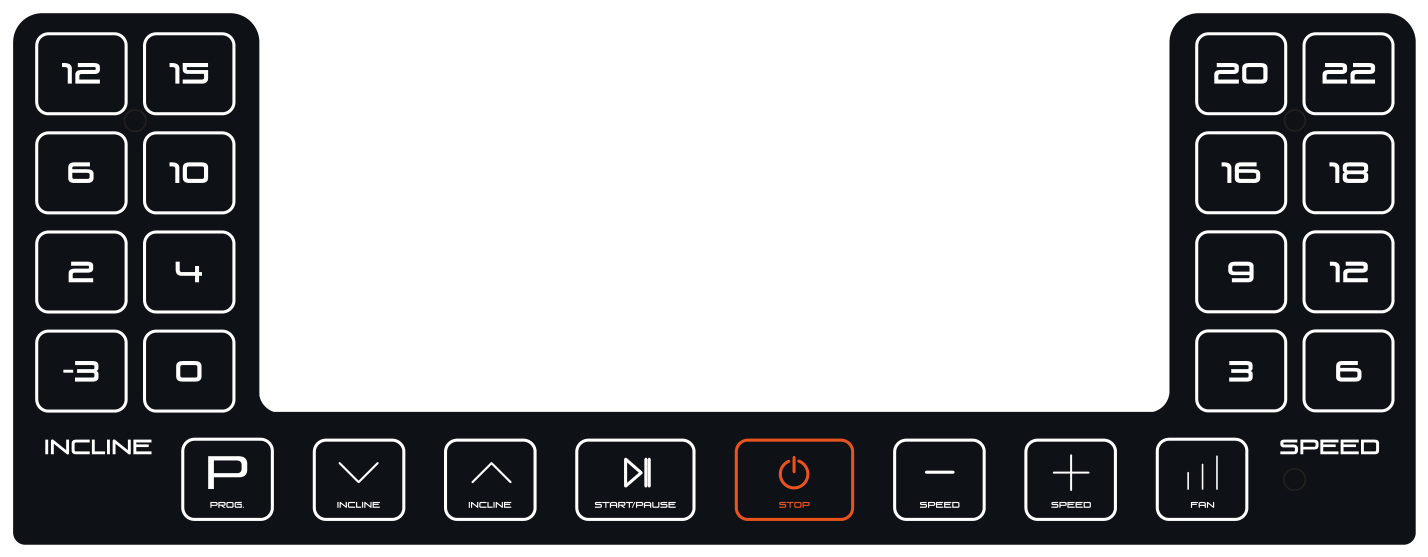
Button functions
| Name | Description |
|---|---|
| Prog. (program) | Press to select one of the programs. |
| Incline (down) | Decrease the incline. |
| Incline (up) | Increase the incline. Incline range: -3% to 15% |
| Start/Pause | Start or pause. Press again to resume. |
| Stop | Stop. |
| Speed - | Decrease speed by 0.1 km/h. |
| Speed + | Increase speed by 0.1 km/h. Speed range: 1–22 km/h. |
| Fan | 1st press: the fan turns on at level 1. 2nd press: switches to level 2. 3rd press: the fan turns off. |
| Incline quick keys | -3, 0, 2, 4, 6, 10, 12, 15 % — for quick incline selection. |
| Speed quick keys | 3, 6, 9, 12, 16, 18, 20, 22 km/h — for quick speed selection. |
Fitness Data Display
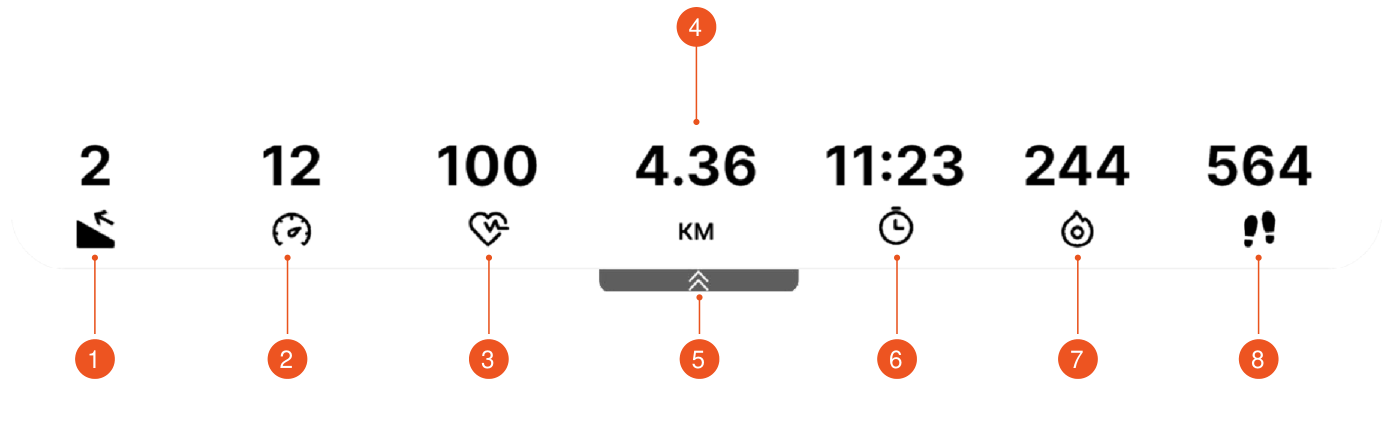
- Incline
- Speed
- Heart rate
- Distance
- Collapse/Expand
- Time
- Calories
- Steps
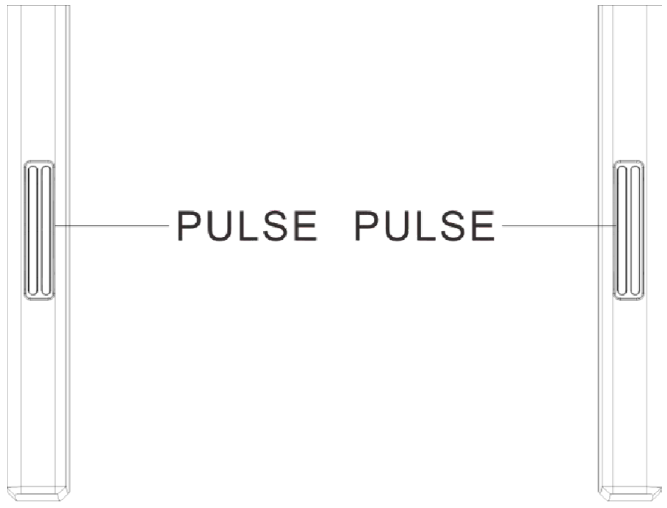
Hold the sensors on the handlebars with both hands or connect a Bluetooth sensor. After ~5 seconds the heart rate value will appear on the console. (The data is not medical.)
Readings
| Name | Description |
|---|---|
| Incline | Shows the current incline. Use the INCLINE ▲/▼ buttons to adjust it. |
| Speed | Shows the current speed. Use the SPEED +/- buttons to adjust it. |
| Heart rate | Shows the current heart rate. |
| Miles/KM | Shows the distance covered, in miles or kilometers depending on the country. |
| Time | Shows the elapsed time. The count starts from 0:00. |
| Calories | Shows the number of calories burned. |
| Steps | Shows the number of steps taken by the user. |
| Collapse/Expand | Press the arrows to show or hide the data panel. |
Touch Display
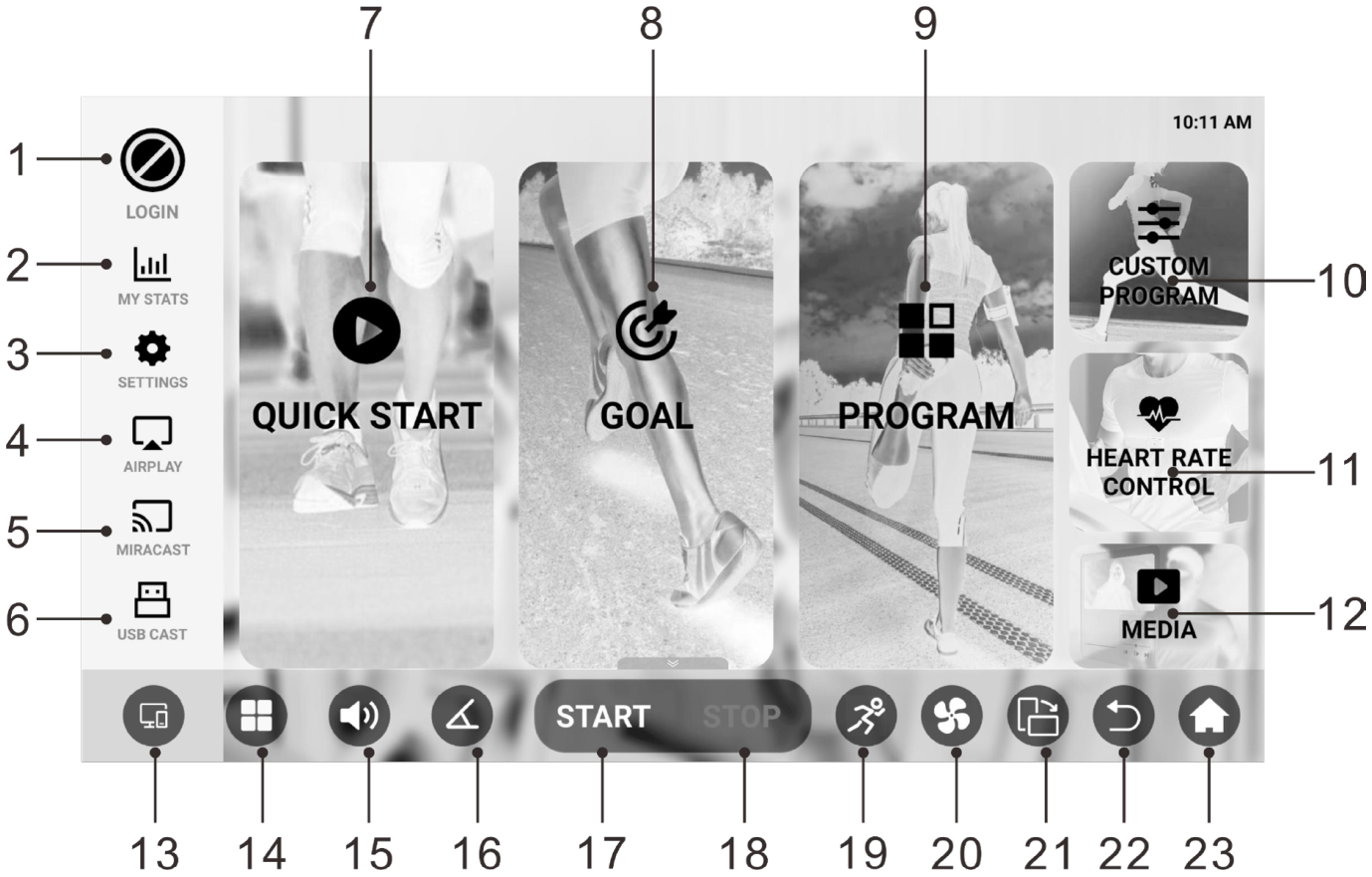
Main functions
1. LOGIN
Connect to Wi-Fi, then press login to sign in to your account. Your workout data will be saved to the cloud automatically.
2. MY STATS
View your saved workout history and the progress of your results.
3. SETTINGS
Press Settings to configure the main system functions.
| Name | Description |
|---|---|
| Wi-Fi | Connect to your home network. |
| Time | Set the local time. |
| Heart rate | Pair with a Bluetooth® heart rate monitor. |
| Language | Change the system language. |
| Cloud | Check for software updates. |
Screen mirroring options:
4. AIRPLAY
Mirror the screen to a compatible Apple device.
5. MIRACAST
Mirror the screen to a Miracast-compatible device.
6. USB CAST
Connect a phone or tablet via USB for wired screen mirroring.
Connection options and casting instructions:
For Apple devices:
- Use the included cable for casting.
- Follow the on-screen instructions.
For Android devices:
- Connect using the included cable.
- Download the recommended mirroring app when prompted.
7. QUICK START
Press to start walking or running right away.
8. GOAL
Press this button to select a countdown by time, distance or calories. Press the «START/PAUSE» button to begin.
9. PROGRAM
- Select one of the preset training programs.
- Each program consists of 16 segments with set speed and incline.
- Speed and incline can be changed at any time, but the settings are reset when moving to a new segment.
- When all segments are completed, the treadmill stops automatically.
10. CUSTOM PROGRAM
Create and save your own workout plan with set speed and incline.
11. HEART RATE CONTROL
To use this function:
- Connect a compatible Bluetooth heart rate sensor.
- The device must support standard heart rate broadcasting via Bluetooth.
- Keep the device no more than 5 meters (16 feet) from the treadmill.
- Set the target heart rate, maximum speed and incline.
- Press «START/PAUSE» to begin.
Before connecting:
- In most cases, heart rate broadcasting is turned off by default to save battery.
- To display your heart rate on the treadmill display, enable heart rate broadcasting in the settings of your Bluetooth device.
Connection notes:
- Keep the wearable device within 5 m (about 16 feet) of the treadmill.
- Once heart rate broadcasting is turned on, the treadmill will automatically detect and display the data.
- Set the target heart rate, select the maximum speed and incline, then press «START/PAUSE» to begin.
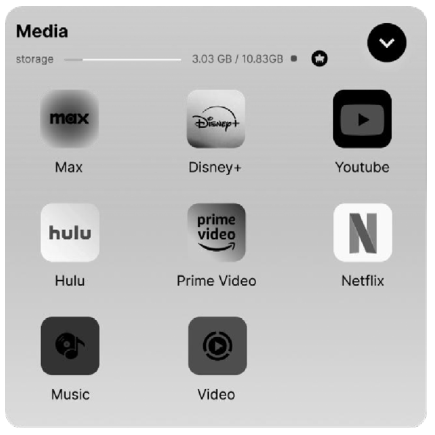
12. MEDIA
- Choose from the built-in music and video apps.
- Insert a USB drive to play your own media files.
Advanced access:
- Press and hold the word Media in the upper left corner.
- Enter the password 123456 to unlock the advanced settings.
13–23
| No. | Name | Description |
|---|---|---|
| 13 | Switch between AirPlay, Miracast and USB CAST | |
| 14 | Open the Media menu | |
| 15 | Volume control | |
| 16 | Quick incline adjustment | |
| 17 | Start | Quick start |
| 18 | Stop | Quick stop |
| 19 | Quick speed selection | |
| 20 | Switch fan mode | |
| 21 | Rotate screen (portrait/landscape) | |
| 22 | Back one screen | |
| 23 | Return to home screen |
MEDIA advanced settings
Knob Function
A short press on the knob starts a 3-2-1 countdown, after which the workout starts automatically.
The screen will switch every 5 seconds between:
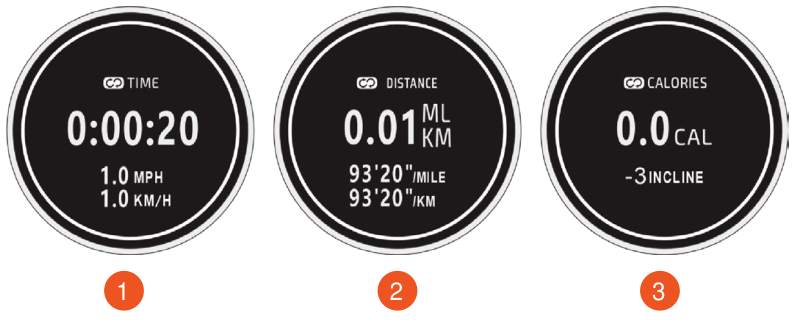
- Time / Speed
- Distance / Pace
- Calories / Incline
During the workout:
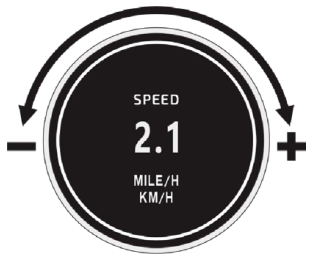
- Turn the knob left to decrease the speed.
- Turn the knob right to increase the speed.
After the workout has started:
- Short press – pause the workout.
- Long press – stop the workout completely.
Bluetooth Connection to Apps
Connecting to the Kinomap app:
- Add new equipment and tap FTMS in the «TREADMILL» screen.
- Select the Bluetooth device whose name starts with “Neogen N6000” to connect, then press the “START/PAUSE” button on the treadmill to begin.
Connecting to the Zwift app:
- Select “RUN SPEED” in the PAIRED DEVICES screen.
- Select the Bluetooth device whose name starts with “Neogen N6000” to connect, then press the “START/PAUSE” button on the treadmill to begin.
Charging Your Device
Method 1: USB charging
- Connect your device to the USB ports of the supplied cable to charge it.
Method 2: Wireless charging
- If your device supports wireless charging, simply place it on the designated wireless charging area to start charging.
Safety Key Function
- In any mode, if you pull out the safety key, the treadmill will stop.
- A message that the safety key is disconnected will appear on the screen. The unit will not work until the key is inserted.
Power On (I) and Off (O)
- You can switch off the power to stop the treadmill. This will not damage the unit, and you can do it at any time.
Screen Off Mode
- The screen turns off automatically after 15 minutes of inactivity if no video is playing.
- In screen-off mode, pressing any console button wakes the system. The screen needs about 40 seconds to fully restart. During this period, button input is disabled. Normal operation resumes only after the screen has finished restarting.
- For better screen protection, it is recommended to switch off the power after your workout.
Error Codes and Troubleshooting
| Problem | Possible cause | Recommended action |
|---|---|---|
| The treadmill does not turn on | Not plugged in | Plug the cord into the outlet |
| The treadmill does not turn on | Safety key not inserted | Insert the safety key |
| The running belt has shifted to one side | Belt tension is unbalanced | Tighten the adjustment bolts |
| The screen does not work | Wires connected incorrectly | Check the connection to the board |
| E01, E02 (Overcurrent) | Current too high | Switch the power off and then on again to check whether the unit works. If the unit does not work, the control board must be replaced. |
| E03 (Board overheating) | Overload or board damage | Switch the power off and then on again to check whether the unit works. If the unit does not work, the control board must be replaced. |
| E04 (Low voltage) | Voltage too low | Switch the power off and on again. Check the voltage. If the voltage is normal but the unit does not work, replace the control board. |
| E05 (High voltage) | Overvoltage | Same as E04 |
| E06–E09 (Motor or wires) | Poor connection or motor failure | Check the wire connections. Replace the motor if necessary. |
| E06–E09 (Motor or wires) | Motor jammed | Check the moving parts. Listen to the motor noise. Replace the motor if necessary. |
| E06–E09 (Motor or wires) | Unstable voltage | Restart the unit. Check the voltage. |
| E10 (Overload) | Current too high | Restart the unit. Replace the controller or motor if the problem persists. |
| E12 (Communication error) | Board connection broken | Restart the unit. Check the wires. Replace the board if necessary. |
| E15 (Servo motor error) | Incorrect servo motor position | Remove the safety key. Press and hold the Incline and Speed buttons at the same time for 3 seconds. After the beep, auto-calibration starts. Wait for the calibration to finish; the unit will then return to normal operation. |
Care, Storage and Maintenance
General cleaning helps extend the service life and performance of your treadmill. Keep the unit clean by regularly removing dust from its components. Clean both sides of the running belt to prevent dust from building up underneath. Keep your running shoes clean so that dirt from them does not wear out the running deck and belt. Wipe the surface of the running belt with a clean damp cloth. Children must not carry out cleaning or maintenance without supervision.
For better care and a longer service life, it is recommended to switch the treadmill off for 10 minutes every 2 hours and to switch it off completely when not in use.
A belt that is too loose will slip while running, and a belt that is too tight will reduce motor performance and increase friction between the roller and the belt. The optimal belt tension is when the belt can be pulled 50–75 mm away from the running deck.
Centering the running belt
Place the treadmill on a level surface and set the speed to 6–9 km/h (3.7–5.6 mph). Center the running belt if it drifts to one side.
- If the running belt drifts to the right, turn the right adjustment bolt ¼ turn clockwise, then turn the left bolt ¼ turn counterclockwise. If the belt does not center, repeat the procedure. See figure A.
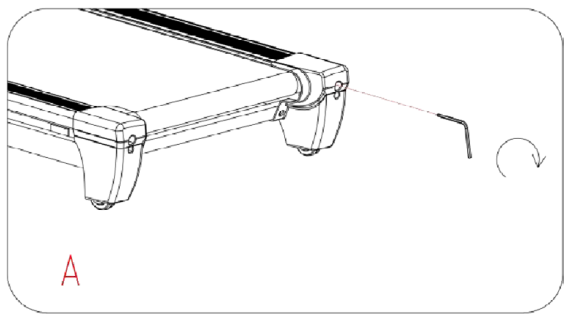
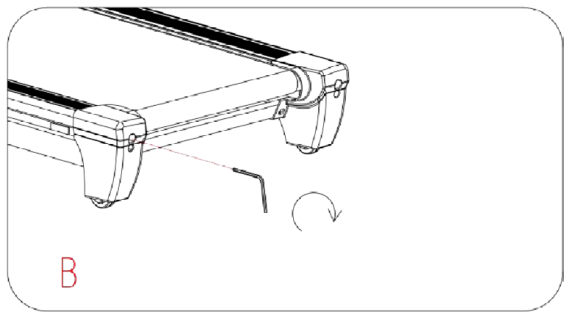
- If the running belt drifts to the left, turn the left adjustment bolts ¼ turn clockwise, then turn the right bolt ¼ turn counterclockwise. If the belt does not center, repeat the procedure. See figure B.
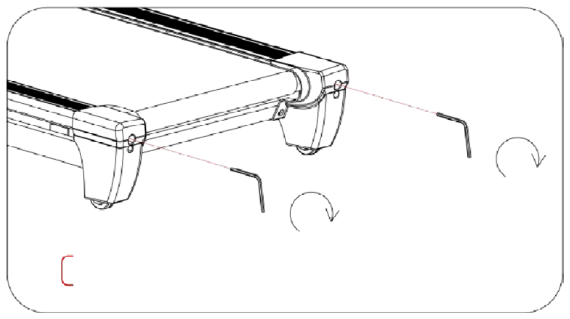
- Over time, the running belt may loosen. To tighten it, turn the left and right bolts one full turn clockwise and check the belt tension. Continue until the tension is correct. Adjust both sides equally for proper belt alignment. See figure C.
Lubricating the treadmill
Malfunctions of moving parts can affect the safety of the unit. Check and tighten the bolts regularly.
For better care of the treadmill and a longer service life, regular maintenance is recommended.
Running belts and treadmill lubricant:
Lubricating the running deck and running belt is necessary because the friction between them affects the service life and performance of the treadmill. Therefore, it is recommended to check the running deck and belt regularly.
How to lubricate:
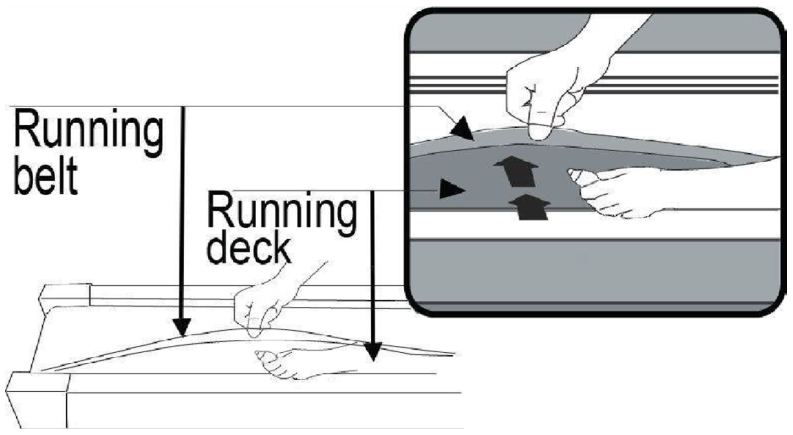
Lift the running belt on one side and apply lubricant to the running deck. Use a cloth to spread the lubricant thoroughly over the running deck. Repeat the process on the other side.
Moving parts should rotate freely and quietly.
Recommended lubrication schedule:
- Light user (less than 3 hours per week) — every six months.
- Average user (3–5 hours per week) — every three months.
- Active user (more than 5 hours per week) — every two months.
Training Tips and Recommendations
Warm-up and Cool-down
A successful exercise program consists of three parts: warm-up, cardio training and cool-down.
The warm-up is a very important part of a workout. It should be done before every workout. The warm-up helps warm up the body, stretch the muscles and let the body adapt to more intense exercise. Repeating the warm-up at the end of the exercise can help relieve muscle soreness.
We suggest doing appropriate warm-up and cool-down exercises according to the following scheme:
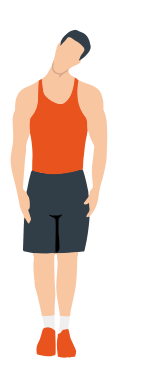
Head rolls
First tilt your head toward your right shoulder, stretch your neck and rotate your head once clockwise and once counterclockwise; then tilt your head toward your left shoulder and make one counterclockwise rotation. Repeat.
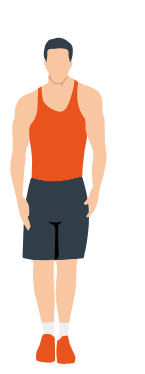
Shoulder lifts
Raise your left shoulder and make 5 backward rotations; then raise your right shoulder and make 5 backward rotations, alternating sides.
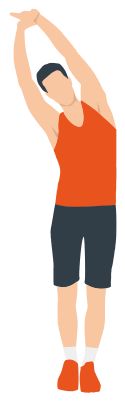
Side stretch
Raise your arms above your head, then grasp your right wrist with your left hand and reach upward until you feel your right arm fully stretched. Hold for 5 seconds before switching to the other arm.
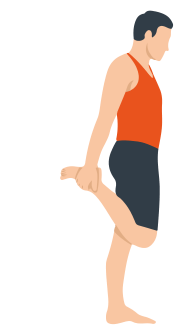
Quadriceps stretch
Holding onto a wall with your right hand for balance, pull your left foot back with your left hand, bringing the heel as close to your buttock as possible. Hold for 15 seconds, then repeat with the other leg.
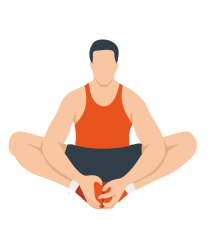
Inner thigh stretch
Sitting on the floor, put the soles of your feet together, clasp them with both hands and pull them in as close to your body as possible. Slowly press down on both heels and hold this position for 15 seconds.
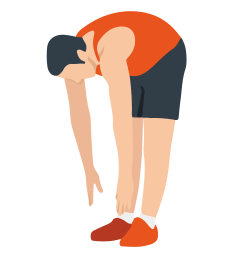
Toe touch
Slowly bend forward, relax your back and shoulders and reach for your toes. Bend as low as you can and hold the position for up to 15 seconds.
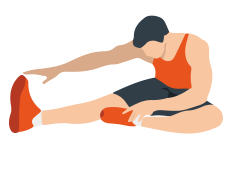
Hamstring stretch
Sit down, straighten your right leg and bend your left leg. Hold your left ankle with your left hand and pull it inward so that your left foot is as close to your body as possible, with the sole against the inner side of your right thigh. Then lean your body forward and reach both hands toward your toes — the deeper the stretch, the better. Hold this position for 15 seconds, then switch legs.
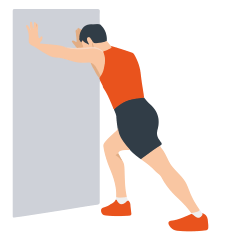
Calf stretch
Lean against a wall with both hands, tilt your body at a 45-degree angle to the floor and alternately move your left and right legs back, as if walking.
Warranty
Genau guarantees the high quality and reliability of its products. We strive to offer only the best, which is why all of our equipment comes with a warranty.
Warranty Terms
- The warranty period starts from the date of sale.
- The warranty covers defects caused by manufacturing faults or defective materials.
- Warranty service is carried out at authorized service centers.
- If the product breaks down during the warranty period, the customer must bring this warranty card and the complete product to a service center for diagnostics and repair.
- If the warranty claim is confirmed, the product will be repaired or replaced free of charge.
- The warranty does not cover the following cases:
- mechanical damage caused by improper use or transportation;
- damage caused by liquids, fire, chemicals or other external factors;
- failures caused by not following the operating instructions;
- modifications to the design or repairs carried out by unauthorized persons without the approval of the Service;
- consumables and components with a limited service life (belts, batteries, etc.).
Warranty claims
To receive warranty service, the customer should contact the seller (the place where the equipment was purchased).
Specifications
| Parameter | Value |
|---|---|
| Speed range | 1–22 km/h |
| Incline range | -3% to 15% |
Manufacturer: Sunlink (Xiamen) Sports Equipments Industrial Co.,Ltd. Add: 7th Floor, No.36, Bannan Road, Haicang District, Xiamen, China.
Service
For questions about assembly, operation and warranty, please contact Genau service in Kyrgyzstan.
Genau GmbH LLC (ОсОО «Генау ГМБХ»), Kyrgyzstan. Phone: +996 778 639 000