Genau Nordic Z1 Electric Treadmill
User Manual
Contents
Thank you for your purchase!
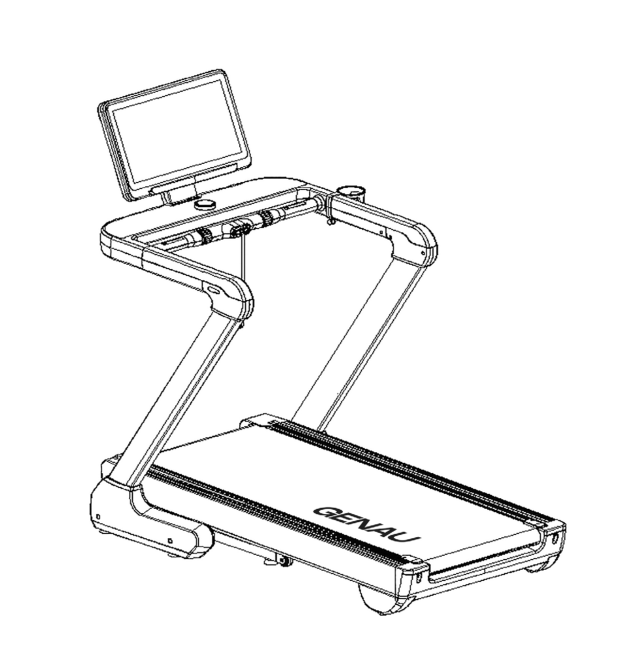
Thank you for purchasing the Genau Nordic Z1 treadmill. Please use the equipment correctly to ensure your safety and health. Read the information below carefully before use.
Please read this manual before assembling and using the treadmill.
As part of our commitment to continuous improvement, the product may be updated when necessary without prior notice. If this manual does not match the product, the actual product takes precedence.
Safety Instructions
Warning!
Before starting any fitness program, you should have a medical examination, especially if you:
- have high blood pressure, high cholesterol, diabetes, chronic respiratory disease or heart disease;
- have a family history of any of the above conditions;
- are pregnant;
- are over 35 years old;
- smoke and/or are obese;
- have not exercised regularly in the past year;
- have other chronic diseases or physical impairments, or are taking any medication.
If you experience dizziness, chest pain, nausea or any other abnormal symptoms while using the treadmill, stop exercising immediately. Consult a doctor before continuing.
Intended Use
- This model can be used for running or walking.
- Suitable for home use.
General Precautions
Indoor use only
The treadmill is suitable only for dry and clean rooms. Keep it away from moisture, dust and direct sunlight. Do not place the equipment near sources of heat or water, such as in a bathroom or kitchen.
Electrical safety
- Use only grounded outlets and do not share the outlet with other appliances.
- A damaged power cord must be replaced by a qualified professional.
- Unplug the treadmill when it is not in use.
- Do not touch the plug or wires with wet hands.
- In case of overheating or overload, the system shuts down automatically. Check the mains voltage and replace faulty parts if problems are found.
Use by children
- Children may use the equipment only under adult supervision.
- The equipment is not a toy.
- Children must not be near the treadmill without adult supervision.
Use by persons with disabilities or limited capacity
Persons with disabilities or limited capacity must be supervised by a doctor or a caregiver.
Clothing and footwear
Wear sportswear and athletic shoes. Avoid loose or baggy clothing that could get caught in the mechanisms and moving parts of the treadmill.
Installation site requirements
The owner is responsible for taking into account the space requirements around the treadmill during operation, voluntary and industry standards, fire safety regulations and other requirements of national legislation. Recommended minimum clearance around the equipment according to EU rules (since March 1, 2017): for access and passage, at least 0.5 m to the left, right and in front of the treadmill, and 2 m behind it.
Assembly requirements
Follow the assembly instructions and assemble the treadmill only on a level surface. Do not plug the treadmill in until assembly is complete. Make sure all assembly parts are present according to the parts list. If you have any difficulties with assembly, contact the seller.
Maximum user weight
Observe the maximum user weight stated in the specifications.
Prohibited actions
- Do not jump on the treadmill, rock it or run barefoot.
- Do not use the treadmill if assembly has not been fully completed or if internal mechanisms are exposed.
- Do not use the treadmill if it is defective or damaged.
- Do not use the treadmill if you feel unwell.
- Only one person may use the treadmill at a time.
- Do not use the treadmill under the influence of alcohol or drugs.
- Keep other people, pets and children away from moving parts during use — this may cause injury.
Operation and Safety
Warm-up
Always warm up your muscles before exercising.
Equipment inspection
Before each use, inspect the treadmill for wear of parts and moving components. Make sure the treadmill is fully functional and safe.
Running belt
To avoid injury, take special care when stepping onto or off the running belt.
Starting a workout and starting the belt
Stand on the side rails, press "Start" and wait until the belt starts moving at low speed. Then carefully step onto the belt. This reduces the load on the motor at startup.
Safety key
Always clip the safety key to your clothing. It will stop the treadmill in an emergency. Keep the key away from children.
Health monitoring
If you feel dizzy, have chest pain or feel unwell in any other way, stop exercising immediately and see a doctor. People over 35 or with chronic diseases are advised to consult a doctor before starting to exercise.
Disposal
The electronic components in this equipment are considered hazardous to the environment. Please dispose of them properly in accordance with national legislation.
Product Components
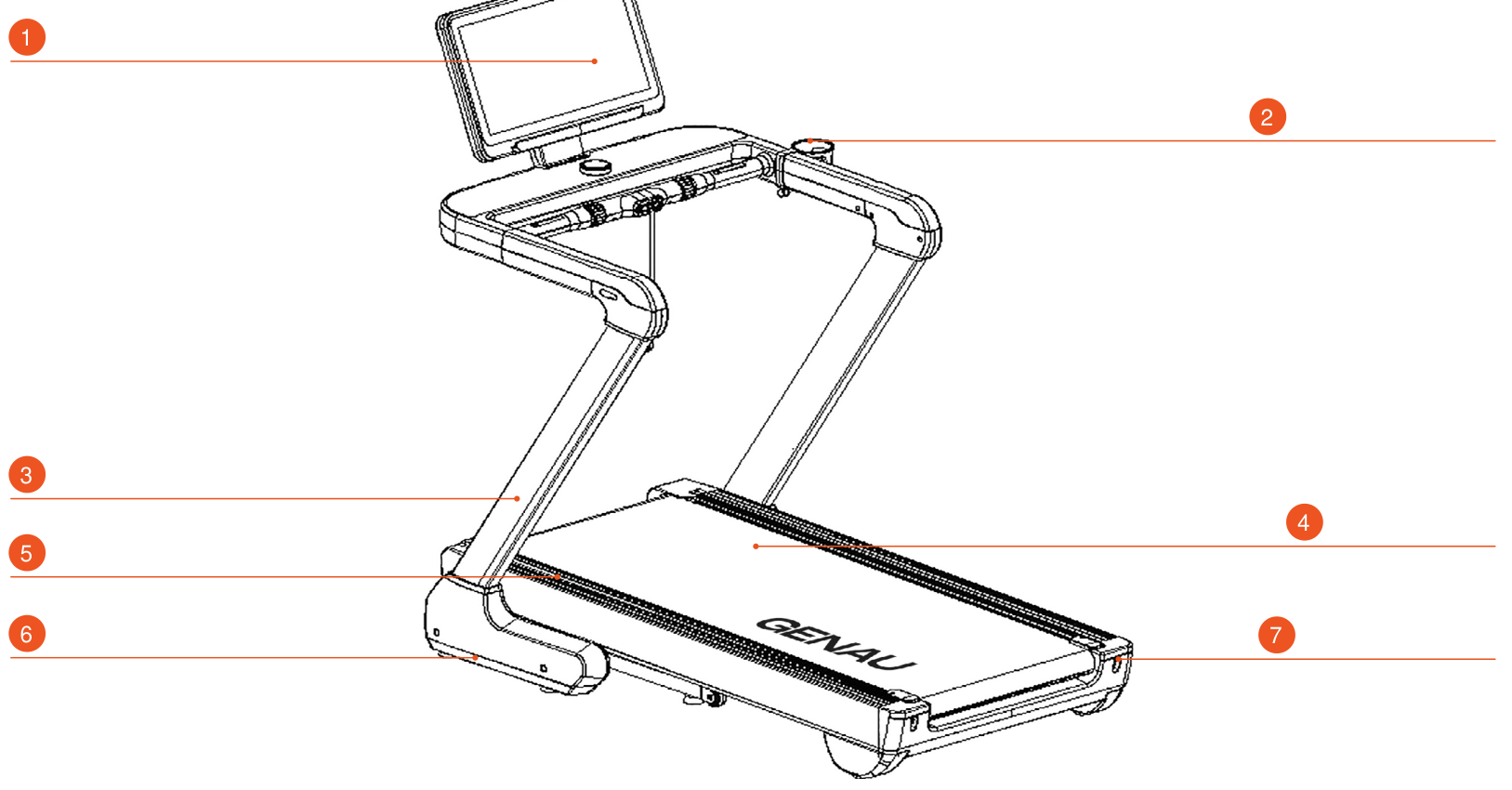
- Console
- Bottle holder
- Upright
- Running belt
- Side rail
- Side cover
- End cap
Packing List
| No. | Item | Unit | Qty |
|---|---|---|---|
| 1 | Treadmill, assembled | set | 1 |
| 2 | Tablet holder | pcs | 1 |
| 3 | Handrail cover set | set | 1 |
| 4 | Upright cover set | set | 1 |
| 5 | Accessory bag | pcs | 1 |
| 6 | Bottle holder | pcs | 1 |
Accessory Bag Contents
| No. | Item | Unit | Qty |
|---|---|---|---|
| 1 | Screw ST4×12 | pcs | 8 |
| 2 | Screw M10×30 | pcs | 6 |
| 3 | Screw M8×16 | pcs | 8 |
| 4 | Hex key 6 mm | pcs | 1 |
| 5 | Hex key 8 mm | pcs | 1 |
| 6 | Hole plug | pcs | 10 |
| 7 | Power cable | pcs | 1 |
| 8 | Safety key | pcs | 1 |
| 9 | Silicone oil | pcs | 1 |
| 10 | User Manual | pcs | 1 |
Assembly
During assembly, first install all screws without tightening them. Fully tighten the screws once the frame is completely assembled.
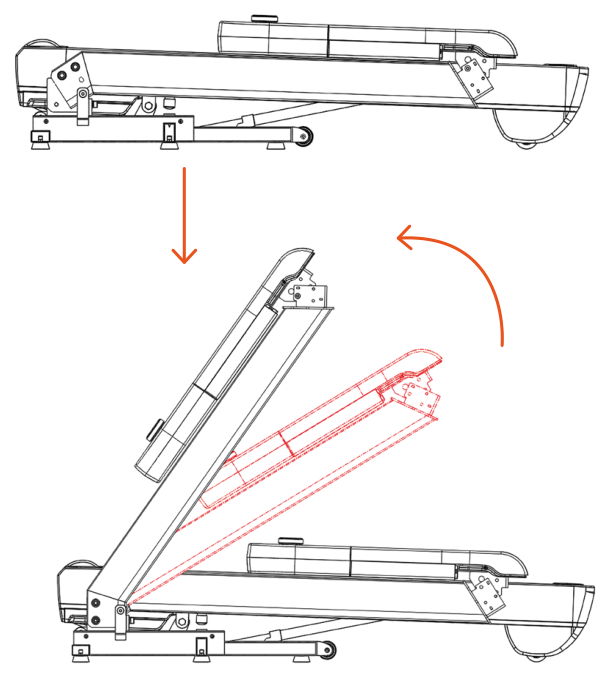
Two or more people should carefully remove the machine from the box and lay it horizontally on the floor. Then cut the nylon cable ties on the left and right sides of the base. One person should rotate the uprights clockwise (see figure).
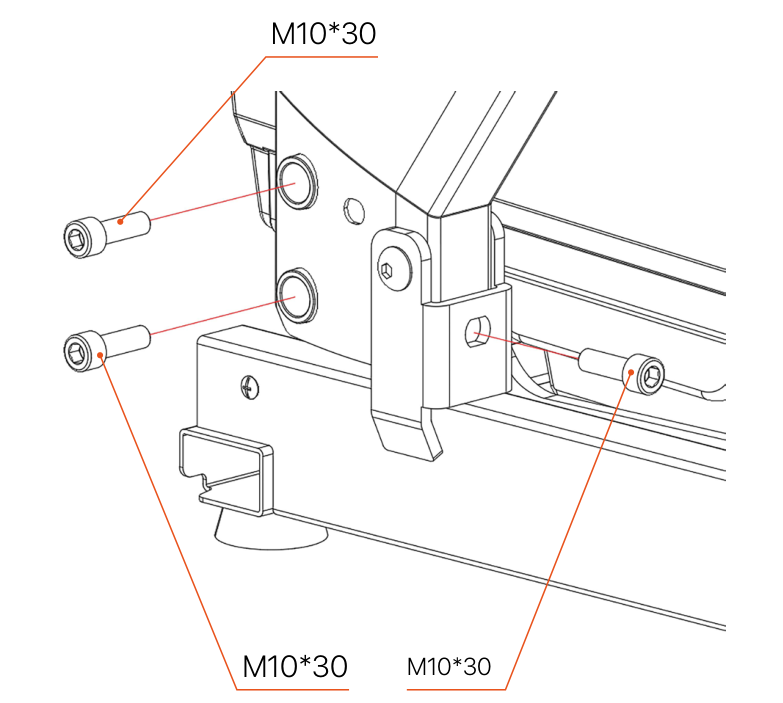
Using the No. 8 hex key, secure the upright with two M10×30 socket head screws (do NOT fully tighten). Then insert one more M10×30 screw from the rear side of the upright and screw it into the frame base (do not tighten it either). Repeat for the second upright on the opposite side.
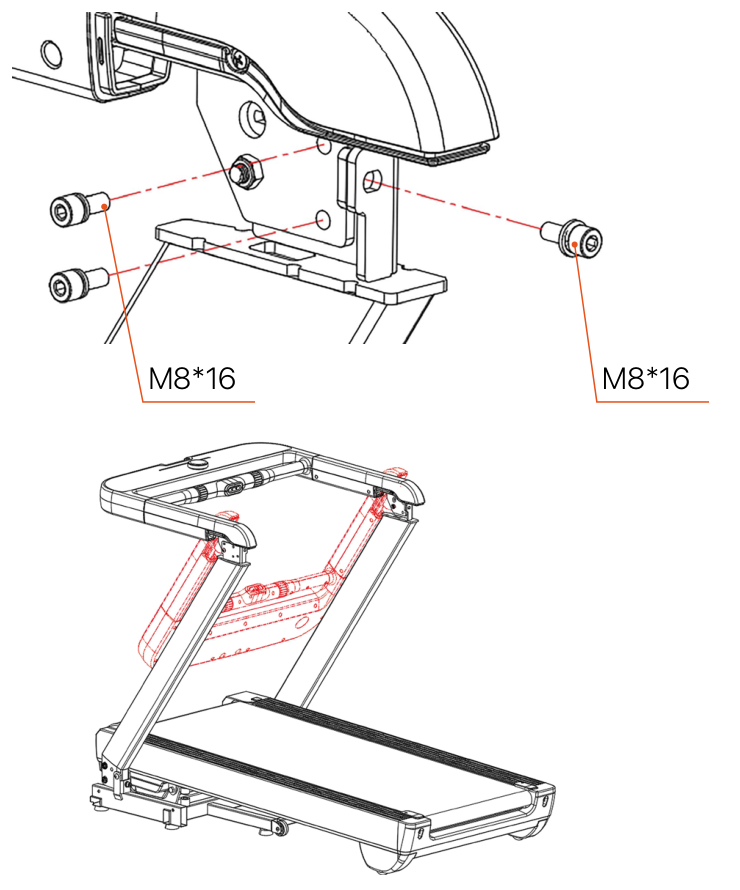
- One person should hold the control panel while rotating it clockwise (do not let go of it during this step).
- The second person uses the No. 6 hex key to screw the panel to the upright with two M8×16 socket head screws (left side of the figure).
- Then one more M8×16 screw is inserted from the rear of the panel into the upright (see the right side of the figure).
- Repeat the same steps for the second upright on the other side.
- After installing all screws, use the No. 8 and No. 6 hex keys to fully tighten the fasteners from steps 2 and 3.
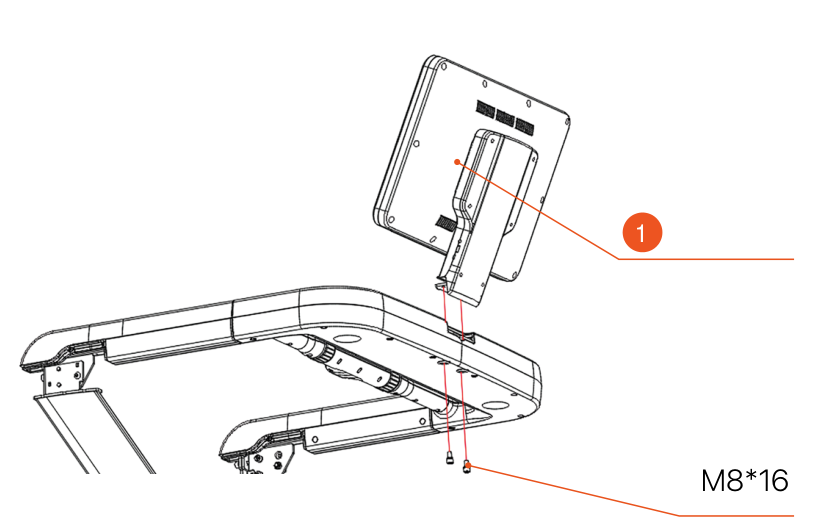
- LED console
Installed by two people:
- Take the LED console out of the foam packing.
- Connect the communication wires from the LED console to the corresponding connectors on the console one to one.
- Carefully tuck the connected wires into the outlet opening of the console.
- Align the mounting holes on the bracket with the two holes on the console.
- Then use the 6# hex key to fasten the bracket to the bottom of the console through the mounting holes with M8×16 screws, and tighten them.
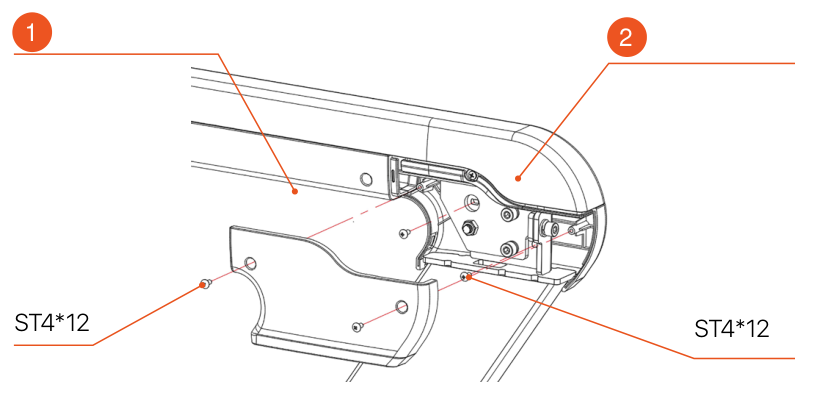
- Inner cover
- Outer cover
- Take the hex screwdriver and install the ST4×12 screws to secure the outer cover of the control panel to the upright.
- Then secure the inner cover of the panel with the same ST4×12 screws.
- Repeat on the opposite side.
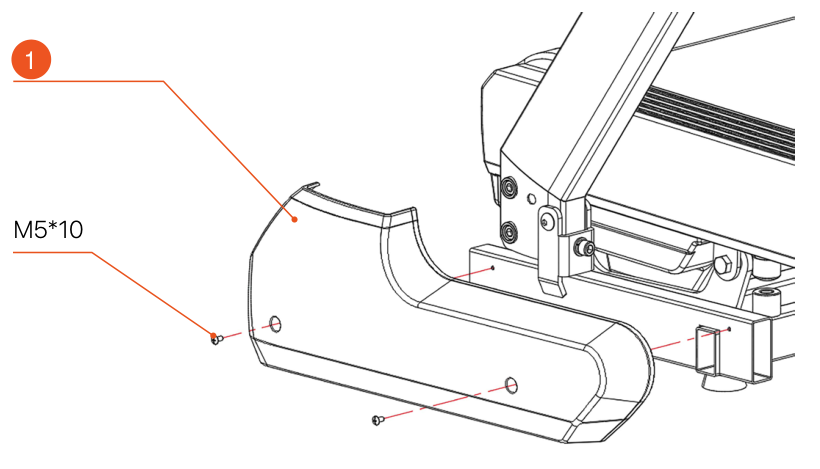
- Upright cover
- Using a Phillips screwdriver, unscrew the 4 M5×10 screws that temporarily held the base of the upright.
- Install the decorative covers on the left and right uprights.
- Secure the covers with the previously removed M5×10 screws (two on each side).
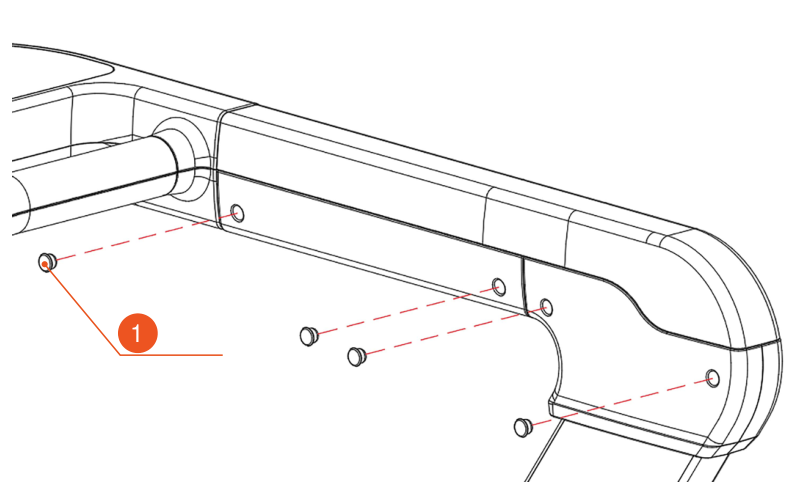
- Plugs
- Take 8 plugs from the accessory kit.
- Insert them one by one into the designated holes on the machine body, as shown in the illustration.
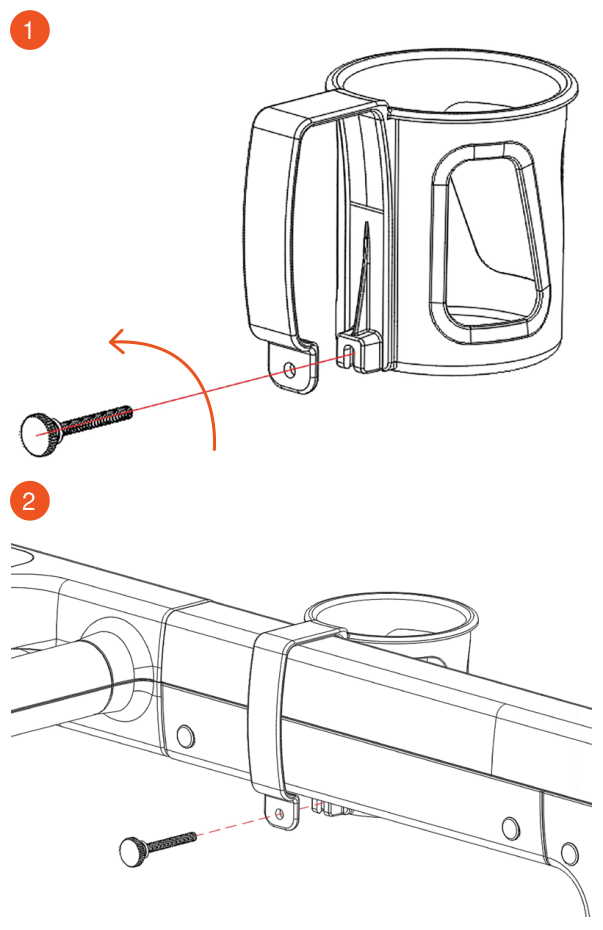
- Figure 1
- Figure 2
- Take the cup holder out of the accessory kit.
- Remove the knob from it by unscrewing the locking screw, as shown in figure 1.
- Insert the cup holder into the corresponding hole on the armrest.
- Screw the knob back in to secure the cup holder firmly, as shown in figure 2.
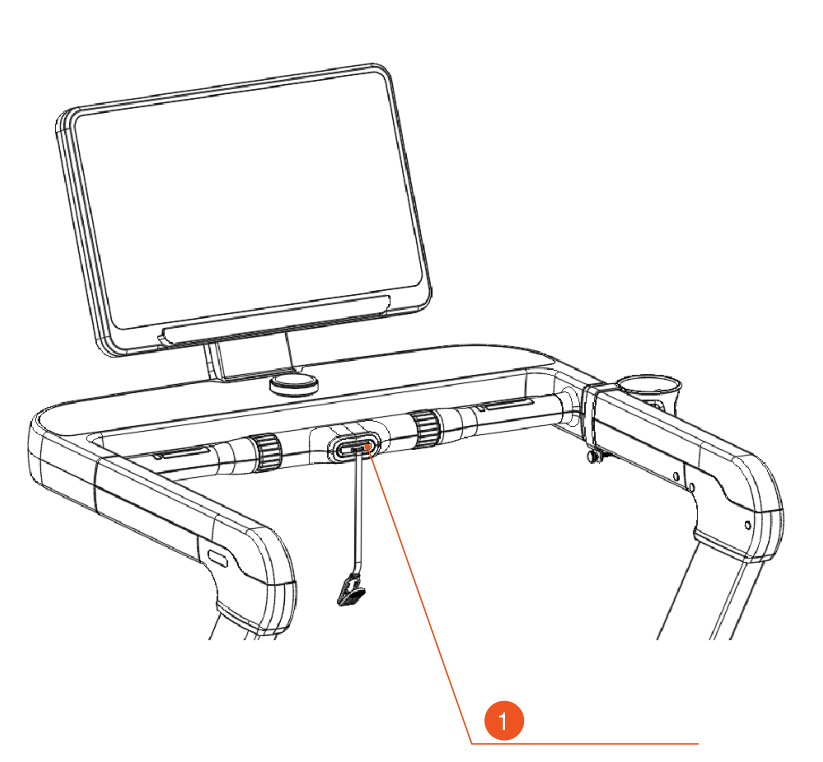
- Safety key
The safety key is in the plastic bag together with the user manual. It is a small red device with locking pins and a red cord. Insert the safety key into the place specially marked in yellow on the control panel. If you remove the key while the treadmill is running, the machine will stop immediately.
- Insert the safety key into the yellow socket under the console, as shown in the figure.
- Plug the power cord into the outlet.
- Press the power button on the front of the motor unit (the indicator should light up).
- After the display turns on, press the "Start" button — the treadmill will start.
- If error code "E7" appears on the display, the safety key is not inserted or is inserted incorrectly.
Setup and Operation
To switch on the treadmill, connect the power cable to the mains and press the red power switch. After switching on, you will hear a beep and the screen will light up. Some models with a colour display may need a little time to load the main interface.
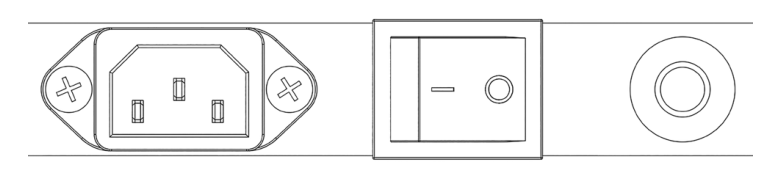
Safety key
The treadmill will only work if the safety key is inserted into the yellow socket on the control panel. The key should be attached to the user's clothing with the clip. In an emergency, simply pull out the key to stop the treadmill motor immediately. When the key is put back, all data on the screen is reset and the machine can be used again. Removing the key always causes an emergency stop and displays error "E7".
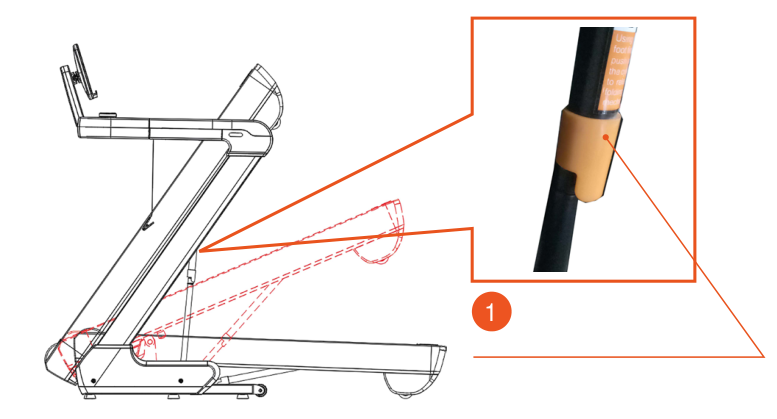
- Press here to unfold the treadmill
Folding the Treadmill
To save space, the treadmill can be folded. First make sure the incline is set to zero, then switch off the power and unplug the treadmill. Lift the running deck by hand until it locks in place.
Unfolding the Treadmill
To unfold the treadmill, press the pneumatic strut with your foot while holding the deck with your hand. Then let go — the deck will lower smoothly to the floor. Be careful not to pinch your hands.
Console Operation
Round Console Controls
| Item | Description |
|---|---|
| Start | When the treadmill is stopped, press the knob down. A 3-2-1 countdown will start on the display, after which the treadmill will start moving. |
| Stop | While the treadmill is running, press and hold the knob down. The treadmill will stop and all data will be reset. |
| Pause | While the treadmill is running, press the knob down to pause. Press it again and the treadmill will resume. |
| Increase speed (+) | Turn the knob clockwise. |
| Decrease speed (−) | Turn the knob counterclockwise. |
Number of programs
3 preset modes (time, distance, calories) and several automatic programs.
Safety key function
If the key is removed, "E7" appears on the screen, the treadmill stops instantly and a "beep-beep-beep" signal sounds. When the key is put back, all data on the display is reset.
In any mode of use, pulling out the safety key stops the treadmill and a warning appears on the screen. When the key is put back, the system resets and returns to the start screen.
Button Functions
| Item | Description |
|---|---|
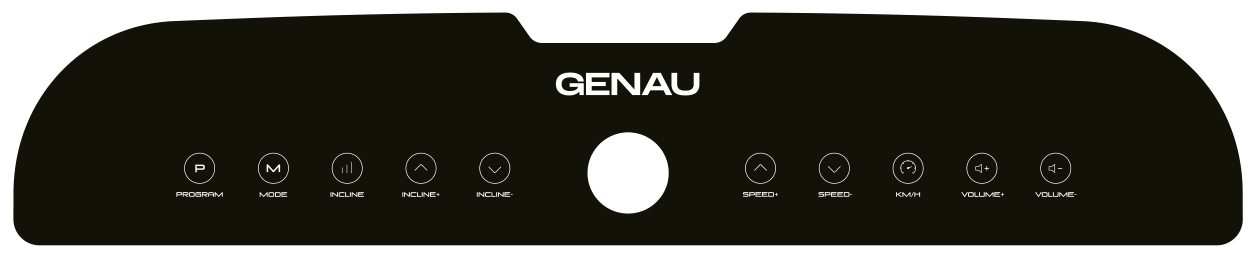
| Program | In standby mode, press this button to switch from manual to automatic mode. Manual mode is set by default. |
| Mode | In standby mode, press this button to switch between the 3 countdown modes. |
| Incline quick keys | After the treadmill has started, press this button to quickly change the incline to 5/10/15/20. |
| Incline + / − | While the treadmill is running, press "Incline +" to increase the incline and "Incline −" to decrease it. |
| Speed + / − | After the treadmill has started, press "+" to increase the speed or "−" to decrease it. |
| Speed quick keys | Allow you to quickly switch the speed between 3/6/9/12. |
| Volume + / − | When playing music, press "Volume +" to increase the volume and "Volume −" to decrease it. |
Display Functions
| Function | Description |
|---|---|
| Time | Shows the workout time or countdown in manual/automatic mode. |
| Distance | Shows the accumulated distance or its countdown. |
| Incline | Shows the current incline. |
| Speed | Shows the current speed. |
| Calories | Shows calories burned in workout mode or by timer. |
| Pulse measurement | When you touch the pulse sensor, your pulse is shown on the screen. |
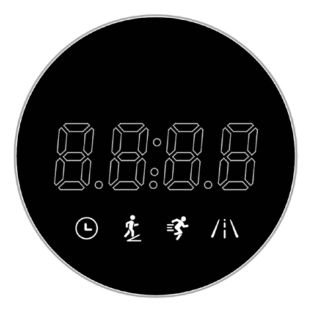
Automatic Mode 1
Special mode for the LED display.
Setting / 10 = duration of each period.
| Program / Time | 1 | 2 | 3 | 4 | 5 | 6 | 7 | 8 | 9 | 10 |
|---|---|---|---|---|---|---|---|---|---|---|
| P1 · Speed | 3 | 4 | 5 | 5 | 5 | 5 | 5 | 5 | 5 | 3 |
| P1 · Incline | 2 | 2 | 2 | 2 | 2 | 2 | 2 | 2 | 2 | 0 |
| P2 · Speed | 4 | 5 | 6 | 6 | 6 | 6 | 6 | 6 | 6 | 4 |
| P2 · Incline | 2 | 2 | 2 | 2 | 2 | 2 | 2 | 2 | 2 | 0 |
| P3 · Speed | 5 | 6 | 7 | 7 | 7 | 7 | 7 | 7 | 7 | 5 |
| P3 · Incline | 2 | 2 | 2 | 2 | 2 | 2 | 2 | 2 | 2 | 0 |
| P4 · Speed | 5.5 | 6.5 | 7.5 | 7.5 | 7.5 | 7.5 | 7.5 | 7.5 | 7.5 | 5.5 |
| P4 · Incline | 2 | 2 | 2 | 2 | 2 | 2 | 2 | 2 | 2 | 0 |
| P5 · Speed | 6 | 8 | 9 | 8 | 9 | 8 | 9 | 8 | 9 | 3 |
| P5 · Incline | 2 | 4 | 4 | 4 | 4 | 4 | 4 | 4 | 4 | 0 |
| P6 · Speed | 7 | 9 | 10 | 9 | 10 | 9 | 10 | 9 | 10 | 4 |
| P6 · Incline | 2 | 4 | 4 | 4 | 4 | 4 | 4 | 4 | 4 | 0 |
| P7 · Speed | 9 | 11 | 12 | 11 | 12 | 11 | 12 | 11 | 12 | 6 |
| P7 · Incline | 2 | 4 | 4 | 4 | 4 | 4 | 4 | 4 | 4 | 0 |
| P8 · Speed | 10 | 12 | 13 | 12 | 13 | 12 | 13 | 12 | 13 | 7 |
| P8 · Incline | 2 | 4 | 4 | 4 | 4 | 4 | 4 | 4 | 4 | 0 |
| P9 · Speed | 4 | 7 | 5 | 7 | 5 | 7 | 5 | 7 | 5 | 3 |
| P9 · Incline | 4 | 6 | 6 | 6 | 6 | 6 | 6 | 6 | 6 | 0 |
| P10 · Speed | 5 | 8 | 6 | 8 | 6 | 8 | 6 | 8 | 6 | 4 |
| P10 · Incline | 4 | 6 | 6 | 6 | 6 | 6 | 6 | 6 | 6 | 0 |
| P11 · Speed | 6 | 9 | 7 | 9 | 7 | 9 | 7 | 9 | 7 | 5 |
| P11 · Incline | 6 | 9 | 7 | 9 | 7 | 9 | 7 | 9 | 7 | 5 |
| P12 · Speed | 6.5 | 9.5 | 7.5 | 9.5 | 7.5 | 9.5 | 7.5 | 9.5 | 7.5 | 5.5 |
| P12 · Incline | 4 | 6 | 6 | 6 | 6 | 6 | 6 | 6 | 6 | 0 |
| P13 · Speed | 3 | 7 | 7 | 7 | 7 | 7 | 7 | 7 | 6 | 3 |
| P13 · Incline | 2 | 2 | 2 | 2 | 2 | 2 | 2 | 2 | 2 | 2 |
| P14 · Speed | 4 | 8 | 8 | 8 | 8 | 8 | 8 | 8 | 7 | 4 |
| P14 · Incline | 2 | 2 | 2 | 2 | 2 | 2 | 2 | 2 | 2 | 2 |
| P15 · Speed | 6 | 10 | 10 | 10 | 10 | 10 | 10 | 10 | 8 | 5 |
| P15 · Incline | 2 | 2 | 2 | 2 | 2 | 2 | 2 | 2 | 2 | 2 |
| P16 · Speed | 8 | 12 | 12 | 12 | 12 | 12 | 12 | 12 | 11 | 8 |
| P16 · Incline | 2 | 2 | 2 | 2 | 2 | 2 | 2 | 2 | 2 | 2 |
| P17 · Speed | 5 | 7 | 6 | 7 | 6 | 7 | 6 | 7 | 6 | 4 |
| P17 · Incline | 3 | 4 | 5 | 4 | 5 | 4 | 5 | 4 | 5 | 2 |
| P18 · Speed | 5 | 7 | 6 | 7 | 6 | 7 | 6 | 7 | 6 | 4 |
| P18 · Incline | 4 | 5 | 6 | 5 | 6 | 5 | 6 | 5 | 6 | 3 |
| P19 · Speed | 5 | 7 | 6 | 7 | 6 | 7 | 6 | 7 | 6 | 4 |
| P19 · Incline | 6 | 7 | 8 | 7 | 8 | 7 | 8 | 7 | 8 | 5 |
| P20 · Speed | 5 | 7 | 6 | 7 | 6 | 7 | 6 | 7 | 6 | 4 |
| P20 · Incline | 8 | 9 | 10 | 9 | 10 | 9 | 10 | 9 | 10 | 7 |
| P21 · Speed | 8 | 12 | 10 | 12 | 10 | 12 | 10 | 12 | 10 | 5 |
| P21 · Incline | 3 | 6 | 3 | 6 | 3 | 6 | 3 | 6 | 3 | 0 |
| P22 · Speed | 9 | 13 | 11 | 13 | 11 | 13 | 11 | 13 | 11 | 6 |
| P22 · Incline | 4 | 7 | 4 | 7 | 4 | 7 | 4 | 7 | 4 | 1 |
| P23 · Speed | 11 | 15 | 13 | 15 | 13 | 15 | 13 | 15 | 13 | 8 |
| P23 · Incline | 6 | 9 | 6 | 9 | 6 | 9 | 6 | 9 | 6 | 3 |
| P24 · Speed | 12 | 16 | 14 | 16 | 14 | 16 | 14 | 16 | 14 | 9 |
| P24 · Incline | 7 | 10 | 7 | 10 | 7 | 10 | 7 | 10 | 7 | 4 |
Body Fat Measurement
In standby mode, press the "Program" button to go to the body mass index (BMI) test. A test icon appears on the display, and the speed window shows the parameters (Gender: 001 — Male, 002 — Female; Age — 025; Height — 170; Weight — 070; Fat test — "---").
Press the "Mode" button to go to the next step. Use the speed control knob to change the values.
When you enter the body fat test screen, the speed window shows "---" and you can start the test.
| FAT | Category | Settings or test data |
|---|---|---|
| F-1 | Gender | 001 — Male / 002 — Female |
| F-2 | Age | 10–99 (25) |
| F-3 | Height | 100–200 (170) |
| F-4 | Weight | 20–150 (70) |
| F-5 | Body fat | <19 Underweight / 19–25 Normal / 25–29 Overweight / >29 Obese |
Test steps:
Hold the metal heart rate sensors with both hands for about 3 seconds. Your body fat percentage will then appear on the display. Check that the weight and height values are correct.
- Below 19% — underweight
- 25–29% — overweight
- Over 30% — obese
* These data are for reference only and are not a medical assessment.
Error Codes and Troubleshooting
| Error code | Problem description | Possible cause and solution |
|---|---|---|
| E1 | Communication error: when the power is turned on, the connection between the lower controller and the console is lost. | Check the cable between the console and the controller. Make sure every connector is fully plugged in. If the cable is damaged, replace it. |
| E2 | No signal from the motor. | Check that the motor cable is connected correctly. If not, reconnect it. Check the cable for damage or a burning smell. If present, replace the motor. |
| E5 | Overcurrent protection: during operation, the controller detects a current above 6 A for more than 3 seconds. | An overload may trigger the protection or stop the motor because of jamming. Restart the treadmill. Check the motor for liquid or a burning smell — if present, replace the motor. If the controller has burned out, replace it. Check the supply voltage. If it is out of range, connect the correct voltage and test again. |
| E6 | Surge protection: abnormal voltage or a fault in the motor power circuit. | Check whether the voltage is too low (less than 50% of nominal). Use the correct voltage and test again. If the controller has burned out, replace it. Make sure the motor cable is connected correctly. |
| E7 | Safety key missing. | Place the safety key in the correct position (the yellow mark on the console). |
Care, Storage and Maintenance
Maintenance
Regular cleaning
Turn off the power before cleaning and use a minimal amount of water and soapy solution to prevent moisture from getting onto electrical parts.
Clean the running belt and other parts of the treadmill regularly. After each workout, wipe down the entire treadmill, including the console, with a mild soapy solution, then dry it thoroughly with a dry cloth. Simple care will keep the equipment looking great for many years. Do not use abrasive or rough brushes and cloths, as they may damage the surface of the equipment. Do not let cleaning agents or liquids get onto the surface of the equipment. Do not use harsh chemicals or solvents to clean the treadmill.
Lubricating the running belt
Use only lubricants recommended by the manufacturer, such as silicone treadmill lubricant. Other types and compositions of lubricants may damage the equipment.
Lubrication frequency
- Light use (less than 3 hours per week): lubricate once every 10 months.
- Heavy use (more than 7 hours per week): lubricate every 2–5 months.
Lubrication procedure
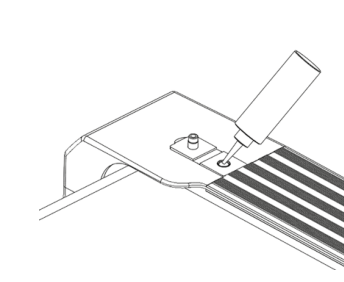
Open the filler cap located at the front of the right side rail (see figure). Take the lubricant bottle, unscrew the cap and carefully squeeze the contents into the filler opening. When finished, close the filler cap tightly.
Avoid over-lubrication
Do not apply too much lubricant, as this can make the belt too slippery and dangerous. Remove excess lubricant with a clean towel.
Running Belt Adjustment
Check and adjust the tension and alignment of the running belt to prevent wear and ensure safe operation.
Checking belt alignment
Make sure the treadmill is placed on a level surface. Run the belt at 3–8 km/h and watch how it moves. If the belt drifts to the left or right, use the adjustment bolts to correct its position.
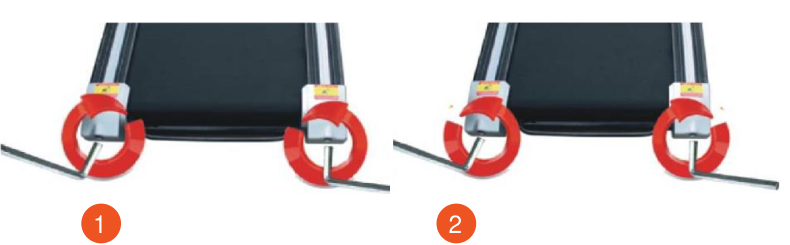
- Belt drifting to the left
- Belt drifting to the right
Belt drifting to the left
- Turn the left adjustment bolt 1/2 turn clockwise.
- Then turn the right adjustment bolt 1/2 turn counterclockwise.
- Check the belt position after 1–2 minutes. If the belt has not returned to the center, repeat the procedure.
Belt drifting to the right
- Turn the right adjustment bolt 1/2 turn clockwise.
- Then turn the left adjustment bolt 1/2 turn counterclockwise.
- Check the belt position after 1–2 minutes. Repeat the adjustment if necessary.
Adjusting belt tension
- If the belt is too loose, it may slip during operation. To check the tension, run the treadmill at 1 km/h and press lightly on the belt with your foot.
- If the belt stops while the motor and rollers keep running, the tension is too loose and must be tightened.
- Turn the adjustment bolts at both ends of the belt 1/2 turn clockwise. Make sure you turn both bolts the same number of times for even tension.
- Check the tension again and make sure the belt does not slip but is not overtightened.
Adjusting Running Belt Slippage
Over time, the running belt or the poly-V belt may loosen due to natural stretching or wear. This causes slipping under load. If during a workout you notice that the belt stops when you step on it, it needs adjusting.
Checking the Belts
First remove the motor cover, then switch on the treadmill and set the speed to 1 km/h. Stand on the belt holding the handrails or the front handlebar and press down lightly on the belt with your feet.
- If the running belt stops while the front roller and the poly-V belt keep turning, the running belt is loose.
- If the running belt and the drive belt stop but the motor keeps turning, the poly-V belt is loose.
- If the belt does not stop when you press on it, the tension of both belts is sufficient and no adjustment is needed.
Avoid overtightening
- Do not overtighten the running belt, as this puts excessive pressure on the front and rear roller bearings, causing squeaking and accelerated wear.
- With correct tension, you can slightly lift the edges of the belt by 50–70 mm on both sides.
Adjusting Belt Tension
- Switch off the treadmill or put it in stop mode.
- Use the 6 mm L-shaped hex key to tighten the adjusting screw on the right side of the motor clockwise.
- If the screw is hard to turn by hand, the poly-V belt tension has reached the required level.
- Then tighten the adjusting screw on the left side in the same way.
- Refit the motor cover and secure it with the screws using a Phillips screwdriver.
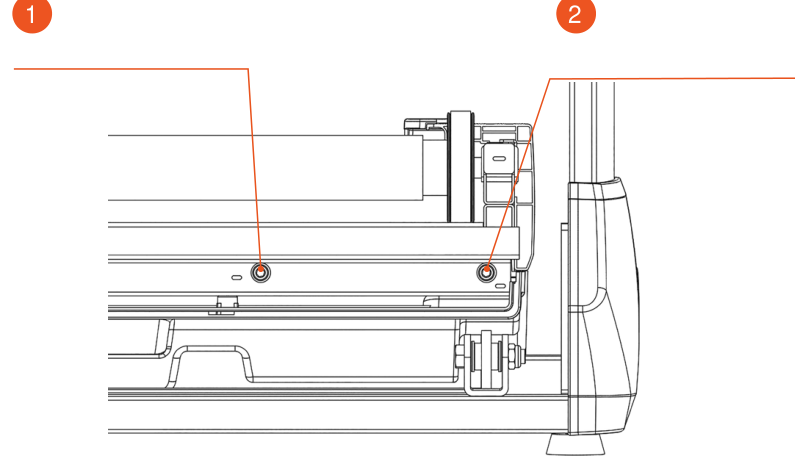
- Left adjusting screw
- Right adjusting screw
Storing the Treadmill
Recommended storage and operating conditions
- Temperature: +10…+35 °C.
- Humidity: 50–75%.
- Acclimatization: if the treadmill has been stored at low temperature or high humidity (there are signs of condensation), keep it under normal conditions for at least 2–4 hours before use. Only then may you start using the treadmill.
Workout Tips and Recommendations
Warm-up and Cool-down
A successful exercise program consists of three parts: warm-up, cardio training and cool-down.
The warm-up is a very important part of a workout. It should be done before every workout. Warming up helps warm the body, stretch the muscles and allow the body to adapt to more intense exercise. Repeating the warm-up at the end of the exercise can help relieve muscle soreness.
We suggest doing the appropriate warm-up and cool-down exercises according to the following scheme:
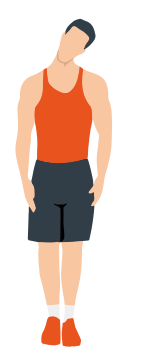
Head rolls
First tilt your head toward your right shoulder, stretch your neck and rotate your head once clockwise and once counterclockwise; then tilt your head toward your left shoulder and make one counterclockwise rotation. Repeat.
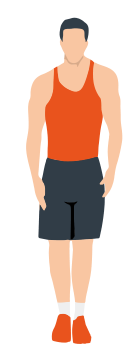
Shoulder lifts
Raise your left shoulder and make 5 backward rotations; then raise your right shoulder and make 5 backward rotations, alternating sides.
Side stretch
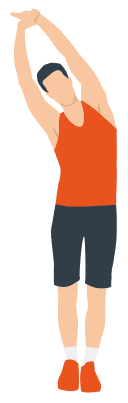
Raise your arms above your head, then grasp your right wrist with your left hand and reach upward until you feel your right arm fully stretched. Hold for 5 seconds before switching to the other arm.
Quadriceps stretch
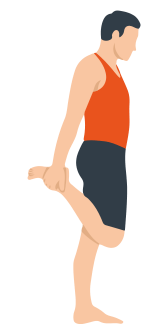
Holding onto a wall with your right hand for balance, pull your left foot back with your left hand, bringing the heel as close to your buttock as possible. Hold for 15 seconds, then repeat with the other leg.
Inner thigh stretch
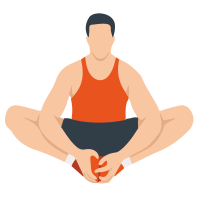
Sitting on the floor, put the soles of your feet together, clasp them with both hands and pull them in as close to your body as possible. Slowly press down on both heels and hold this position for 15 seconds.
Toe touch
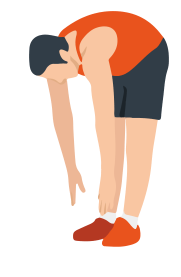
Slowly bend forward, relax your back and shoulders and reach for your toes. Bend as low as you can and hold the position for up to 15 seconds.
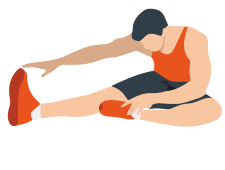
Hamstring stretch
Sit down, straighten your right leg and bend your left leg. Hold your left ankle with your left hand and pull it inward so that your left foot is as close to your body as possible, with the sole against the inner side of your right thigh. Then lean your body forward and reach both hands toward your toes — the deeper the stretch, the better. Hold this position for 15 seconds, then switch legs.
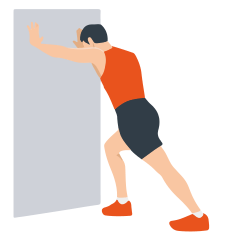
Calf stretch
Lean against a wall with both hands, tilt your body at a 45-degree angle to the floor and alternately move your left and right legs back, as if walking.
Warranty
Genau guarantees the high quality and reliability of its products. We strive to offer only the best, which is why all of our equipment comes with a warranty.
Warranty Terms
- The warranty period starts from the date of sale.
- The warranty covers defects caused by manufacturing faults or defective materials.
- Warranty service is carried out at authorized service centers.
- If the product breaks down during the warranty period, the customer must bring this warranty card and the complete product to a service center for diagnostics and repair.
- If the warranty claim is confirmed, the product will be repaired or replaced free of charge.
- The warranty does not cover the following cases:
- mechanical damage caused by improper use or transportation;
- damage caused by liquids, fire, chemicals or other external factors;
- failures caused by not following the operating instructions;
- modifications to the design or repairs carried out by unauthorized persons without the approval of the Service;
- consumables and components with a limited service life (belts, batteries, etc.).
Warranty claims
To receive warranty service, the customer should contact the seller (the place where the equipment was purchased).
Specifications
| Parameter | Value |
|---|---|
| Input voltage | 220–240 V~ |
| Rated frequency | 50–60 Hz |
| Rated power | 1600 W |
| Motor | brushless, 4.0 hp |
| Speed | 1.0–20 km/h |
| Running belt size | 1400×540 mm |
| Maximum user weight | 170 kg |
| Unfolded dimensions | 1650×890×1570 mm |
| Net weight | 101 kg |
| Functions | Running |
Manufacturer: Zhejiang Lijiujia Sports Equipment Co., Ltd. ADD: No.88 Yuegui South Road, Xicheng Street, Yongkang, Zhejiang, China.
Service
For questions about assembly, operation of the treadmill and warranty, please contact Genau service in Kyrgyzstan.
Genau GmbH LLC (ОсОО «Генау ГМБХ»), Kyrgyzstan. Phone: +996 778 639 000