Genau RW300-S rowing machine
User Manual
Contents
Thank you for your purchase!
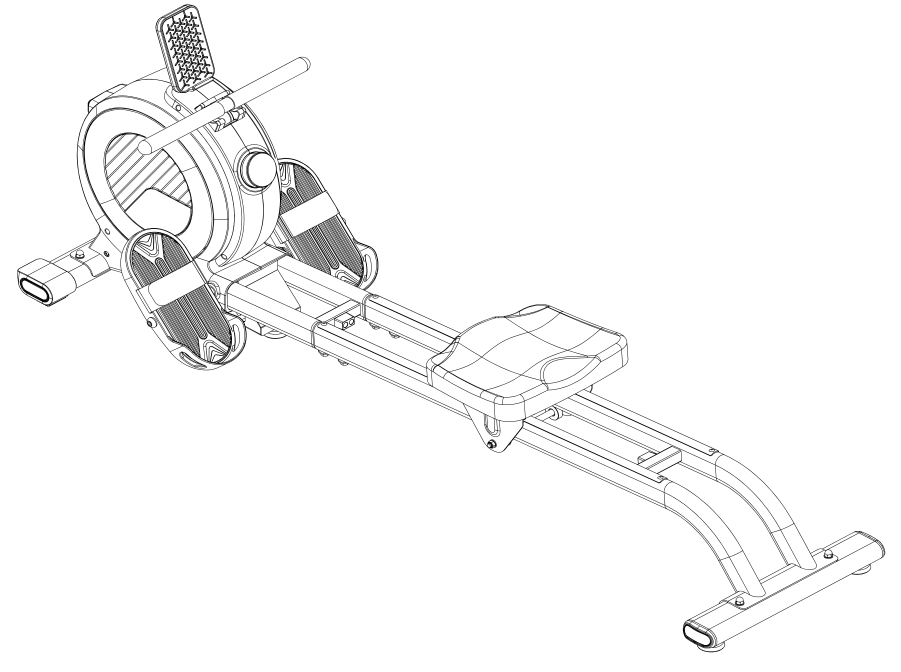
Thank you for purchasing the Genau RW300-S rowing machine. Please use the equipment correctly to ensure your safety and health. Before use, read the information below carefully.
Please read this manual before assembling and using the treadmill.
As part of our commitment to continuous improvement, the product may be updated when necessary without prior notice. If this manual does not match the product, the actual product takes precedence.
Safety Instructions
- This rowing machine is intended for indoor use only. Place it on a flat, stable surface.
- Do not place foreign objects on the machine.
- If the power cord is damaged, it must be replaced by a qualified specialist of the manufacturer's service center.
- If the machine is not used for a long time, disconnect the power.
- The device is not intended for use by children or people with limited abilities without supervision.
- Do not use the machine if you feel unwell — this may lead to injury.
- Do not install the machine in damp or dusty rooms. Excess humidity and static electricity can damage the electronic console.
- Use only original components. Replacing parts without permission is prohibited.
- Do not place the machine near heating appliances or hot surfaces.
- Do not try to disassemble the device yourself — this may cause damage and injury.
- Before exercising, make sure your clothing and footwear are worn correctly, and avoid loose items that could catch on moving parts.
- If you feel discomfort during use, stop and consult a doctor.
- Use only intact sockets and plugs. If the plug does not fit the socket, do not try to force it in — contact an electrician.
- The machine is intended for home use only and must not be used for medical or commercial purposes.
- Do not use the device if the housing is cracked or there are exposed parts.
- Do not use the machine when tired or unwell.
- Do not allow moisture, needles or debris to get into the power socket.
- Do not touch the plug with wet hands — this may cause a short circuit or electric shock.
- Disconnect the power after use.
- The protection class of the device is HC. If in doubt about the grounding of the appliance, contact a qualified electrician.
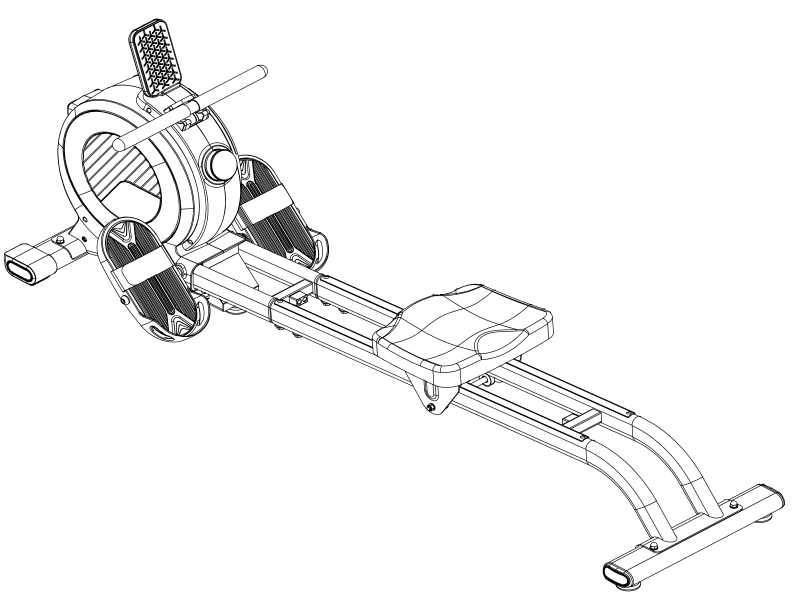
Product Components
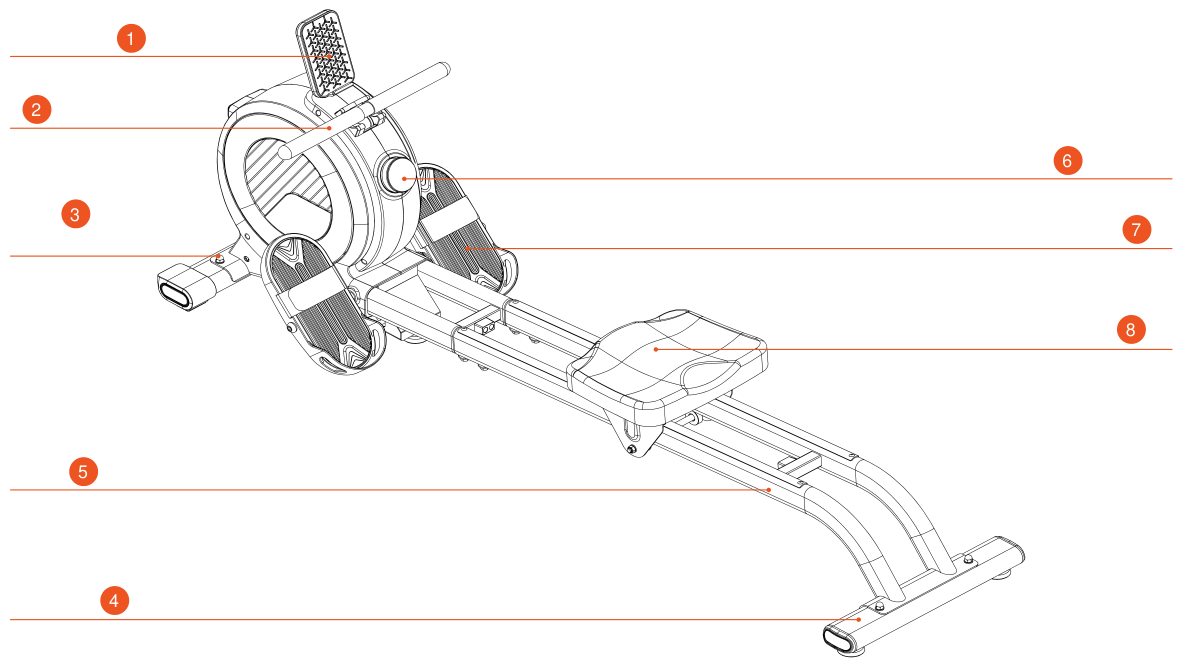
- Phone holder
- Knob
- Front stabilizer
- Rear stabilizer
- Rail
- Electronic console
- Pedal
- Seat
Packing List
| No. | Item | Unit | Qty |
|---|---|---|---|
| 1 | Main frame | pcs | 1 |
| 2 | Rail | pcs | 1 |
| 3 | Tool kit | pcs | 1 |
| 4 | Front stabilizer | pcs | 1 |
| 5 | Rear stabilizer | pcs | 1 |
| 6 | Seat | pcs | 1 |
| 7 | Left pedal | pcs | 1 |
| 8 | Right pedal | pcs | 1 |
| 9 | Pedal locking bar | pcs | 1 |
| 10 | Adapter | pcs | 1 |
Tool kit
| No. | Item | Unit | Qty |
|---|---|---|---|
| 1 | Hex key 5 mm | pcs | 1 |
| 2 | Hex key 8 mm | pcs | 1 |
| 3 | Wrench | pcs | 1 |
| 4 | Nut M8 | pcs | 4 |
| 5 | Flat washer | pcs | 8 |
| 6 | Square-neck bolt M8×55 | pcs | 4 |
| 7 | Cylinder head screw | pcs | 4 |
| 8 | User Manual | pcs | 1 |
Fastener identification table
This table is provided to make it easier to identify the fasteners used during assembly. Use the scale to check the length of bolts and screws.

Assembly
During assembly, first fasten all screws without tightening them fully, and do the final tightening after the machine is completely assembled.
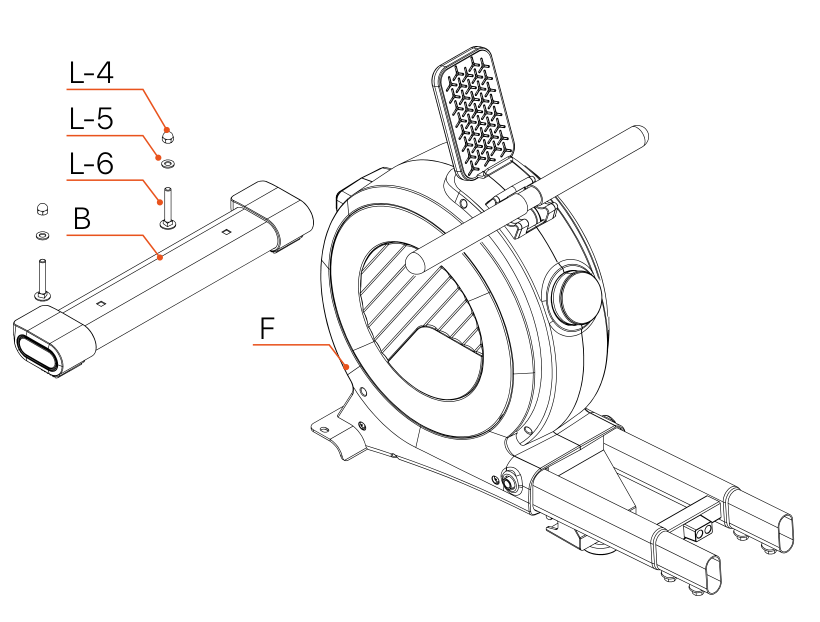
- Take the front stabilizer (B) and the frame (F) out of the packaging, and from the tool kit take the square-neck bolt (L-6), flat washer (L-5), nut (L-4) and wrench (L-1).
- As shown in the manual, install the front stabilizer B using wrench L-1 and nut L-4.
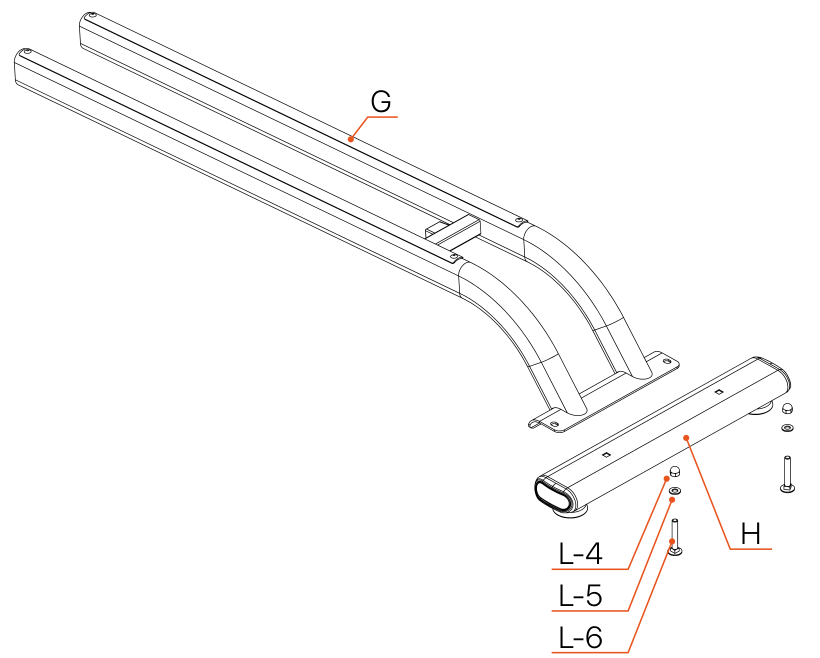
- Take the rail (G) and the rear stabilizer (H) out of the packaging.
- From the tool kit take the square-neck bolt (L-6), flat washer (L-5), nut (L-4) and wrench (L-1).
- As shown in the manual, install the rear stabilizer H using wrench L-1 and nut L-4.
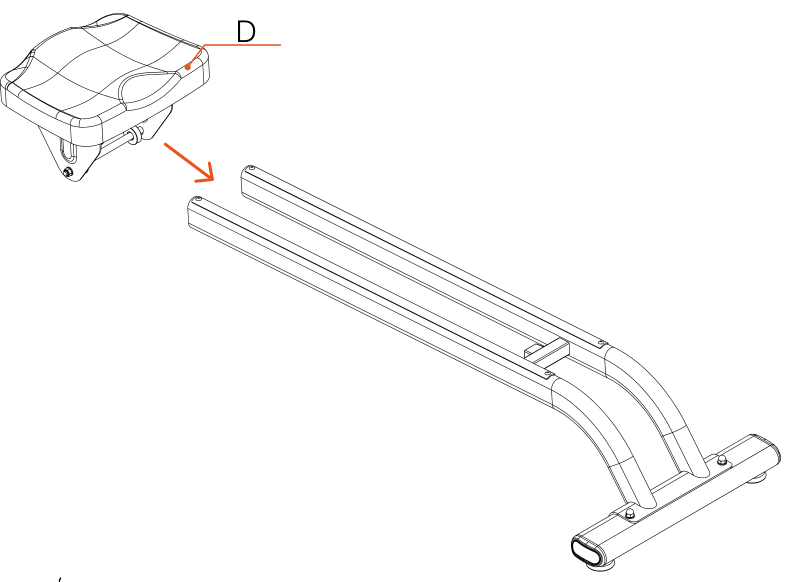
Take the seat (D). As shown in the picture, place the seat on the rail and make sure it slides smoothly along the rail without sticking.
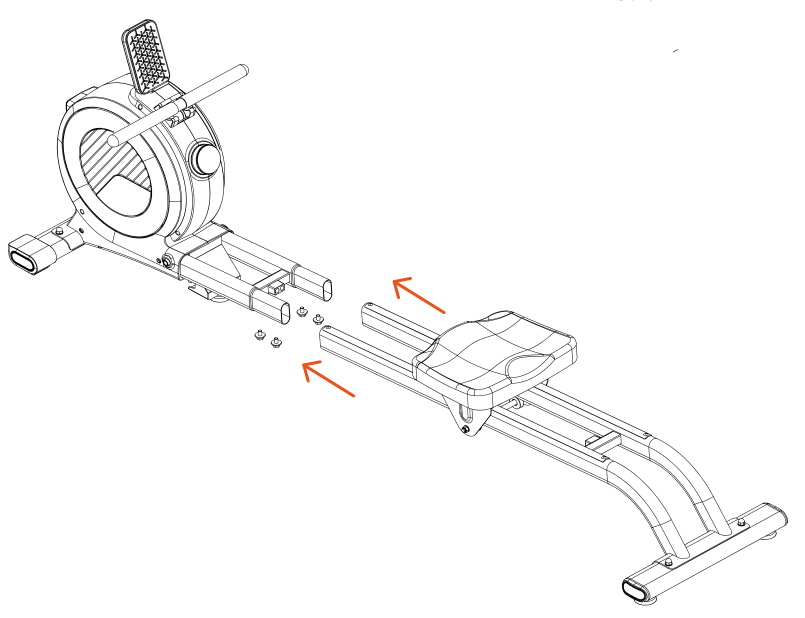
- Remove the pre-installed screws from the frame (F).
- Connect the assembled rail to the connecting tube of the frame and use hex key L-3 to tighten the screws removed earlier.
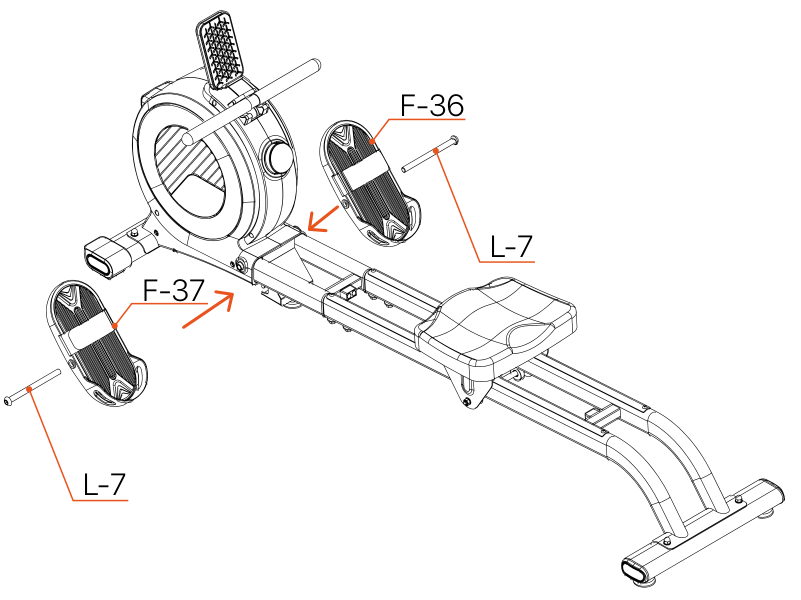
- Take the left pedal (F-37) and the right pedal (F-36) out of the packaging, and the cylinder head screw (L-7) from the tool kit.
- As shown in the picture, pass the screw through the hole in the pedal, align it with the threaded hole on the frame and tighten it with hex key L-2 (8 mm).
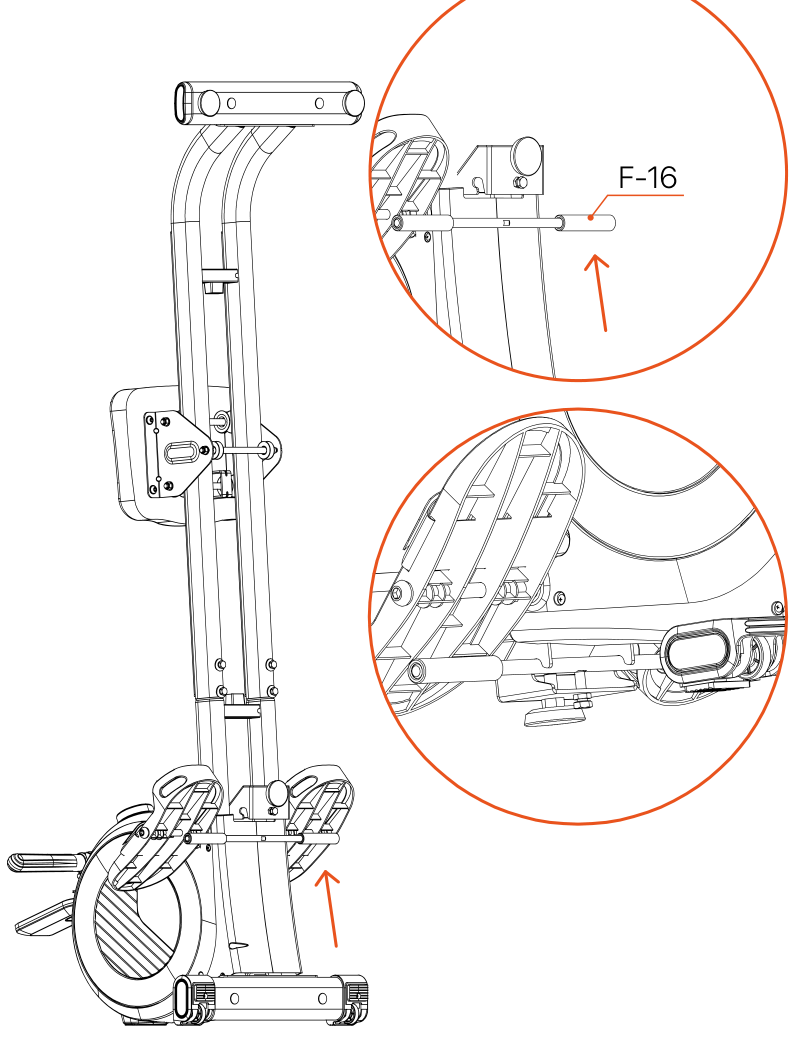
- Take the pedal locking bar (F-16) out of the packaging.
- As shown in the picture, lift the frame slightly and remove the pre-installed screw with wrench L-1, then insert the pedal locking bar into the slot of the frame.
- Secure the connection with wrench L-1.
- Take the adapter (F-38) out of the packaging. Connect the adapter cable to the DC socket on the frame.
- Then plug the adapter into a 100–240V socket to turn on the electronic console (F-26).
- This completes the assembly of the rowing machine.
Folding
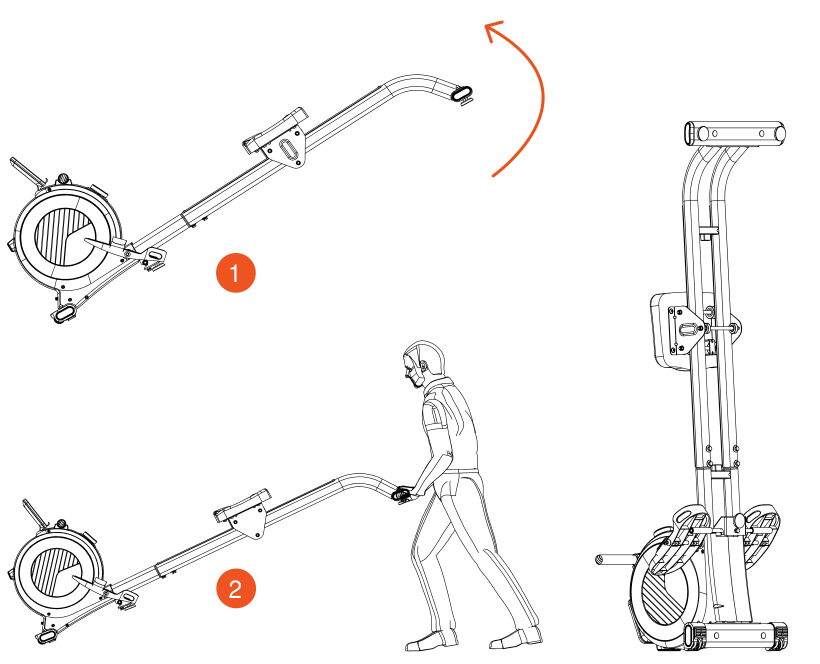
- Figure A
- Figure B
- When the machine is not in use, it can be folded to save space — follow the diagram in Figure A.
- To move the machine, follow the instructions in Figure B.
Operation
Main display description
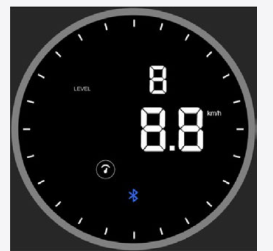
Full display
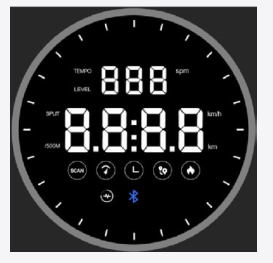
- 24 indicator lights around the outer ring.
- TEMPO display: stroke rate (unit: spm).
- LEVEL display: resistance level (1–32).
- Workout data display: stroke rate, pace per 500 m, speed, time, distance and calories.
- Bluetooth connection indicator.
Carousel mode
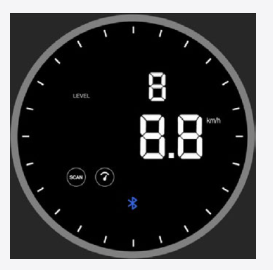
- Data change interval: 3 seconds.
- The small window shows: TEMPO and LEVEL.
- The main window shows: stroke rate, pace per 500 m, speed, time, distance and calories.
- The Bluetooth indicator shows the connection status (lit when connected, off when disconnected).
- The outer ring indicators light up during the workout.
Lock mode
- A short press on the knob (button) switches display modes and locks the required parameter.
- You can lock the data in the main window: stroke rate, pace per 500 m, speed, time, distance and calories.
- You can also lock the data in the small window: TEMPO and LEVEL.
- The outer ring indicators are active during the workout.
Basic operating instructions
| Action | Brief description |
|---|---|
| Waking the screen from sleep mode | In sleep mode the screen is off. To wake the screen, press the knob (regulator) or start exercising. |
| Pressing the knob (regulator) | The screen automatically goes into sleep mode if no action is performed for 3 minutes. In sleep mode, press the knob briefly to turn on the screen. When working, press the knob to enter workout mode. During a workout, a short press switches display modes. Press and hold the knob for 2 seconds to reset the data and return to standby mode. A beep sounds when pressed. |
| Turning the knob (regulator) | Turn clockwise to increase the resistance level. Turn counterclockwise to decrease the resistance level. A short beep sounds when the resistance changes. |
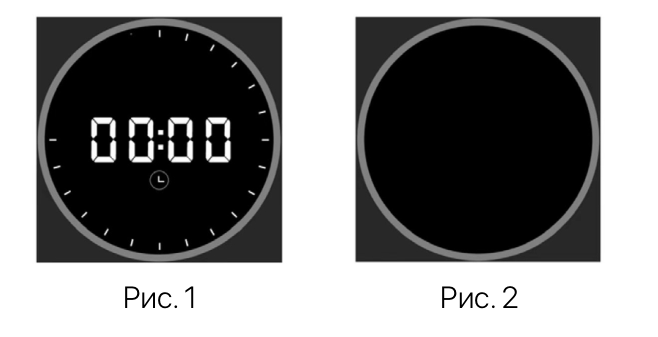
- When the power is on, one beep (BUZZER) sounds and the display on the regulator lights up, entering the READY state (see Fig. 1).
- After switching on, the resistance level is automatically reset to level 1.
- If no action is performed for 3 minutes, the screen turns off automatically and goes into standby mode (see Fig. 2).
- When the device is in the READY state, a short press on the knob or starting to row activates the screen and switches it to workout mode.
- The small display window shows data in «carousel» mode: stroke rate (TEMPO) and resistance level (LEVEL); the information updates every 3 seconds (see Fig. 3 and Fig. 4).
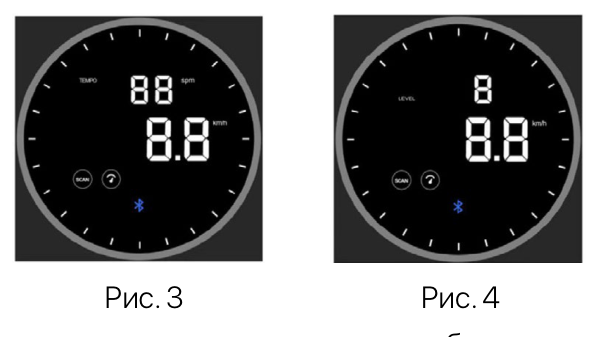
- The data in the main display window is shown in turn in automatic mode.
- The “SCAN” icon lights up, and the information — speed, time, distance, calories, SPLIT / 500 m — changes every 3 seconds (see Fig. 5–10).
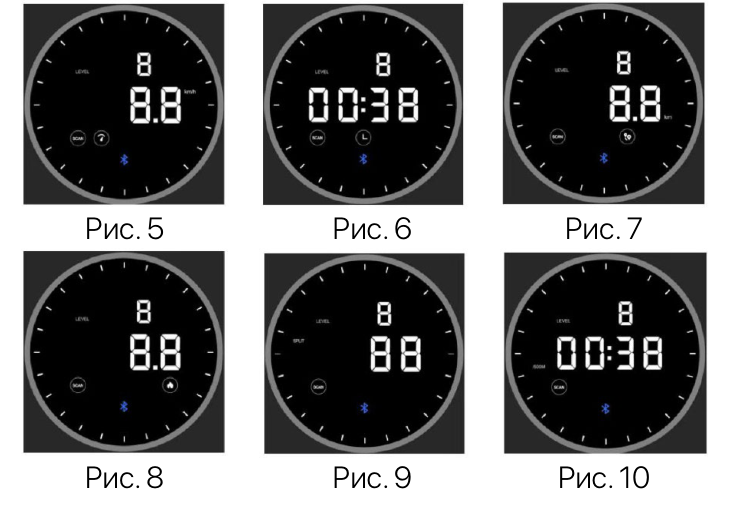
- The display mode can be locked with a short press on the knob (regulator).
- When the display is locked, the “SCAN” icon is not shown.
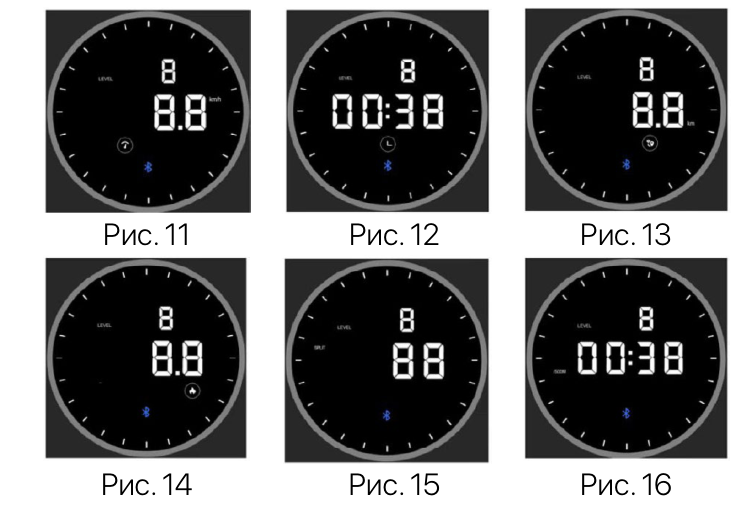
- In lock mode you can view the following data: speed, time, distance, calories, SPLIT or 500 m (see Fig. 11–16).
Data display description
| Parameter | Data description |
|---|---|
| Stroke rate | 0 ~ 999. Shows the stroke rate in real time. |
| Resistance level | 1 ~ 32. The higher the level, the greater the resistance. |
| Stroke count | 0 ~ 9999. Number of strokes in real time. |
| Pace per 500 m | 00:00 ~ 99:59. |
| SCAN mode | Displayed: data is shown in turn. Not displayed: data is locked. |
| Speed | 0.0 ~ 999.9 km/h. |
| Time | 00:00 ~ 99:59. In standby mode: press the knob or start moving to start the count; the timer stops 4 seconds after movement stops. |
| Distance | 0.0 ~ 999.9 km. Depending on stroke power: 1.6 m/stroke. |
| Calories | 0.0 ~ 999.9 kcal. Proportional to the resistance level: level 1 = 33 kcal/km; level 32 = 73 kcal/km. |
| Bluetooth | Displayed: Bluetooth is connected. Not displayed: Bluetooth is not connected. |
Error Codes and Troubleshooting
| Error code | Cause | Solution |
|---|---|---|
| E01 | The cable motor has a faulty connection | Check the wiring of the cable motor or replace the motor |
| E01 | Insufficient cable tension | Check the steel cable or replace the cable motor |
| E01 | The motor control chip is damaged | Replace the control board (PM Board) |
| E02 | Incorrect motor position angle | Check the wiring of the cable motor or replace the motor |
| E03 | The gearbox does not detect the initial position of the rod | Replace the gearbox and the handle |
Care, Storage and Maintenance
Cleaning
- Regular and thorough cleaning will extend the service life of the rowing machine.
- Remove dust regularly to keep the device clean.
- Make sure your sports shoes are clean, and avoid foreign objects getting into the machine.
Maintenance
- Replace faulty parts immediately or do not use the device until they are replaced.
- Please pay special attention to the parts that wear out fastest.
Workout Tips and Recommendations
Warm-up and Cool-down
A successful exercise program consists of three parts: warm-up, cardio training and cool-down.
Warm-up is a very important part of a workout. A warm-up must be done before every workout. It helps warm up the body, stretch the muscles and allows the body to adapt to more intense exercise.
Repeating the warm-up at the end of the exercise can help relieve muscle soreness.
We suggest doing the appropriate warm-up and cool-down exercises according to the following scheme:

Head rolls
First tilt your head toward your right shoulder, stretch your neck and rotate your head once clockwise and once counterclockwise; then tilt your head toward your left shoulder and make one counterclockwise rotation. Repeat.
Shoulder lifts
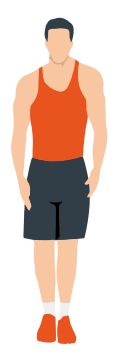
Raise your left shoulder and make 5 backward rotations; then raise your right shoulder and make 5 backward rotations, alternating sides.
Side stretch
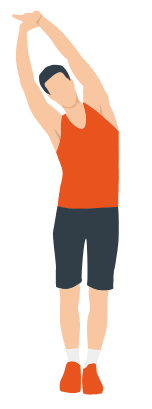
Raise your arms above your head, then grasp your right wrist with your left hand and reach upward until you feel your right arm fully stretched. Hold for 5 seconds before switching to the other arm.
Quadriceps stretch
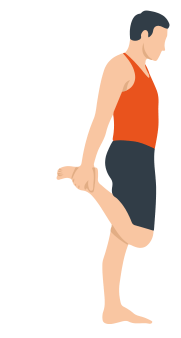
Holding onto a wall with your right hand for balance, pull your left foot back with your left hand, bringing the heel as close to your buttock as possible. Hold for 15 seconds, then repeat with the other leg.
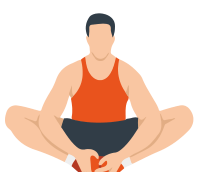
Inner thigh stretch
Sitting on the floor, put the soles of your feet together, clasp them with both hands and pull them in as close to your body as possible. Slowly press down on both heels and hold this position for 15 seconds.
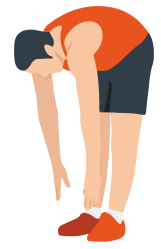
Toe touch
Slowly bend forward, relax your back and shoulders and reach for your toes. Bend as low as you can and hold the position for up to 15 seconds.
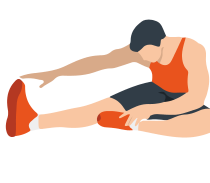
Hamstring stretch
Sit down, straighten your right leg, bend your left leg, grab your left ankle with your left hand and push it inward so that your left foot is as close to your torso as possible and the sole of the foot is against the inside of your right thigh. Then press forward with your body and reach both arms forward to touch your toes; the more pressure, the better. Hold this position for 15 seconds and switch to the left leg.
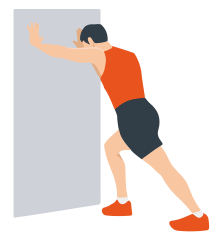
Calf stretch
Lean against a wall with both hands, tilt your body at a 45-degree angle to the floor and alternately move your left and right legs back, as if walking.
Warranty
Genau guarantees the high quality and reliability of its products. We strive to offer only the best, which is why all of our equipment comes with a warranty.
Warranty Terms
- The warranty period starts from the date of sale.
- The warranty covers defects caused by manufacturing faults or defective materials.
- Warranty service is carried out at authorized service centers.
- If the product breaks down during the warranty period, the customer must bring this warranty card and the complete product to a service center for diagnostics and repair.
- If the warranty claim is confirmed, the product will be repaired or replaced free of charge.
- The warranty does not cover the following cases:
- mechanical damage caused by improper use or transportation;
- damage caused by liquids, fire, chemicals or other external factors;
- failures caused by not following the operating instructions;
- modifications to the design or repairs carried out by unauthorized persons without the approval of the Service;
- consumables and components with a limited service life (belts, batteries, etc.).
Warranty claims
To receive warranty service, the customer should contact the seller (the place where the equipment was purchased).
Service
For questions about assembly, operation and warranty, please contact Genau service in Kyrgyzstan.
Genau GmbH LLC (ОсОО «Генау ГМБХ»), Kyrgyzstan. Phone: +996 778 639 000